How to access AWS
To access AWS, you have three options:
- AWS Management Console (protected by password + MFA)
- AWS Command Line Interface (CLI): protected by access keys
- AWS Software Developer Kit (SDK) - for code: protected by access keys
Access Key ID is like username and Secret access key is like password.
IAM
IAM is a global service
- One IAM User per PHYSICAL PERSON
- One IAM Role per Application
- Never use the ROOT account except for initial setup.
- Never use ROOT IAM Credentials
- Group always include users not other groups
- A user can be part of multiple team as well
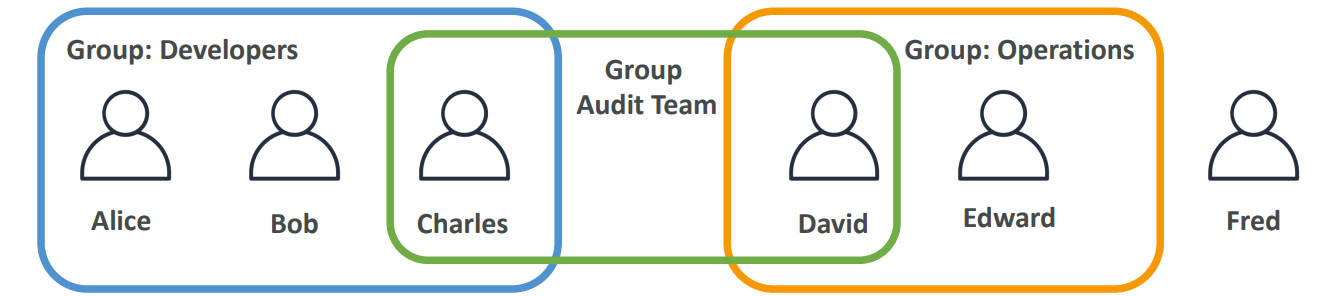
IAM Policies
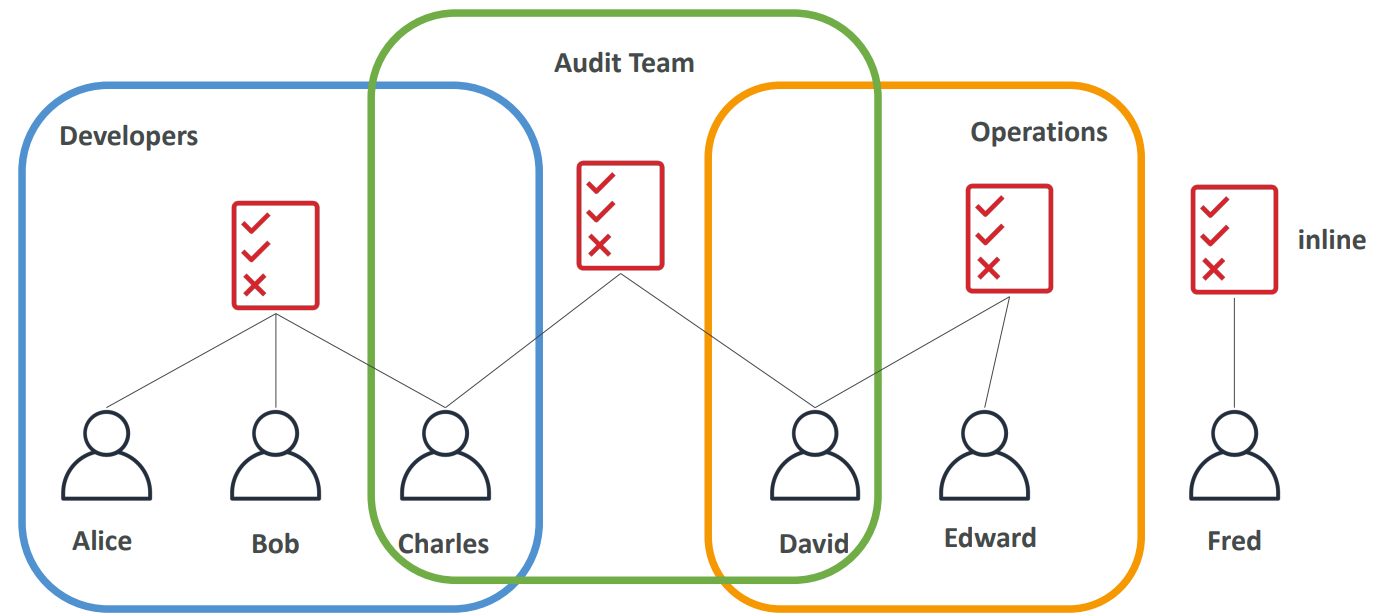
Users or Groups can be assigned JSON documents called policies. These policies define the permissions of the users. AWS you apply the least privilege principle: don’t give more permissions than a user needs.
IAM Policies inheritance
{
  "Version": "2012-10-17",
  "Id": "S3-Account-Permissions",
  "Statement": [
    {
      "Sid": "1",
      "Effect": "Allow",
      "Principal": {
        "AWS": "arn:aws:iam::123456789012:root"
      },
      "Action": [
        "s3:GetObject",
        "s3:PutObject"
      ],
      "Resource": ["*"]
    }
  ]
}- Version
The policy language version.
Always use:"2012-10-17" - Id (optional)
An identifier for the policy. - Statement (required)
One or more individual permission statements. - Sid (optional)
An identifier for the statement. - Effect (required)
Whether the statement allows or denies access.
Values:AlloworDeny - Principal
The AWS account, user, or role the policy applies to. - Action
A list of AWS actions that are allowed or denied. - Resource
A list of AWS resources the actions apply to. - Condition (optional)
Rules that define when the statement is in effect.
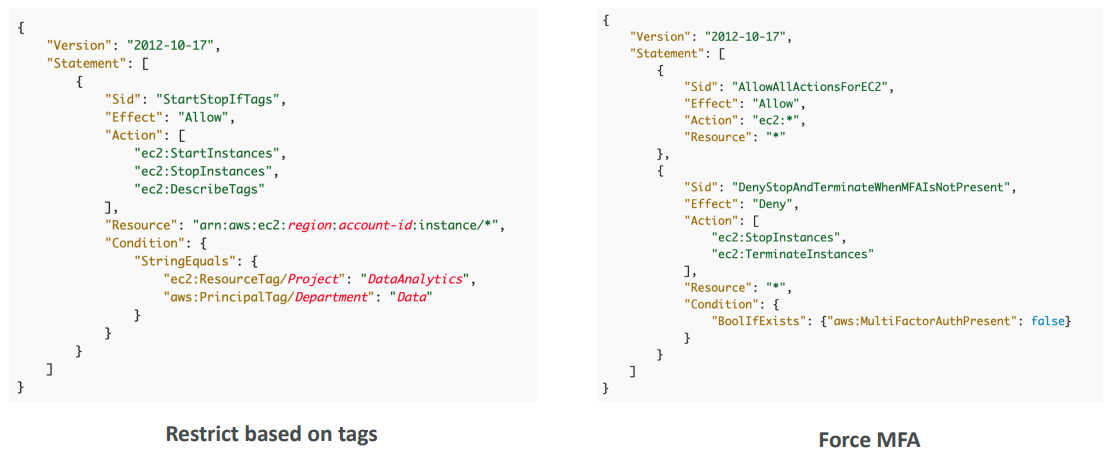
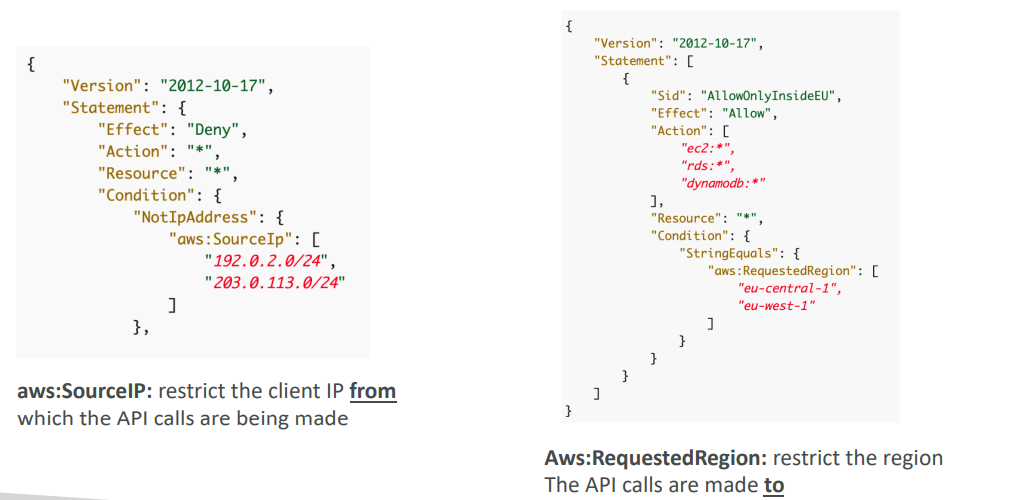
Use cases:
- Restrict access to certain services (for example: can’t use EMR)
- Enforce PCI compliance by explicitly disabling services
IAM Conditions
IAM Roles
- Some AWS service will need to perform actions on your behalf
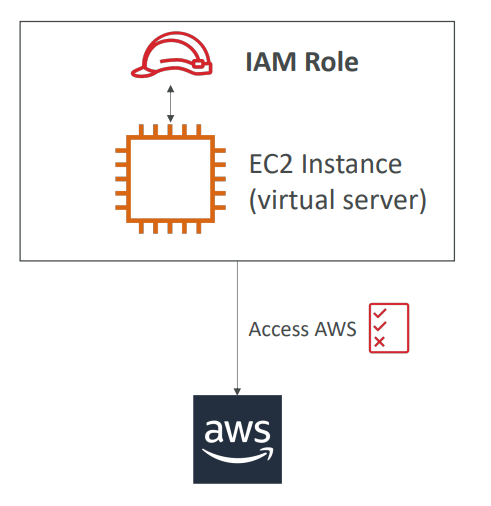
- To do so, we will assign permissions to AWS services with IAM Roles
- Common roles:
- EC2 Instance Roles
- Lambda Function Roles
- Roles for CloudFormation
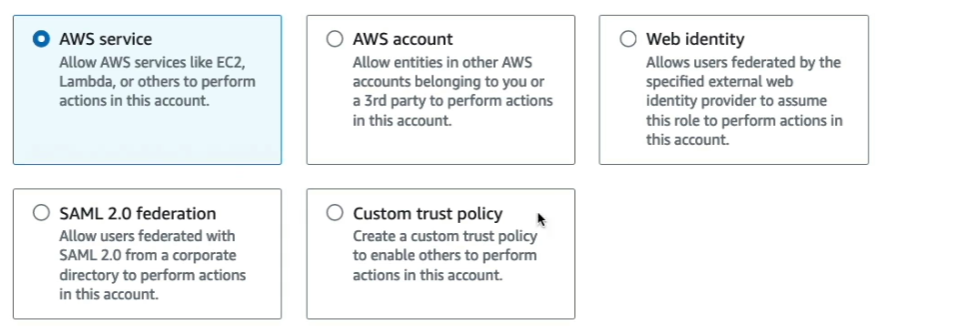
When you assume a role (user, application or service), you give up your original permissions and take the permissions assigned to the role
When using a resource based policy, the principal doesn’t have to give up his permissions
IAM Password policy
• Strong passwords = higher security for your account
• In AWS, you can setup a password policy:
• Set a minimum password length
• Require specific character types:
• including uppercase letters
• lowercase letters
• numbers
• non-alphanumeric characters
• Allow all IAM users to change their own passwords
• Require users to change their password after some time (password expiration)
• Prevent password re-use
IAM MFA
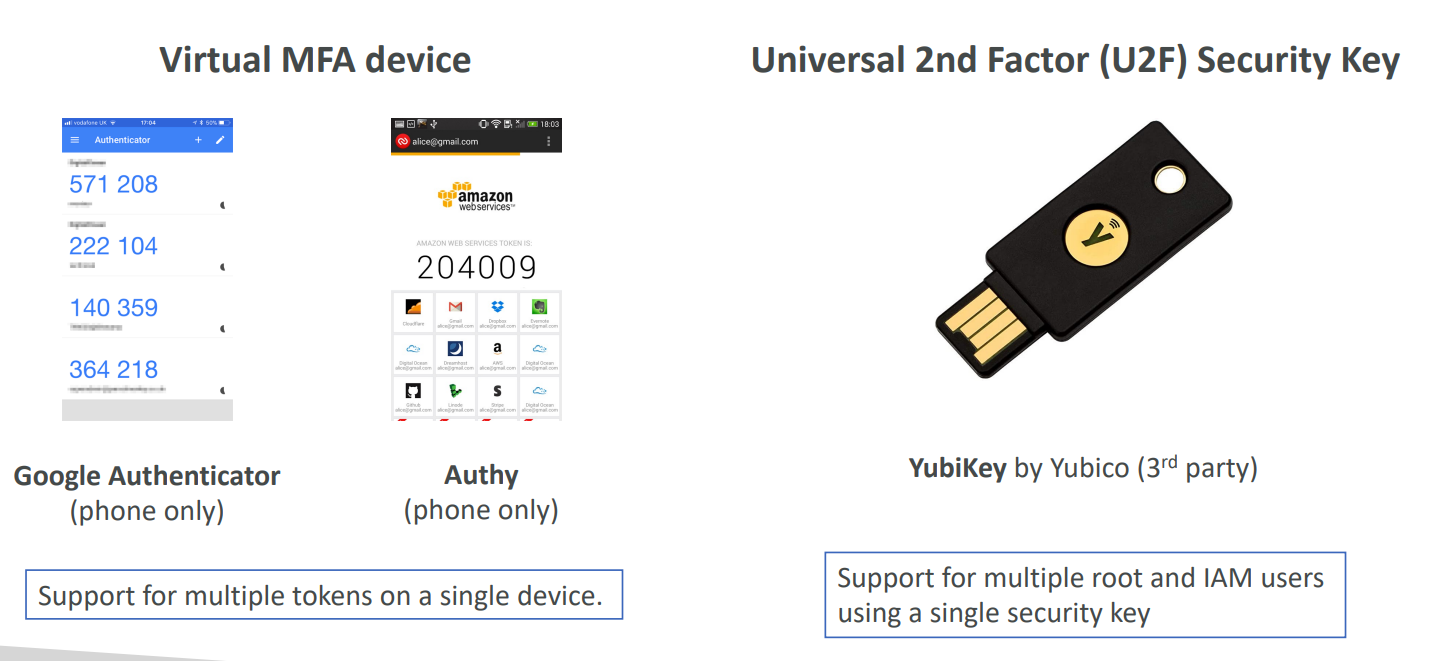
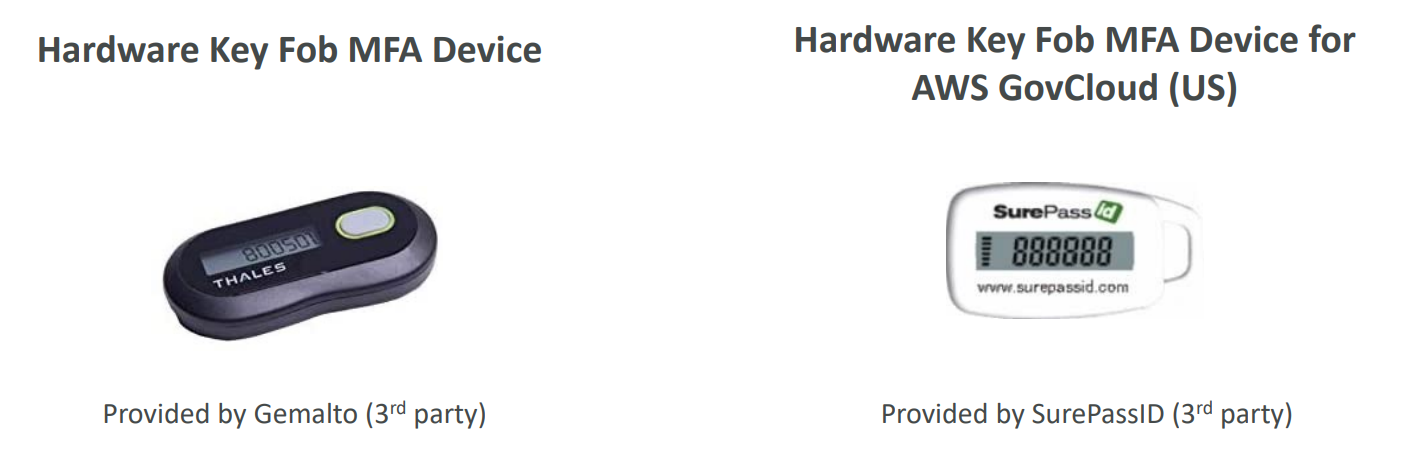
MFA = password you know + security device you own
IAM Credentials Report (account-level)
A report that lists all your account’s users and the status of their various credentials
IAM Access Advisor (user-level)
Access advisor shows the service permissions granted to a user and when those services were last accessed. You can use this information to revise your policies.
IAM Best practices
• Don’t use the root account except for AWS account setup
• One physical user = One AWS user
• Assign users to groups and assign permissions to groups
• Create a strong password policy
• Use and enforce the use of Multi Factor Authentication (MFA)
• Create and use Roles for giving permissions to AWS services
• Use Access Keys for Programmatic Access (CLI / SDK)
• Audit permissions of your account using IAM Credentials Report & IAM Access Advisor
• Never share IAM users & Access Keys
IAM Summary
• Users: mapped to a physical user, has a password for AWS Console
• Groups: contains users only
• Policies: JSON document that outlines permissions for users or groups
• Roles: for EC2 instances or AWS services
• Security: MFA + Password Policy
• AWS CLI: manage your AWS services using the command-line
• AWS SDK: manage your AWS services using a programming language
• Access Keys: access AWS using the CLI or SDK
• Audit: IAM Credential Reports & IAM Access Advisor
IAM QUIZ
What is the definition of an IAM role?
Which of the following is an IAM Security Tool? IAM Credential report and IAM Access advisor
STS
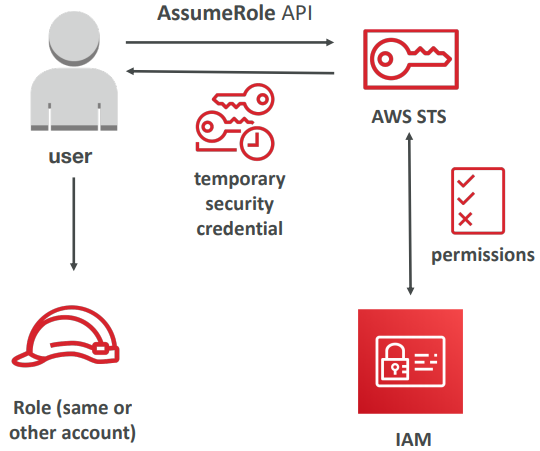
- Allows to grant limited and temporary access to AWS resources.
- Token is valid for up to one hour (must be refreshed)
- AssumeRole
- Within your own account: for enhanced security
- Cross Account Access: assume role in target account to perform actions there
- AssumeRoleWithSAML
- return credentials for users logged with SAML
- AssumeRoleWithWebIdentity
- return creds for users logged with an IdP (Facebook Login, Google Login, OIDC compatible…)
- AWS recommends against using this, and using Cognito instead
- GetSessionToken
- for MFA, from a user or AWS account root user
How to assume a role
- Define an IAM Role within your account or cross-account
- Define which principals can access this IAM Role
- Use AWS STS (Security Token Service) to retrieve credentials and impersonate the IAM Role you have access to (AssumeRole API)
- Temporary credentials can be valid between 15 minutes to 1 hour
Federation
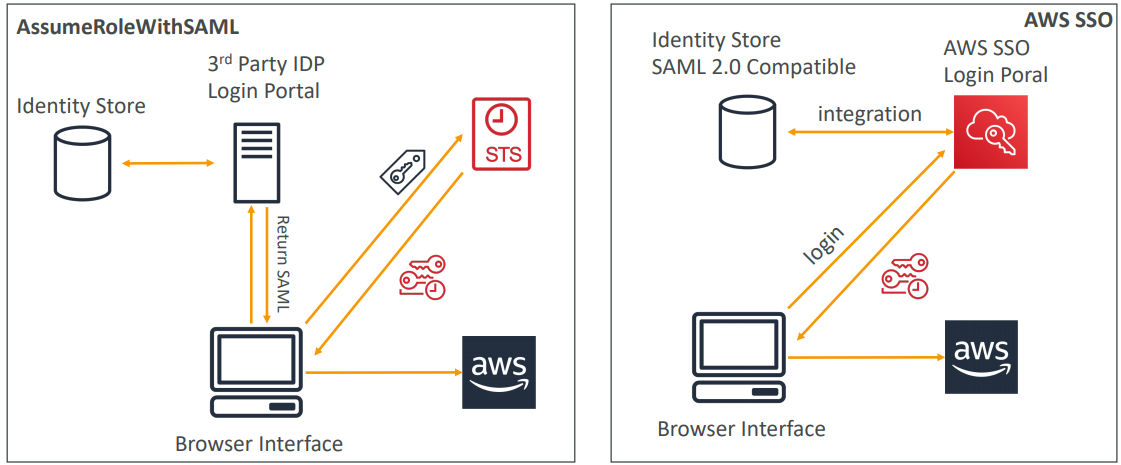
Note: federation through SAML is the “old way” of doing things. Amazon Single Sign On (SSO) Federation is the new managed and simpler way
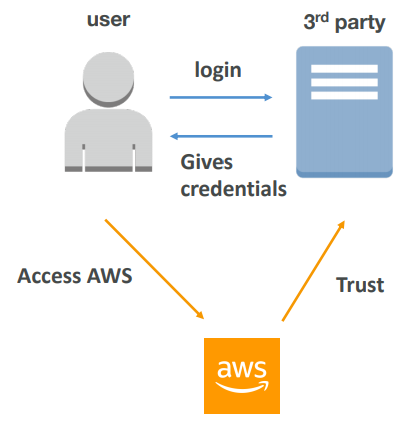
- Federation lets users outside of AWS to assume temporary role for accessing AWS resources.
- These users assume identity provided access role.
- Federations can have many flavors:
- SAML 2.0
- Custom Identity Broker
- Web Identity Federation with Amazon Cognito
- Web Identity Federation without Amazon Cognito
- Single Sign On
- Non-SAML with AWS Microsoft AD
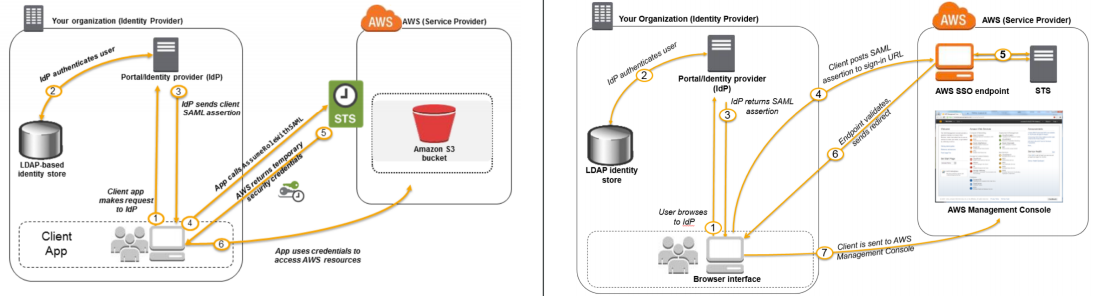
SAML 2.0
Uses the STS API: AssumeRoleWithSAML to provide temporary credentials
- To integrate Active Directory / ADFS with AWS (or any SAML 2.0)
- Provides access to AWS Console or CLI (through temporary creds)
- No need to create an IAM user for each of your employees
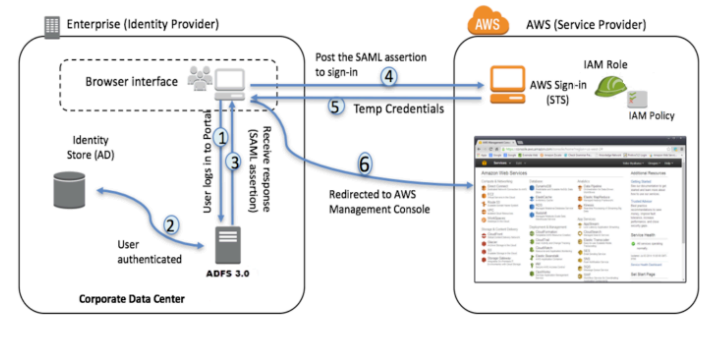
ADFS SAML Integration
Same process as SAML 2.0
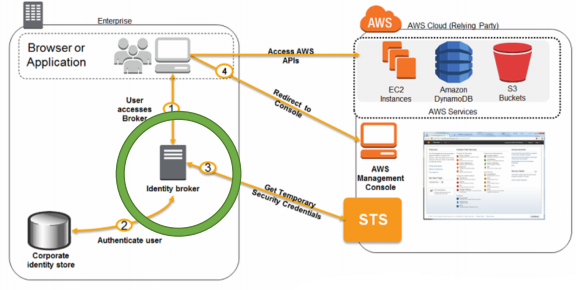
Custom Identity Broker Application
- Use only if identity provider is not compatible with SAML 2.0
- The identity broker must determine the appropriate IAM policy
- Uses the STS API: AssumeRole or GetFederationToken
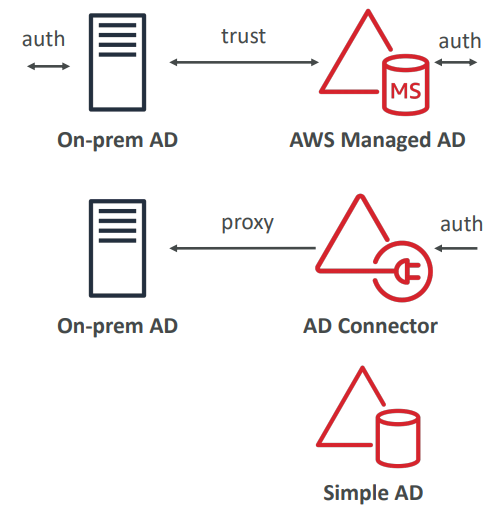
AD Flavours
AWS Managed Microsoft AD
- Create your own AD in AWS, manage users locally, supports MFA
- Establish “trust” connections with your on- premise AD
AD Connector
- Directory Gateway (proxy) to redirect to on-premise AD
- Users are managed on the on-premise AD
Simple AD
- AD-compatible managed directory on AWS
- Cannot be joined with on-premise AD
KMS
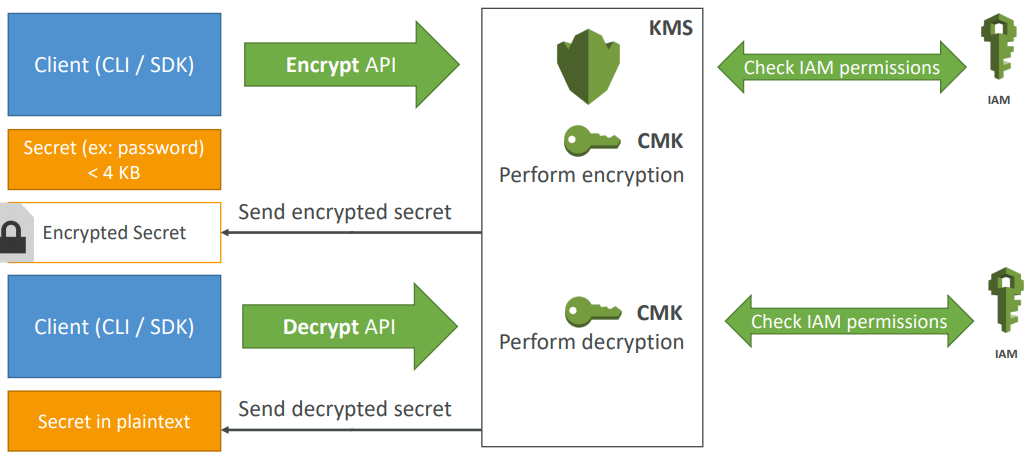
- Anytime you hear “encryption” for an AWS service, it’s most likely KMS
- Easy way to control access to your data, AWS manages keys for us
- Fully integrated with IAM for authorization
- Able to fully manage the keys & policies:
- Create
- Rotation policies
- Enable
- Able to audit key usage (using CloudTrail)
- Three types of Customer Master Keys (CMK):
- AWS Managed Service Default CMK: free
- User Keys created in KMS: $1 / month
- User Keys imported (must be 256-bit symmetric key): $1 / month
- + pay for API call to KMS ($0.03 / 10000 calls)
Parameter Store
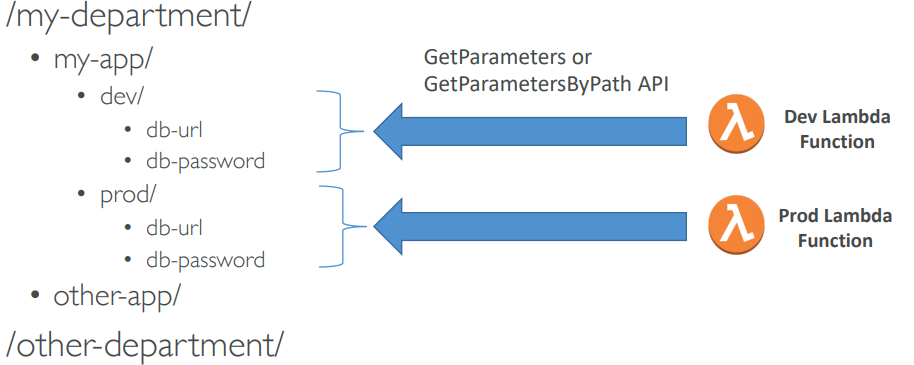
- Secure storage for configuration and secrets
- Optional Seamless Encryption using KMS
- Serverless, scalable, durable, easy SDK, free
- Version tracking of configurations / secrets
- Configuration management using path & IAM
- Notifications with CloudWatch Events
- Integration with CloudFormation
AWS Secrets Manager
Mostly meant for RDS integration
- Newer service, meant for storing secrets
- Capability to force rotation of secrets every X days
- Automate generation of secrets on rotation (uses Lambda)
- Integration with Amazon RDS (MySQL, PostgreSQL, Aurora)
- Secrets are encrypted using KMS
Cloud HSM
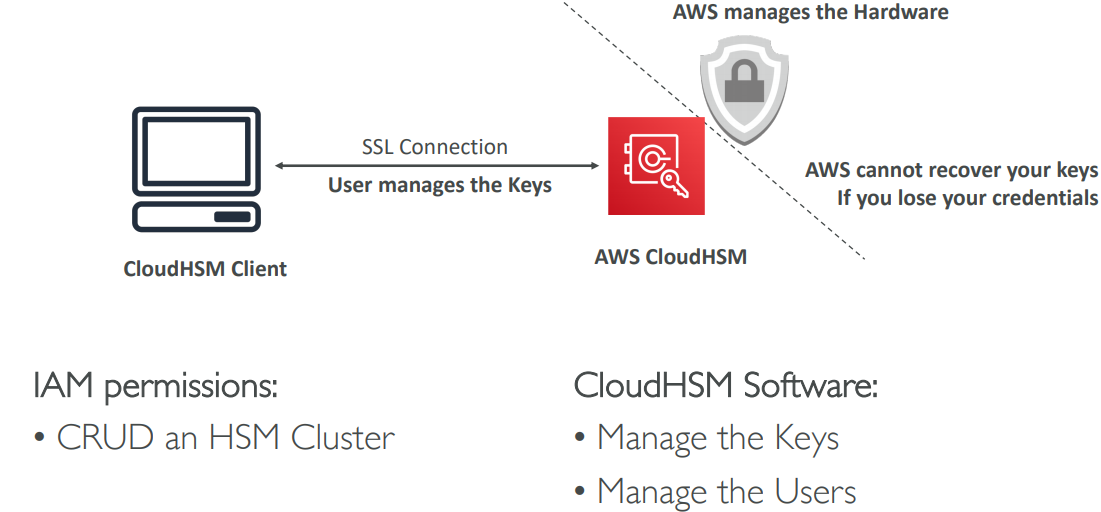
- Supports both symmetric and asymmetric encryption (SSL/TLS keys)
- You manage your own encryption keys entirely (not AWS)
- Dedicated Hardware (HSM = Hardware Security Module)
AWS Shield
AWS Shield Standard:
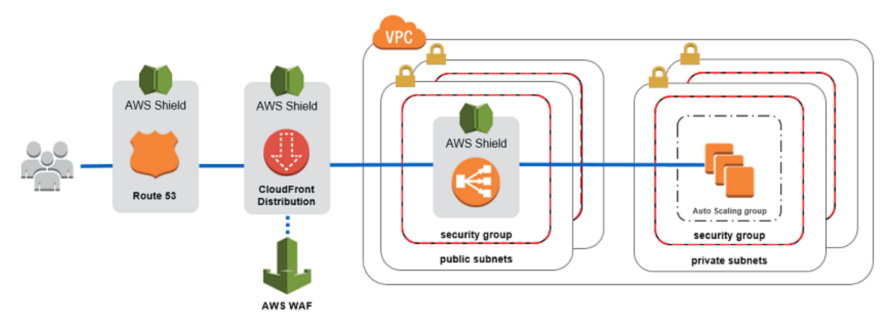
- Free service that is activated for every AWS customer
- Provides protection from attacks such as SYN/UDP Floods, Reflection attacks and other layer 3/layer 4 attacks
AWS Shield Advanced:
- Optional DDoS mitigation service ($3,000 per month per organization)
- Protect against more sophisticated attack on Amazon EC2, Elastic Load Balancing (ELB), Amazon CloudFront, AWS Global Accelerator, and Route 53
- 24/7 access to AWS DDoS response team (DRP)
- Protect against higher fees during usage spikes due to DDoS
AWS WAF – Web Application Firewall
- Protects your web applications from common web exploits (Layer 7)
- Layer 7 is HTTP (vs Layer 4 is TCP)
- Deploy on Application Load Balancer, API Gateway, CloudFront
Define Web ACL (Web Access Control List):
- Rules can include: IP addresses, HTTP headers, HTTP body, or URI strings
- Protects from common attack - SQL injection and Cross-Site Scripting (XSS)
- Size constraints, geo-match (block countries)
- Rate-based rules (to count occurrences of events) – for DDoS protection
Cognito
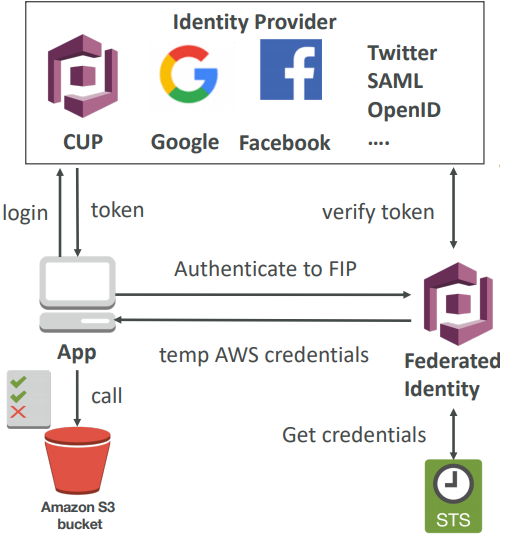
Goal:
- Provide direct access to AWS Resources from the Client Side (mobile, web app)
Example:
- provide (temporary) access to write to S3 bucket using Facebook Login
Problem:
- We don’t want to create IAM users for our app users
How:
- Log in to federated identity provider – or remain anonymous
- Get temporary AWS credentials back from the Federated Identity Pool
- These credentials come with a pre-defined IAM policy stating their permissions
Organization
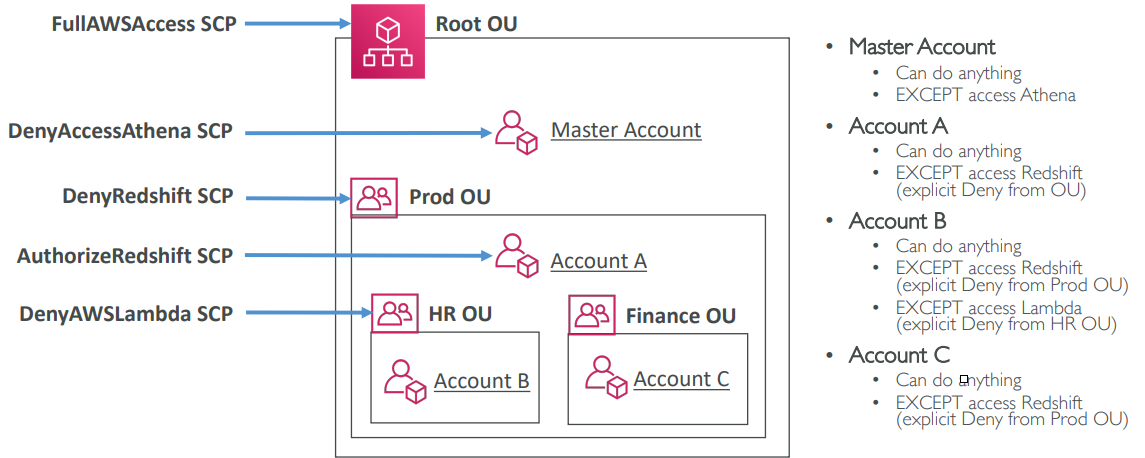
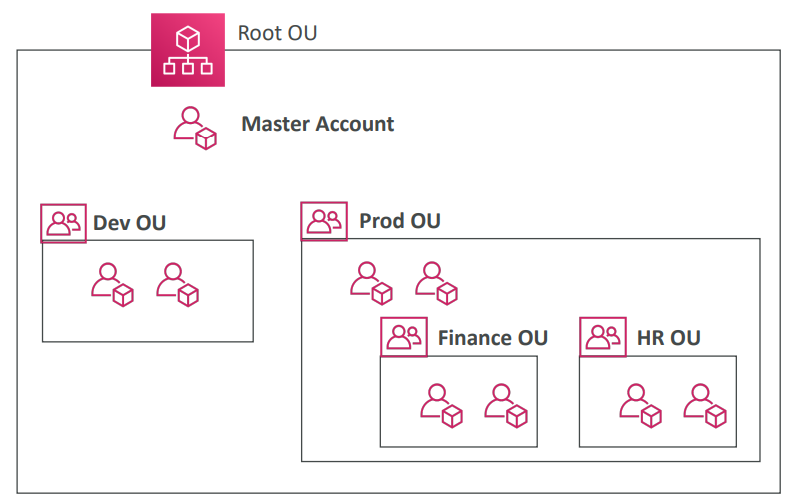
Global service and Allows to manage multiple AWS accounts. The main account is the master account and other accounts are member accounts. Member accounts can only be part of one organization and it allows us to do consolidated Billing across all accounts (single payment method)
We can get Pricing benefits from aggregated usage (volume discount for EC2, S3…)
We can use Organization with different strategies as it is very flexible.
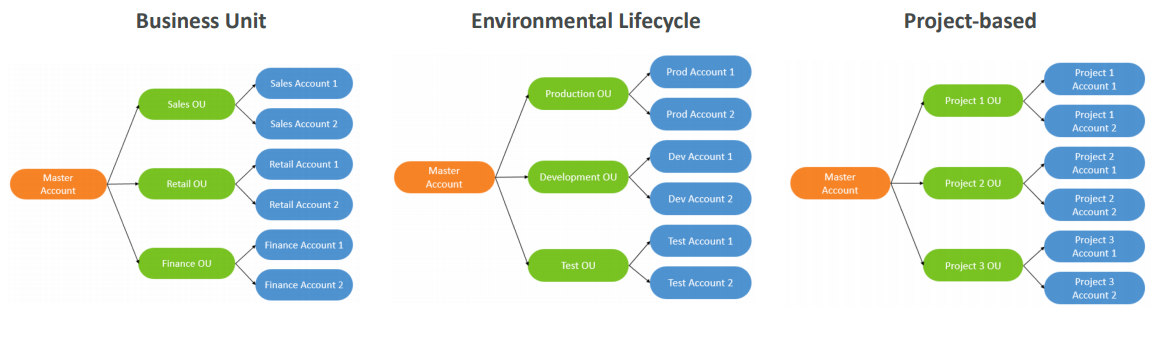
- Multi Account vs One Account Multi VPC
- Use tagging standards for billing purposes
- Enable CloudTrail on all accounts, send logs to central S3 account
- Send CloudWatch Logs to central logging account
- Establish Cross Account Roles for Admin purposes
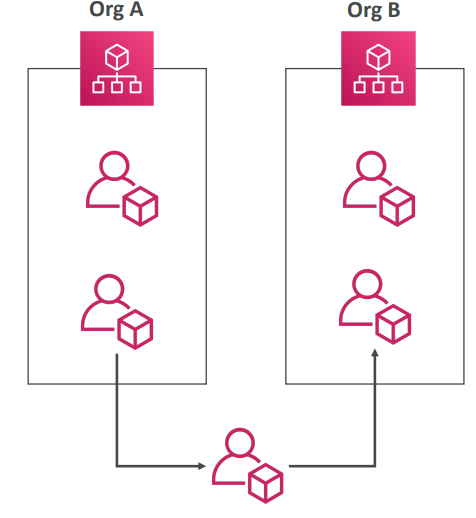
In order to move an account from one ORG to another ORG we have to remove the ACC from the base ORG and then add it to target ORG.
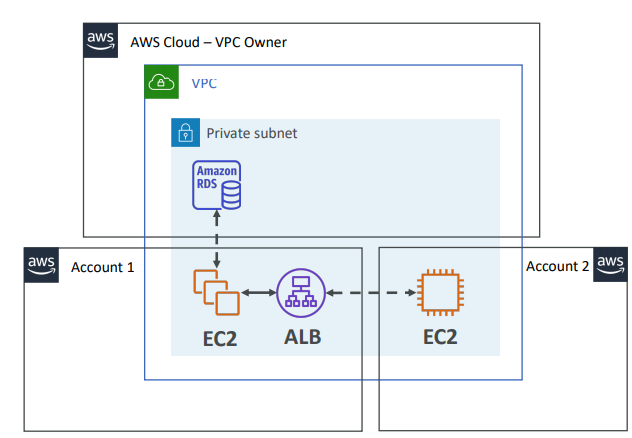
RAM
Share AWS resources that you own with other AWS accounts. Share with any account or within your Organization. Avoid resource duplication!
- Each account…
- is responsible for its own resources
- cannot view, modify or delete other resources in other accounts
- Network is shared so…
- Anything deployed in the VPC can talk to other resources in the VPC
- Applications are accessed easily across accounts, using private IP!
- Security groups from other accounts can be referenced for maximum security
SSO
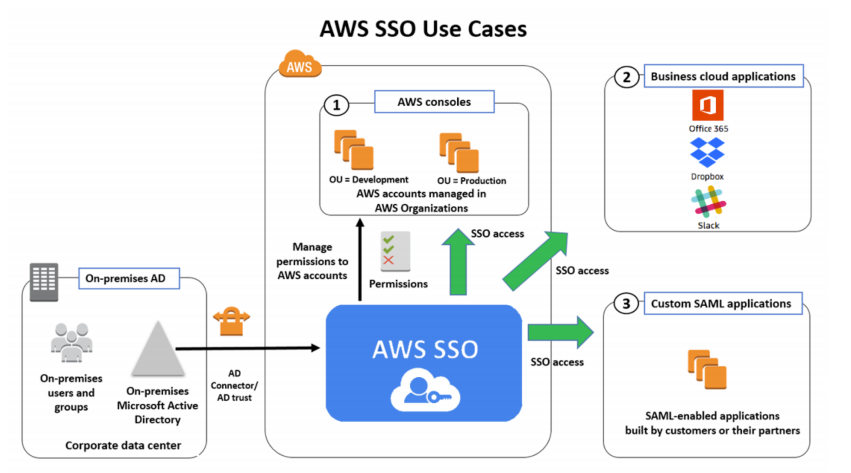
- Centrally manage Single Sign-On to access multiple accounts and 3rd-party business applications.
- Integrated with AWS Organizations
- Supports SAML 2.0 markup
- Integration with on-premise Active Directory
- Centralized permission management
- Centralized auditing with CloudTrail
SSO VS Assume Role
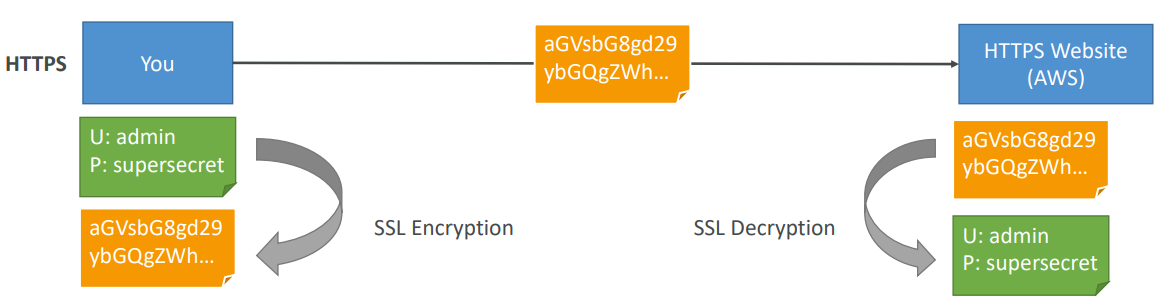
Encryption in flight (SSL)
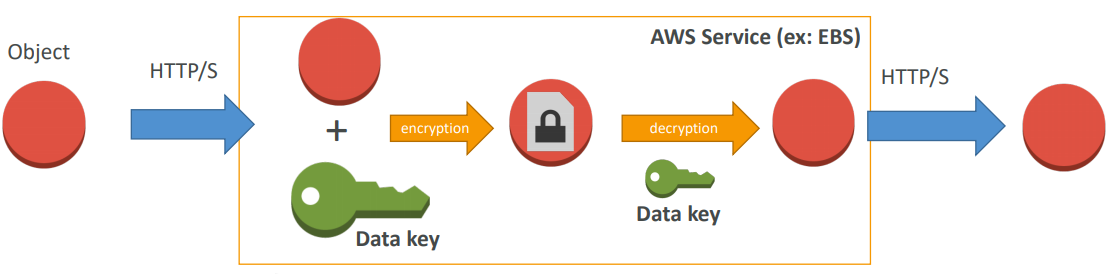
Encryption at rest (Server side)
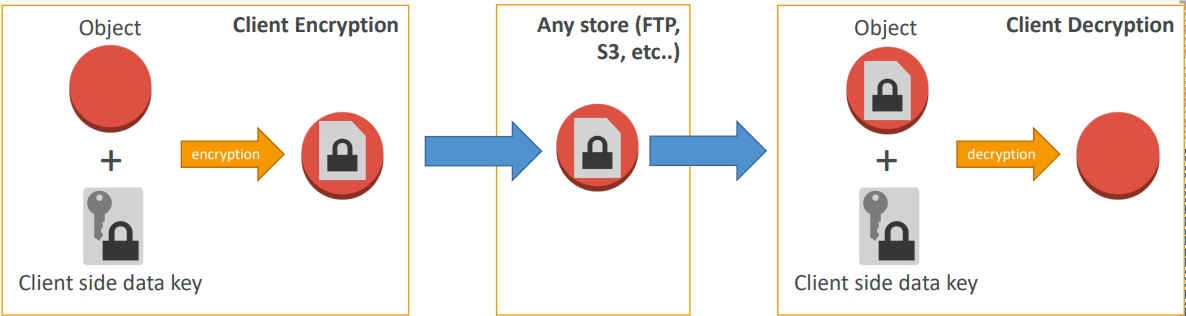
Client Side Encryption