⛅️ AWS Basics
Reset all the below recap tracking and refine orders.
- S3, EFS, EBS, FX , FX For Lustre
- RDS & Dynamo DB and databases DAX and etc
- EC2, Lambda, ECS
- STS, SNS, SQS, Kinesis, Realtime event management
- API GATEWAY
- ELB, ASG
- Route 53
- IAM, KMS, CMs, Security
- VPC
💽 Storage
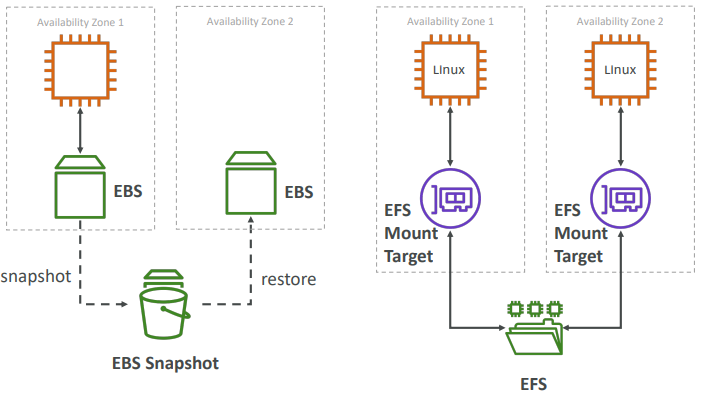
EFS and EBS could be attached to EC2 instance while creating one.
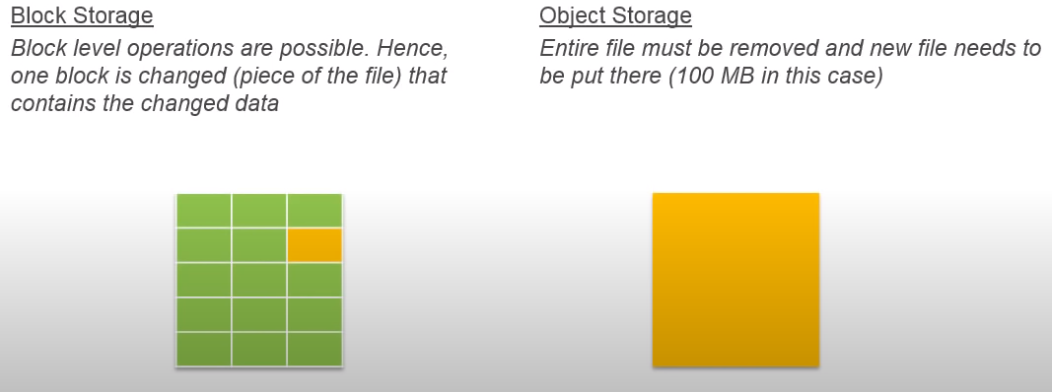
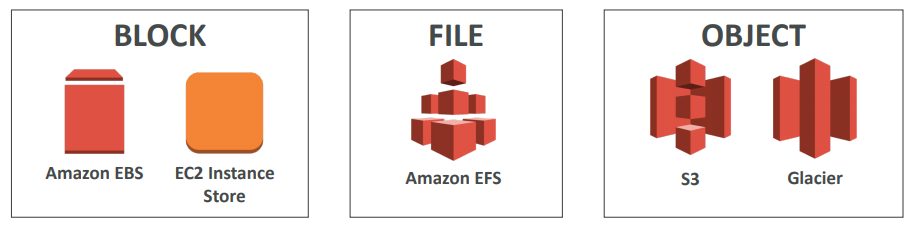
// TODO: Remove ⇒ section 5, 9, 11
EBS
Amazon Elastic Block Store provides persistent block stroage volumes for use with Amazon EC2 instances in the AWS cloud. Each Amazon EBS volume is automatically replicated within it’s availability zone to protect you from component failure, offering high availability.
- An EC2 machine loses its root volume (main drive) when it is manually terminated
- It’s a network drive (i.e. not a physical drive)
- It uses the network to communicate the instance, which means there might be a bit of latency
- It can be detached from an EC2 instance and attached to another one quickly
- It’s locked to an Availability Zone (AZ)
- An EBS Volume in us-east-1a cannot be attached to us-east-1b
- To move a volume across, you first need to snapshot it
- Have a provisioned capacity (size in GBs, and IOPS)
- You get billed for all the provisioned capacity
- Snapshots are incremental
- Means that only the blocks that have changed since your last snapshot are moved to S3
- Snapshots will be stored in S3 (but you won’t directly see them)
- Can copy snapshots across AZ or Region
- Can make Image (AMI) from Snapsh
IMPORTANT FOR AUTOMATION: Snapshots can be automated using Amazon Data Lifecycle Manager
Encrypytion
When you create an encrypted EBS volume, you get the following:
- Data at rest is encrypted inside the volume
- All the data in flight moving between the instance and the volume is encrypted
- All snapshots are encrypted
- All volumes created from the snapshot
- Encryption and decryption are handled transparently (you have nothing to do)
- Encryption has a minimal impact on latency
- EBS Encryption leverages keys from KMS (AES-256)
- Copying an unencrypted snapshot allows encryption
- Snapshots of encrypted volumes are encrypted
EBS vs Instances Store
Some instance do not come with Root EBS volumes Instead, they come with “Instance Store” (= ephemeral storage). Instance store is physically attached to the machine (EBS is a network drive). It is Block Storage (just like EBS)
Local Storage
- Pros:
- Better I/O performance (EBS gp2 has an max IOPS of 16000, io1 of 64000)
- Good for buffer / cache / scratch data / temporary content
- Data survives reboots
- Cons:
- On stop or termination, the instance store is lost
- You can’t resize the instance store
- Backups must be operated by the user
RAID Options
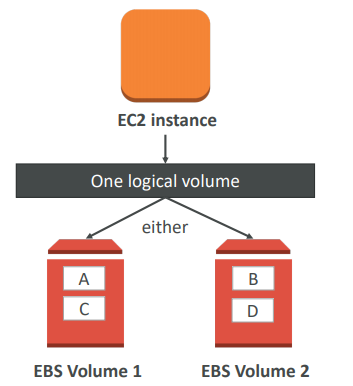
EBS is already redundant storage (replicated within an AZ). But what if you want to increase IOPS to say 100 000 IOPS, you can do a RAID 0.
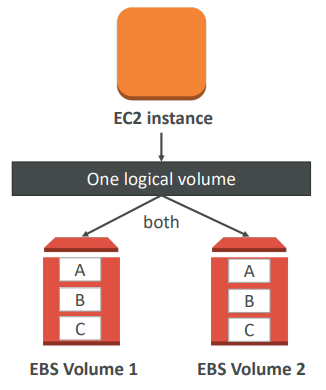
But if you want the more fault tolerance option - you would do a RAID-1 (mirroring) on EBS volumes.
Types

EFS
- Compatible with Linux based AMI (not Windows - it is a POSIX file system (~Linux) that has a standard file API)
- Encryption at rest using KMS
- Grow to Petabyte-scale network file system, automatically
- Supports the Network File System version 4 (NFSv4) protocol
- You only pay for the storage you use (no pre-provisioning required)
- Read after write consistency
- Could be monted to multiple EC2 at the same size
EFS is only for linux instances while EBS could be mounted to windows OS as well.
S3
Amazon S3 allows people to store objects (files) in “buckets” (directories)
-
It’s advertised as ”infinitely scaling” storage
-
Many AWS services uses AWS S3 as an integration as well
-
Objects (files) have a Key. The key is the FULL path:
- <my_bucket>/my_file.txt
- <my_bucket>/my_folder1/another_folder/my_file.txt
Objects
- Max Size is 5TB
- Metadata (list of text key / value pairs – system or user metadata)
- Tags (Unicode key / value pair – up to 10) – useful for security / lifecycle
- Version ID (if versioning is enabled)
Versioning
- You can version your files in AWS S3. It is enabled at the bucket level
- Protect against unintended deletes (ability to restore a version)
Encryption
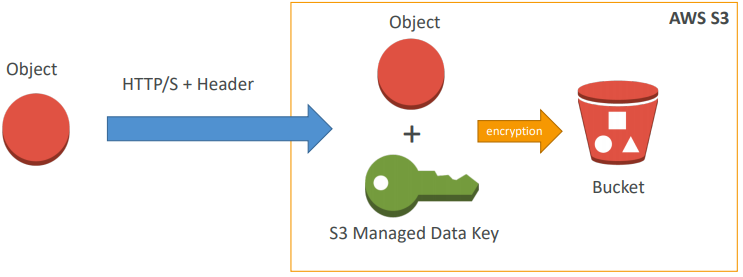
Approach 1) SSE-S3: encrypts S3 objects using keys handled & managed by AWS
- Must set header: “x-amz-server-side-encryption”: “AES256”
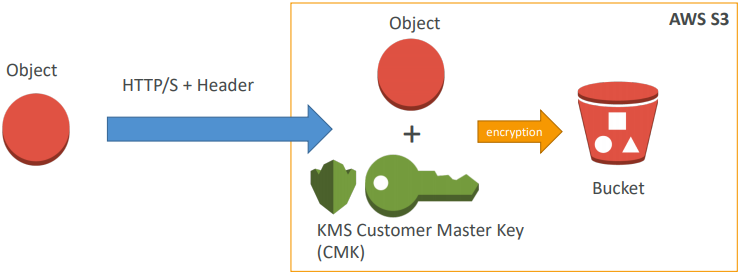
Approach 2) SSE-KMS: leverage AWS Key Management Service to manage encryption keys
- KMS Advantages: user control + audit trail
- Must set header: “x-amz-server-side-encryption”: ”aws:kms
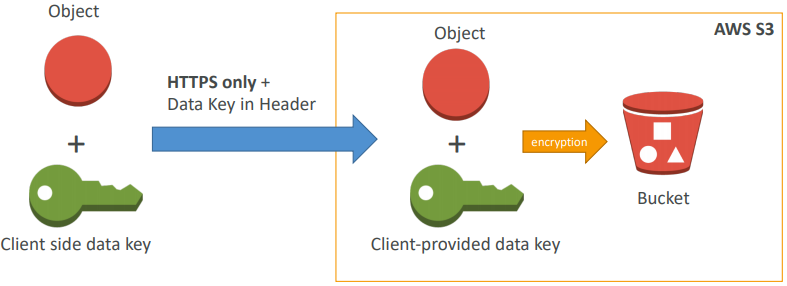
Approach 3) SSE-C: when you want to manage your own encryption keys
- SSE-C: server-side encryption using data keys fully managed by the customer outside of AWS
- HTTPS must be used - it’s a must
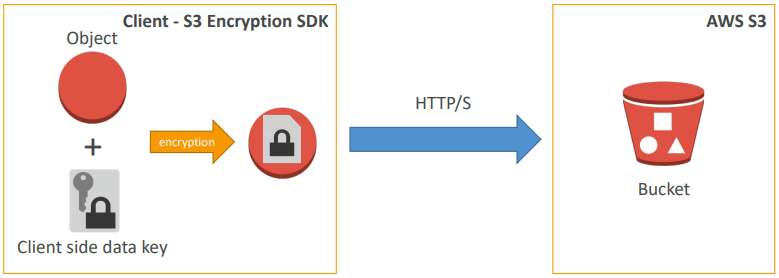
Approach 4) Client Side Encryption
- Client library such as the Amazon S3 Encryption Client
- Clients must encrypt data themselves before sending to S3
- Clients must decrypt data themselves when retrieving from S3
- Customer fully manages the keys and encryption cycle
Approach 5) Encryption in transit (SSL)
- You’re free to use the endpoint you want, but HTTPS is recommended
- Encryption in flight is also called SSL / TLS
Bucket Policies
- JSON based policies
- Resources: buckets and objects
- Actions: Set of API to Allow or Deny
- Effect: Allow / Deny
- Principal: The account or user to apply the policy to
- Use S3 bucket for policy to:
- Grant public access to the bucket
- Force objects to be encrypted at upload • Grant access to another account (Cross Account)
Security
- User based:
- IAM policies - which API calls should be allowed for a specific user from IAM console
- Resource Based:
- Bucket Policies - bucket wide rules from the S3 console - allows cross account
- Object Access Control List (ACL) – finer grain
- Bucket Access Control List (ACL) – less common
- User Security:
- MFA (multi factor authentication) can be required in versioned buckets to delete objects
- Signed URLs: URLs that are valid only for a limited time (ex: premium video service for logged in users)
- Logging and Audit:
- S3 access logs can be stored in other S3 bucket
- API calls can be logged in AWS CloudTrail
Static Website hosting
- If you get a 403 (Forbidden) error, make sure the bucket policy allows public reads!
- S3 can host static websites and have them accessible on the www
CORS
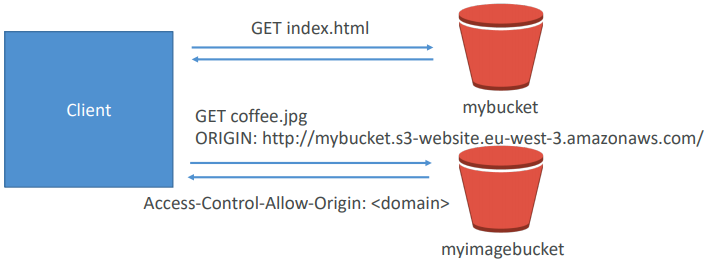
- If you request data from another S3 bucket, you need to enable CORS
- Cross Origin Resource Sharing allows you to limit the number of websites that can request your files in S3 (and limit your costs)
Consistency Model
- Read after write consistency for PUTS of new objects
- As soon as an object is written, we can retrieve it ex: (PUT 200 → GET 200)
- This is true, except if we did a GET before to see if the object existed ex: (GET 404 → PUT 200 → GET 404) – eventually consistent
- Eventual Consistency for DELETES and PUTS of existing objects
- If we read an object after updating, we might get the older version ex: (PUT 200 → PUT 200 → GET 200 (might be older version))
- If we delete an object, we might still be able to retrieve it for a short time ex: (DELETE 200 → GET 200)
Logs
- For audit purpose, you may want to log all access to S3 buckets
- Any request made to S3, from any account, authorized or denied, will be logged into another S3 bucket
- That data can be analyzed using data analysis tools or Amazon Anthena…
Advanced
- MFA (multi factor authentication) forces user to generate a code on a device (usually a mobile phone or hardware) before doing important operations on S3
- MFA-Delete currently can only be enabled using the CL
- The old way to enable default encryption was to use a bucket policy and refuse any HTTP command without the proper headers:
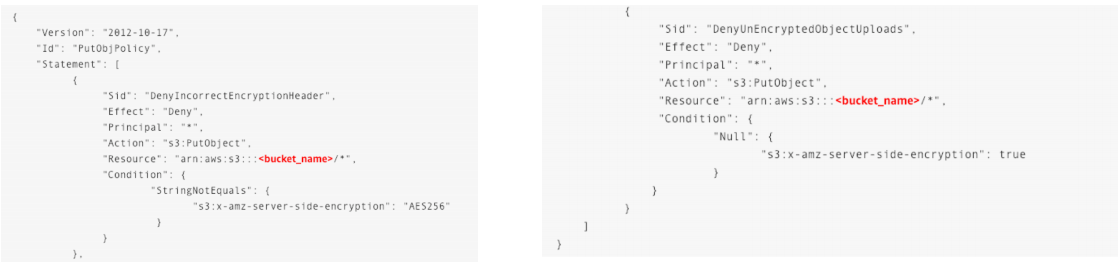
- The new way is to use the “default encryption” option in S3
- Note: Bucket Policies are evaluated before “default encryption”
Cross Replication
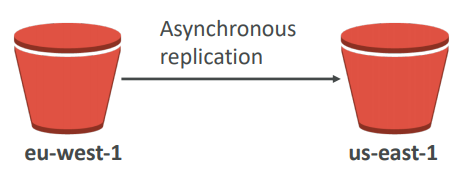
- Must enable versioning (source and destination)
- Buckets must be in different AWS regions
- Can be in different accounts
- Copying is asynchronous
- Must give proper IAM permissions to S3
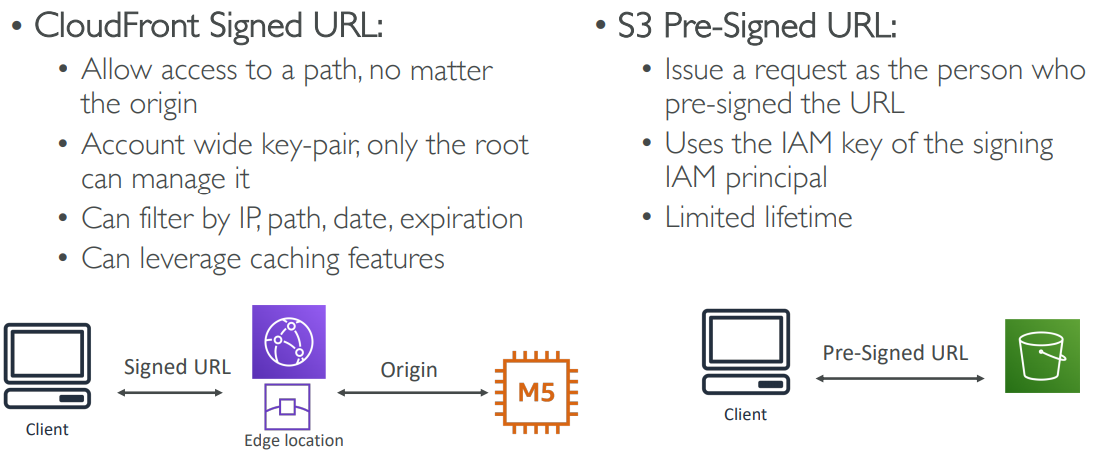
Pre-signed URLS
-
Can generate pre-signed URLs using SDK or CLI
-
For downloads (easy, can use the CLI)
-
For uploads (harder, must use the SDK)
-
-
Valid for a default of 3600 seconds, can change timeout with —expires-in [TIME_BY_SECONDS] argument
-
Users given a pre-signed URL inherit the permissions of the person who generated the URL for GET / PUT
-
Examples :
- Allow only logged-in users to download a premium video on your S3 bucket
-
Allow an ever changing list of users to download files by generating URLs dynamically
- Allow temporarily a user to upload a file to a precise location in our bucket
You have created an S3 bucket in us-east-1 region with default configurations. You have uploaded few documents and need to be shared with a group within the organization granting them access for a limited time. What is the recommended approach?
Generate pre-signed URL with an expiry date and share the URL with all persons via email.
LifeCycle Rules
-
Automates moving your objects between different storage tiers.
-
Can be used in conjuction with versioning
-
Can be applied to current versions and previous versions.
-
Transition actions: It defines when objects are transitioned to another storage class.
- Move objects to Standard IA class 60 days after creation
- Move to Glacier for archiving after 6 months
-
Expiration actions: configure objects to expire (delete) after some time
- Access log files can be set to delete after a 365 days
- Can be used to delete old versions of files (if versioning is enabled)
- Can be used to delete incomplete multi-part uploads
-
Rules can be created for a certain prefix (ex - s3://mybucket/mp3/*)
-
Rules can be created for certain objects tags (ex - Department: Finance)
KMS Limitation for S3
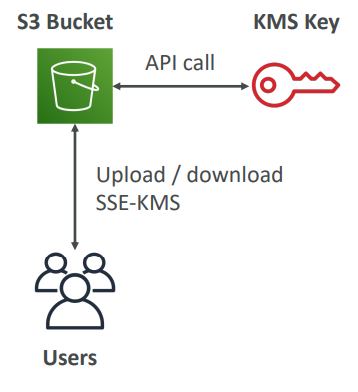
- When you upload, it calls the GenerateDataKey KMS API
- When you download, it calls the Decrypt KMS API
- Count towards the KMS quota per second (5500, 10000, 30000 req/s based on region)
- As of today, you cannot request a quota increase for KMS
Multipart Upload
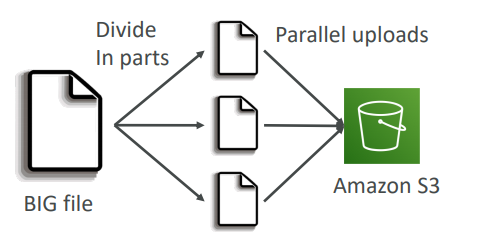
- recommended for files > 100MB, must use for files > 5GB and can help parallelize uploads (speed up transfers)
Transfer Accelaration
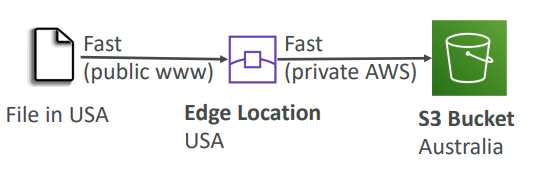
Cross region S3 Transfer Accelaration enables fast, easy and secure transfers of files over long distances between your end users and and S3 bucket. Transfer Accelaration takes advantage of Amazon CloudFront’s globally distributed edge locations. As the data arrives at an edge location, data is routed to Amazon S3 over an optimized network path.
Uploads to the Edge locations
S3 Transfer accelaration utilises the CloudFront Edge Network to accelerate your uploads to S3. Instead of uploading directly to your S3 bucket, you can use a distinct URL to upload directly to an edge location which will then transfer that file to S3. Your will get a distinct URL to upload.
Mybucket.s3-accelerate.amazonaws.com
Users upload to edge location and that uploads to the bucket.
S3 Select & Glacier Select
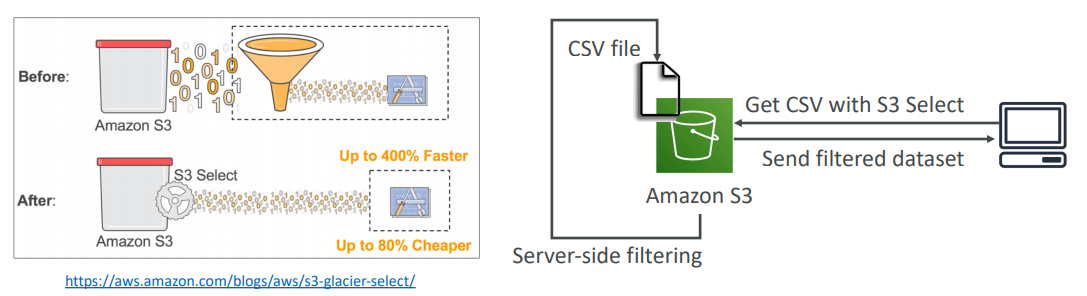
- Retrieve less data using SQL by performing server side filtering
- Can filter by rows & columns (simple SQL statements)
- Less network transfer, less CPU cost client-side
Types
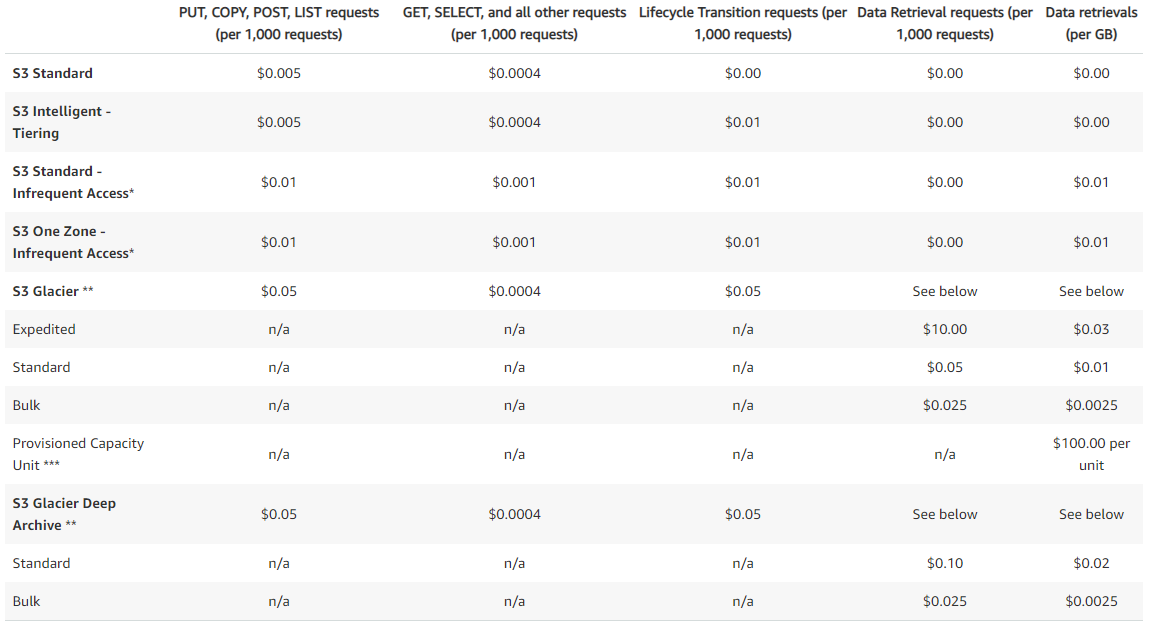
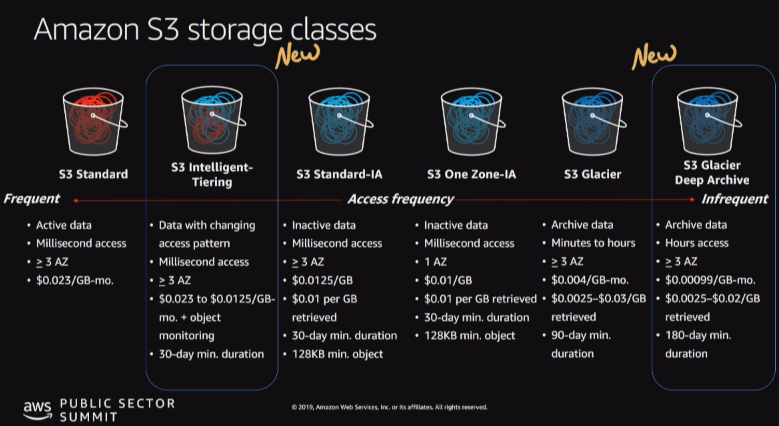
FSx for Windows (File Server)
- EFS is a shared POSIX system for Linux systems.
- FSx for Windows is a fully managed Windows file system share drive
- Supports SMB protocol & Windows NTFS
- Microsoft Active Directory integration, ACLs, user quotas
- Built on SSD, scale up to 10s of GB/s, millions of IOPS, 100s PB of data
- Can be accessed from your on-premise infrastructure
- Can be configured to be Multi-AZ (high availability)
- Data is backed-up daily to S3
FX for Lustre
- Lustre is a type of parallel distributed file system, for large-scale computing
- The name Lustre is derived from “Linux” and “cluster”
- Machine Learning, High Performance Computing (HPC)
- Video Processing, Financial Modeling, Electronic Design Automation
- Scales up to 100s GB/s, millions of IOPS, sub-ms latencies
- Seamless integration with S3
- Can “read S3” as a file system (through FSx)
- Can write the output of the computations back to S3 (through FSx)
- Can be used from on-premise servers
Transportation
Direct upload
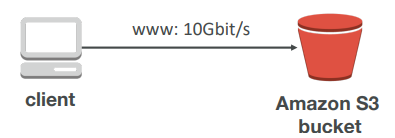
Snowball
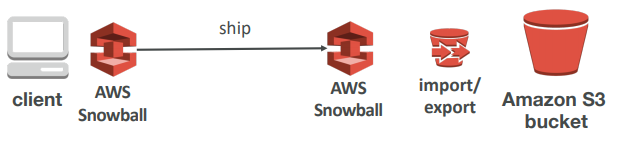
Snowball is a petabyte-scale data transport solution that uses secure appliances to transfer large amounts of data into and out of AWS. Using snowball addresses common challenges with large-scale data transfers including high network costs, long transfer times, and security concerns. Transferring data with Snowball is simple, fast, secure, and can be as little as one-fifth the cost of high-speed internet.
- Comes in 50TB or 80TB size
- Multiple layer of security for data protection
- including: temper-resistant enclosures, 256-bit encryption, and an industry-standard Trusted Platfrom Module.
- Once the data transfer job has been processed and verified, AWS performs a software erasure of the snowball appliance.
Snowball into Glacier
Snowball cannot import to Glacier directly • You have to use Amazon S3 first, and an S3 lifecycle policy

Snowball edge
Snowball edge is a 100TB data transfer device with on-board storage and compute capabilities. You can use snowball edge to move large amounts of data in and out of AWS, as a temporary storage tier for large local datasets, or to support local workloads in remote or off site locations.
SnoballEdge connects to your existing applications and infrastructure using standard storage interfaces, streamlining the data transfer process and minimizing setup and integration.
Snowball edge can cluster together to a local storage tier and process your data on-premises, helping ensure your applications continue to run even when they are not able to access the cloud.
Snowmobile
AWS snowmobile is an exabyte scale data transfer service used to move extremely large amounts of data to AWS. You can transfer up to 100 PB per snowmobile, a 45-foot long ruggedized shipping container, pulled by a semi-trailer truck. Snowmobile makes it easy to move massive volumes of data to the cloud, including video libraries, image repositories, or even a complete data center migration. Transfering data with Snowmobile is fast, secure and cost effective.
why should I use Snowball?

Storage Gateway
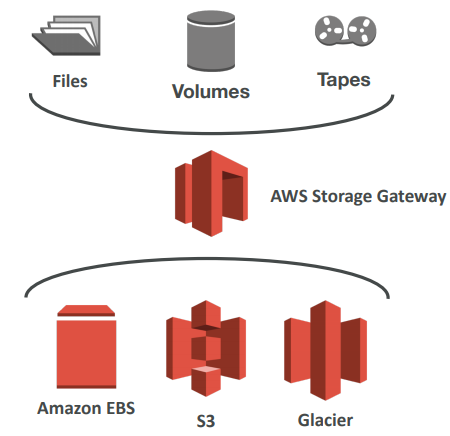
AWS Storage Gateway is a service that connects an on-premises software appliance with cloud-based storage to provide seamless and secure integration between an organization’s on-premises IT environment and AWS’s storage infrastructure.
AWS storage gateway’s software appliance is available for download as a virtual machine(VM) image that you install on a host in your datacenter.
Storage gateway supports either VMware ESXi or Microsoft Hyper-V. Once we installed the gateway and associated with our AWS account through activation process, we can create different type of storage gateway(3 types)
- File Gateway (NTF)
- Volume Gateway (iSCSI)
- Stored Volumes
- Cached Volumes
- Tape Gateway Volume
File Gateway
-
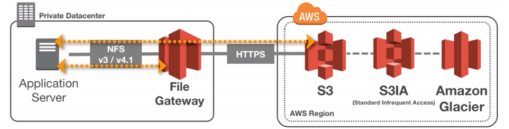
Configured S3 buckets are accessible using the NFS and SMB protocol
-
Supports S3 standard, S3 IA, S3 One Zone IA
-
Bucket access using IAM roles for each File Gateway
-
Most recently used data is cached in the file gateway
-
Can be mounted on many servers
Files are stored as objects in your S3 buckets, accessed through a Network File System(NFS) mount point. Ownership, permissions, and timestamps are durably stored in S3 in the user-metadata of the object associated with the file. Once objects are transferred to S3, they can be managed as anative S3 objects, and bucket policies such as Versioning, Lifecycle management, and cross-region replication apply directly to objects stored in your bucket.
Volume Gateway
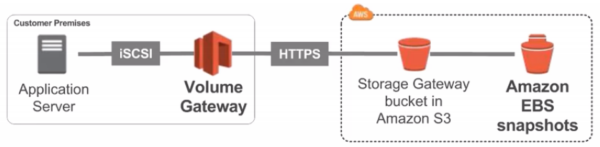
- Block storage using iSCSI protocol backed by S3
- Backed by EBS snapshots which can help restore on-premise volumes!
- Cached volumes: low latency access to most recent data
- Stored volumes: entire dataset is on premise, scheduled backups to S3
- Use EBS snapshot for disaster recovery
Tape Gateway
-
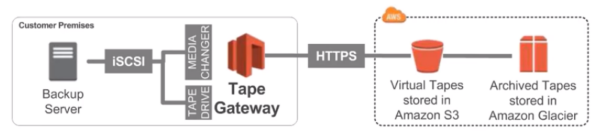
Emulates industry-standard iSCSI-based virtual tape library
-
Common backup applications
-
Some companies have backup processes using physical tapes (!)
-
With Tape Gateway, companies use the same processes but in the cloud
-
Virtual Tape Library (VTL) backed by Amazon S3 and Glacier
-
Back up data using existing tape-based processes (and iSCSI interface)
-
Works with leading backup software vendors
Anthena
- Serverless service to perform analytics directly against S3 files
- Uses SQL language to query the files
- Has a JDBC / ODBC driver
- Charged per query and amount of data scanned
- Supports CSV, JSON, ORC, Avro, and Parquet (built on Presto)
- Use cases: Business intelligence / analytics / reporting, analyze & query VPC Flow Logs, ELB Logs, CloudTrail trails, etc…
- Exam Tip: Analyze data directly on S3 ⇒ use Athena
Use cases
- S3: Object Storage
- Glacier: Object Archival
- EFS: Network File System for Linux instances, POSIX filesystem
- FSx for Windows: Network File System for Windows servers
- FSx for Lustre: High Performance Computing Linux file system
- EBS volumes: Network storage for one EC2 instance at a time
- Instance Storage: Physical storage for your EC2 instance (high IOPS)
- Storage Gateway: File Gateway, Volume Gateway (cache & stored), Tape Gateway
- Snowball / Snowmobile: to move large amount of data to the cloud, physically
- Database: for specific workloads, usually with indexing and querying
Scenario 1)
Your application on EC2 creates images thumbnails after profile photos are uploaded to Amazon S3. These thumbnails can be easily recreated, and only need to be kept for 45 days. The source images should be able to be immediately retrieved for these 45 days, and afterwards, the user can wait up to 6 hours. How would you design this?
S3 source images can be on STANDARD, with a lifecycle configuration to transition them to GLACIER after 45 days. S3 thumbnails can be on ONEZONE_IA, with a lifecycle configuration to expire them (delete them) after 45 day
Scenario 2) A rule in your company states that you should be able to recover your deleted S3 objects immediately for 15 days, although this may happen rarely. After this time, and for up to 365 days, deleted objects should be recoverable within 48 hours.
You need to enable S3 versioning in order to have object versions, so that “deleted objects” are in fact hidden by a “delete marker” and can be recovered You can transition these “noncurrent versions” of the object to S3_IA. You can transition afterwards these “noncurrent versions” to DEEP_ARCHIVE
🧁 Event Management
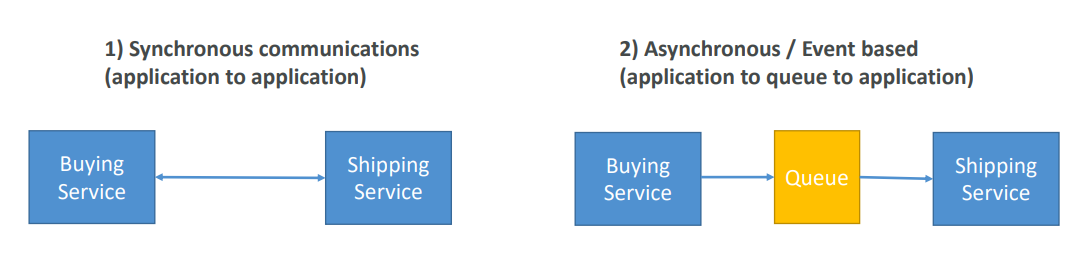
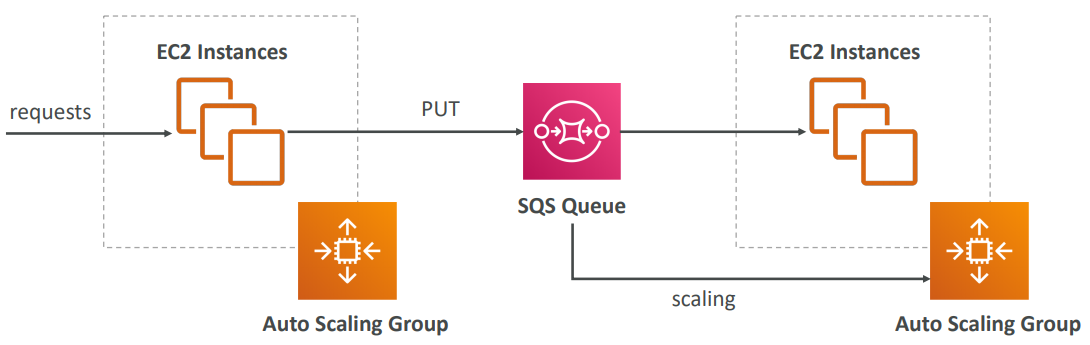
In that case, it’s better to decouple your applications,
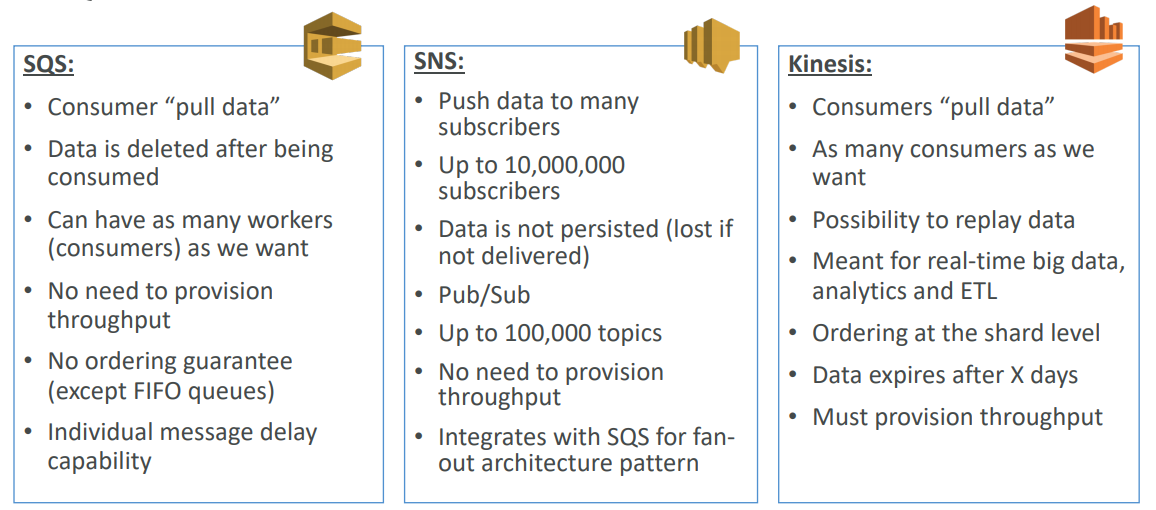
- using SQS: queue model
- using SNS: pub/sub model
- using Kinesis: real-time streaming model
SQS
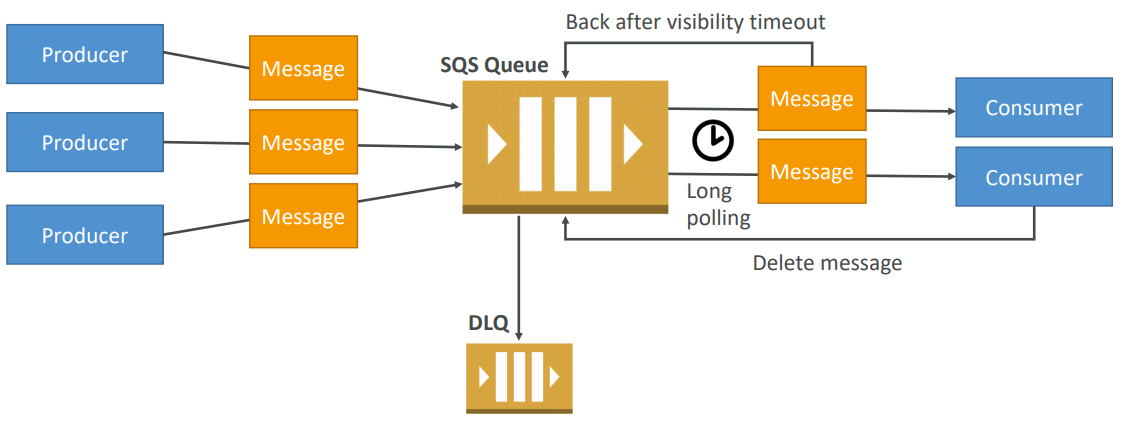
- Fully managed
- Scales from 1 message per second to 10,000s per second
- Default retention of messages: 4 days, maximum of 14 days
- No limit to how many messages can be in the queue
- Horizontal scaling in terms of number of consumers
- Can have duplicate messages (at least once delivery, occasionally)
- Can have out of order messages (best effort ordering)
- Limitation of 256KB per message sent
AWS SQS – Delay Queue
- Delay a message (consumers don’t see it immediately) up to 15 minutes
- Default is 0 seconds (message is available right away)
- Can set a default at queue level
- Can override the default using the DelaySeconds parameter

SQS Messages
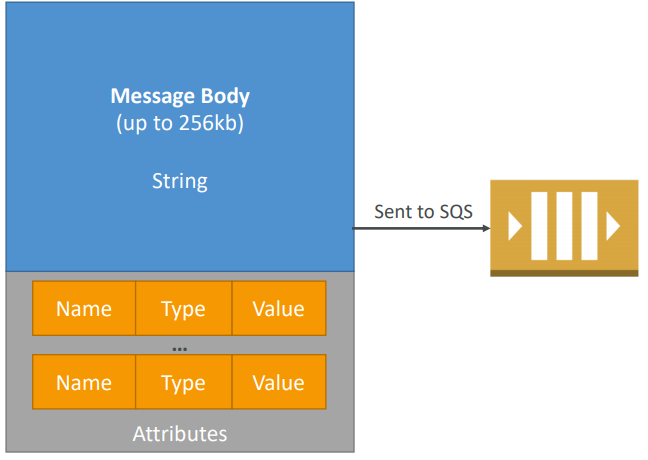
- Define Body
- Add message attributes (metadata – optional)
- Provide Delay Delivery (optional)
- Get back
- Message identifier
- MD5 hash of the body
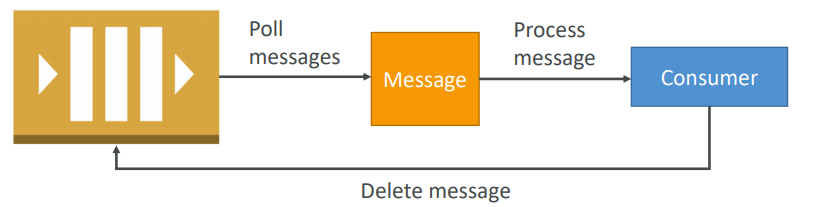
Visibility Timeout
When a consumer polls a message from a queue, the message is “invisible” to other consumers for a defined period… the Visibility Timeout:
- Set between 0 seconds and 12 hours (default 30 seconds)
- If too high (15 minutes) and consumer fails to process the message, you must wait a long time before processing the message again
- If too low (30 seconds) and consumer needs time to process the message (2 minutes), another consumer will receive the message and the message will be processed more than once
- ChangeMessageVisibility API to change the visibility while processing a message
- DeleteMessage API to tell SQS the message was successfully processed
SQS – Dead Letter Queue
-
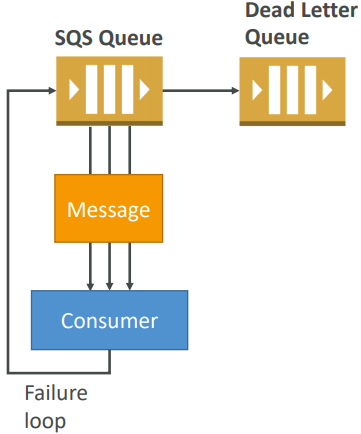
If a consumer fails to process a message within the Visibility Timeout… the message goes back to the queue!
-
We can set a threshold of how many times a message can go back to the queue – it’s called a “redrive policy”
-
After the threshold is exceeded, the message goes into a dead letter queue (DLQ)
-
We have to create a DLQ first and then designate it dead letter queue
-
Make sure to process the messages in the DLQ before they expire!
SQS Long Polling
When a consumer requests message from the queue, it can optionally “wait” for messages to arrive if there are none in the queue
LongPolling decreases the number of API calls made to SQS while increasing the efficiency and latency of your application.
The wait time can be between 1 sec to 20 sec (20 sec preferable)
Long polling can be enabled at the queue level or at the API level using WaitTimeSeconds
SQS FIFO
- Newer offering (First In - First out) – not available in all regions
- Name of the queue must end in .fifo
- Lower throughput (up to 3,000 per second with batching, 300/s without)
- Messages are processed in order by the consumer
- Messages are sent exactly once
- No per message delay (only per queue delay)
- Ability to do content based de-duplication
- 5-minute interval de-duplication using “Duplication ID”
- Possibility to group messages for FIFO ordering using “Message GroupID ”
- Only one worker can be assigned per message group so that messages are processed in order
- Message group is just an extra tag on the message!
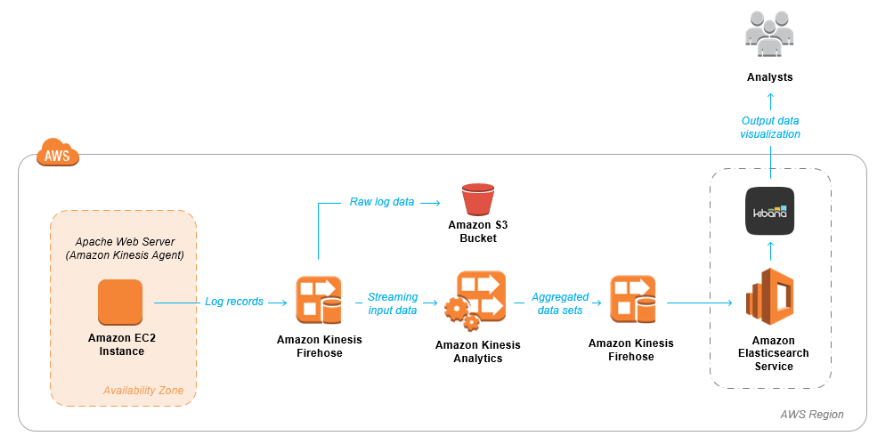
Build Log Analytics Solution with Kinesis
SNS
-
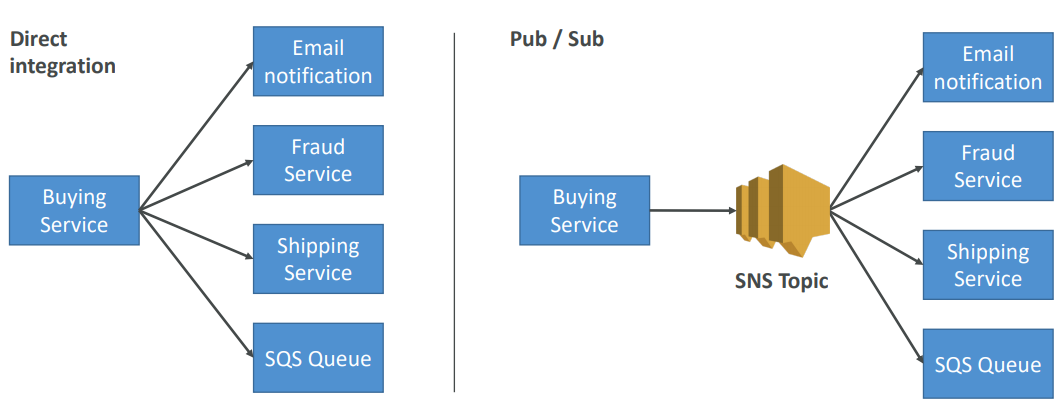
The “event producer” only sends message to one SNS topic
-
As many “event receivers” (subscriptions) as we want to listen to the SNS topic notifications
-
Each subscriber to the topic will get all the messages (note: new feature to filter messages)
-
Up to 10,000,000 subscriptions per topic
-
100,000 topics limit
-
Subscribers can be:
- SQS
- HTTP / HTTPS (with delivery retries – how many times)
- Lambda
- Emails
- SMS messages
- Mobile Notifications
Some services can send data directly to SNS for notifications:
-
CloudWatch (for alarms)
-
Auto Scaling Groups notifications
-
Amazon S3 (on bucket events)
-
CloudFormation (upon state changes ⇒ failed to build, etc)
-
Topic Publish (within your AWS Server using the SDK)
-
Create a topic
-
Create a subscription (or many)
-
Publish to the topic
-
Direct Publish (for mobile apps SDK)
- Create a platform application
- Create a platform endpoint
- Publish to the platform endpoint
- Works with Google GCM, Apple APNS, Amazon ADM…
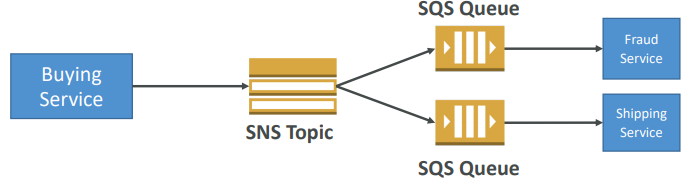
Fan out Pattern
Kinesis
Kinesis is a managed alternative to Apache Kafka, Great for application logs, metrics, IoT, clickstreams, Great for “real-time” big data, Great for streaming processing frameworks (Spark, NiFi, etc…).
*Kinesis Streams* is like *Kafka Core*. *Kinesis Analytics* is like *Kafka Streams*. *A Kinesis Shard* is like *Kafka Partition*.
Data is automatically replicated to 3 AZ
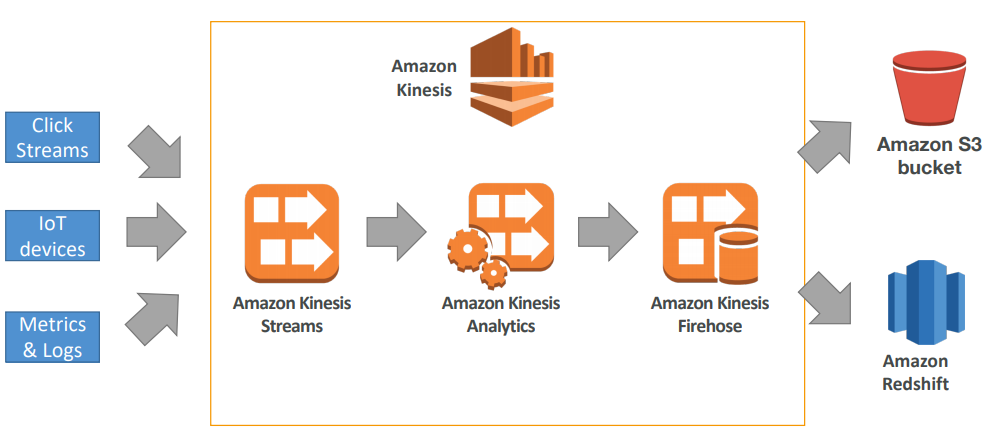
- Kinesis Streams: low latency streaming ingest at scale
- Kinesis Analytics: perform real-time analytics on streams using SQL
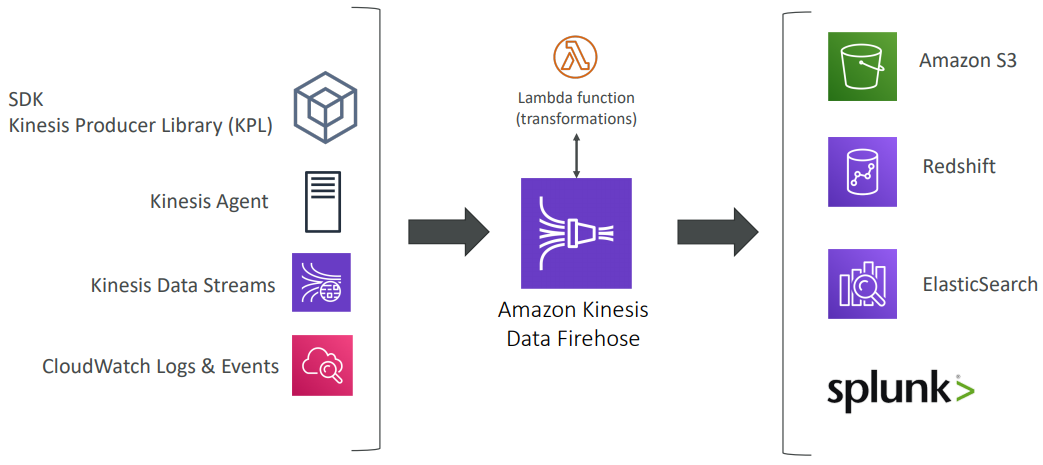
- Kinesis Firehose: load streams into S3, Redshift, ElasticSearch…
Security
- Control access / authorization using IAM policies
- Encryption in flight using HTTPS endpoints
- Encryption at rest using KMS
- Possibility to encrypt / decrypt data client side (harder)
- VPC Endpoints available for Kinesis to access within VPC
Streams vs Firehouse
Streams
- Going to write custom code (producer / consumer)
- Real time (~200 ms)
- Must manage scaling (shard splitting / merging)
- Data Storage for 1 to 7 days, replay capability, multi consumers
Firehose
- Fully managed, send to S3, Splunk, Redshift, ElasticSearch
- Serverless data transformations with Lambda
- Near real time (lowest buffer time is 1 minute)
- Automated Scaling
- No data storage
Consumers
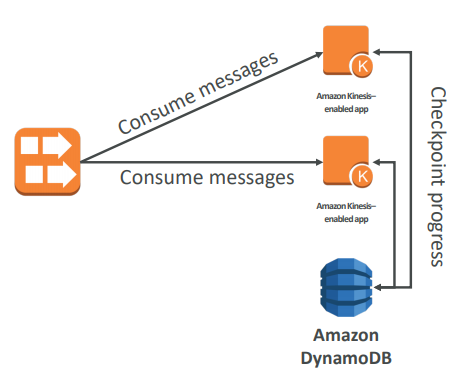
- Can use a normal consumer (CLI, SDK, etc…)
- Can use Kinesis Client Library (in Java, Node, Python, Ruby, .Net)
- KCL uses DynamoDB to checkpoint offsets
- KCL uses DynamoDB to track other workers and share the work amongst shards
Kinesis Streams
- Streams are divided in ordered Shards / Partitions
- Data retention is 1 day by default, can go up to 7 days
- Ability to reprocess / replay data
- Multiple applications can consume the same stream
- Real-time processing with scale of throughput
- Once data is inserted in Kinesis, it can’t be deleted (immutability)
- One stream is made of many different shards
- 1MB/s or 1000 messages/s at write PER SHARD
- 2MB/s at read PER SHARD
- Billing is per shard provisioned, can have as many shards as you want
- Batching available or per message calls.
- The number of shards can evolve over time (reshard / merge)
- Records are ordered per shard


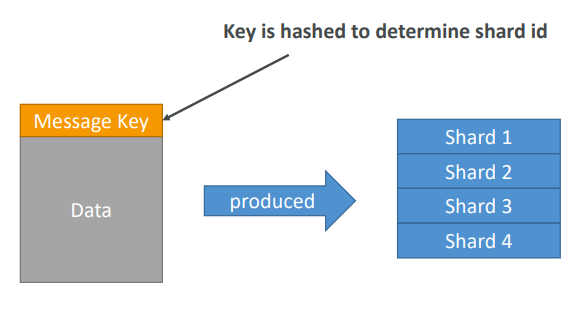
- PutRecord API + Partition key that gets hashed
- The same key goes to the same partition (helps with ordering for a specific key)
- Messages sent get a “sequence number”
- Choose a partition key that is highly distributed (helps prevent “hot partition”)
- user_id if many users
- Not country_id if 90% of the users are in one country
- Use Batching with PutRecords to reduce costs and increase throughput
- ProvisionedThroughputExceeded if we go over the limits
- Can use CLI, AWS SDK, or producer libraries from various frameworks
Exceptions
- ProvisionedThroughputExceeded Exceptions
- Happens when sending more data (exceeding MB/s or TPS for any shard)
- Make sure you don’t have a hot shard (such as your partition key is bad and too much data goes to that partition)
Solution:
- Retries with backoff
- Increase shards (scaling)
- Ensure your partition key is a good one
Kinesis Analytics
- Perform real-time analytics on Kinesis Streams using SQL
- Kinesis Data Analytics:
- Auto Scaling
- Managed: no servers to provision
- Continuous: real time
- Pay for actual consumption rate
- Can create streams out of the real-time queries
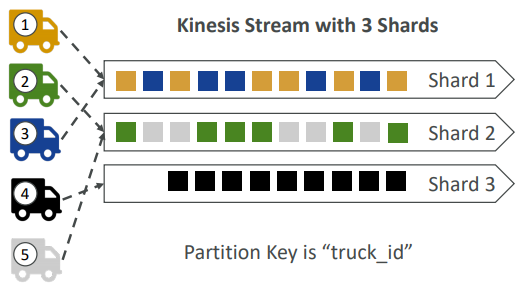
- Imagine you have 100 trucks (truck_1, truck_2, … truck_100) on the road sending their GPS positions regularly into AWS.
- You want to consume the data in order for each truck, so that you can track their movement accurately.
- How should you send that data into Kinesis?
- Answer: send using a “Partition Key” value of the “truck_id”
- The same key will always go to the same shard
Ordering Data into SQS
- For SQS standard, there is no ordering.
- For SQS FIFO, if you don’t use a Group ID, messages are consumed in the order they are sent, with only one consumer

- You want to scale the number of consumers, but you want messages to be “grouped” when they are related to each other
- Then you use a Group ID (similar to Partition Key in Kinesis)
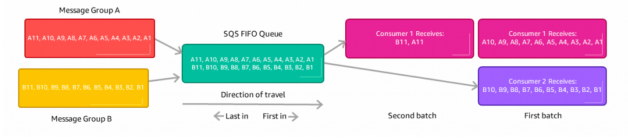
Kinesis vs SQS ordering
- Let’s assume 100 trucks, 5 kinesis shards, 1 SQS FIFO
Kinesis Data Streams:
- On average you’ll have 20 trucks per shard
- Trucks will have their data ordered within each shard
- The maximum amount of consumers in parallel we can have is 5
- Can receive up to 5 MB/s of data
SQS FIFO
- You only have one SQS FIFO queue
- You will have 100 Group ID
- You can have up to 100 Consumers (due to the 100 Group ID)
- You have up to 300 messages per second (or 3000 if using batching)
Kinesis Firehouse
🏎️ Compute
EC2
- Renting virtual machines (EC2)
Security Group
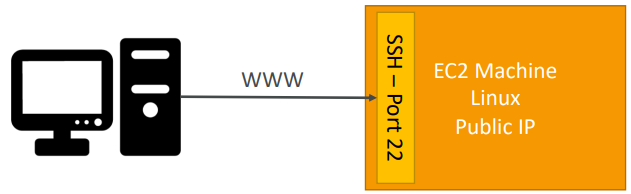
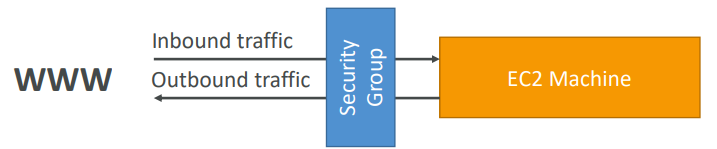
A security group acts as a virtual firewall that controls the traffic for one or more instances.
- Can be attached to multiple instances
- Locked down to a region / VPC combination
- It’s good to maintain one separate security group for SSH access
- All inbound traffic is blocked by default
- All outbound traffic is authorised by default
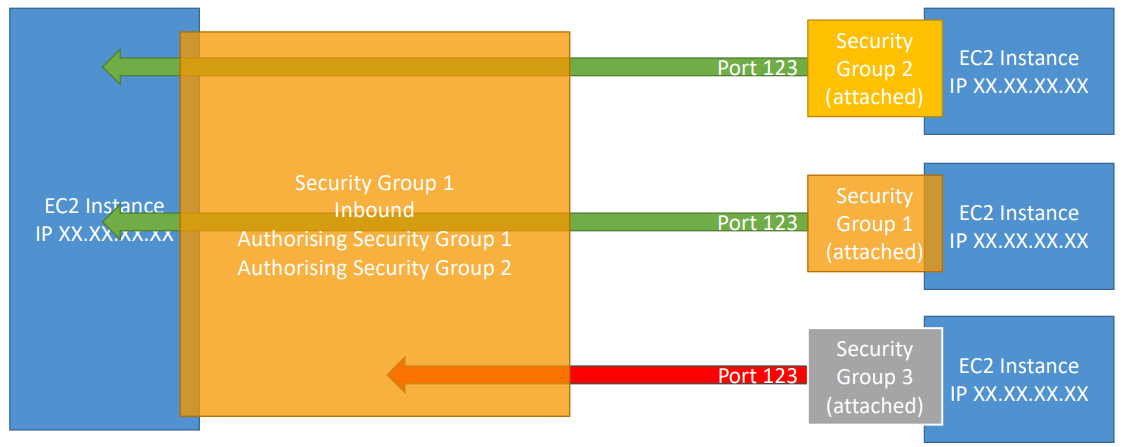
Combination of security group referencing to each other.
Elastic IP
• With an Elastic IP address, you can mask the failure of an instance or software by rapidly remapping the address to another instance in your account.
- When you stop and then start an EC2 instance, it can change its public IP.
- You can only have 5 Elastic IP in your account (you can ask AWS to increase that).
- If you need to have a fixed public IP for your instance, you need an Elastic IP
- An Elastic IP is a public IPv4 IP you own as long as you don’t delete it
- You can attach it to one instance at a time
Overall, try to avoid using Elastic IP, They often reflect poor architectural decisions, Instead, use a random public IP and register a DNS name to it Or, as we’ll see later, use a Load Balancer and don’t use a public IP.
User Data
Startup script
AMI
AMI are built for a specific AWS region (!) - Your AMI take space and they live in Amazon S3 and by default, your AMIs are private, and locked for your account / region. AMIs live in Amazon S3, so you get charged for the actual space in takes in Amazon S3
Warning: Do not use an AMI you don’t trust! Some AMIs might come with malware or may not be secure for your enterprise.
As we saw, AWS comes with base images such as: Ubuntu, Fedora, RedHat, Windows, Etc….
Using a custom built AMI can provide the following advantages:
- Pre-installed packages needed
- Faster boot time (no need for ec2 user data at boot time)
- Machine comes configured with monitoring / enterprise software
- Security concerns – control over the machines in the network
- Control of maintenance and updates of AMIs over time
- Active Directory Integration out of the box
- Installing your app ahead of time (for faster deploys when auto-scaling)
- Using someone else’s AMI that is optimised for running an app, DB, etc…
Cross Account AMI
You can share an AMI with another AWS account. Sharing an AMI does not affect the ownership of the AMI. If you copy an AMI that has been shared with your account, you are the owner of the target AMI in your account.
To copy an AMI that was shared with you from another account, the owner of the source AMI must grant you read permissions for the storage that backs the AMI, either the associated EBS snapshot (for an Amazon EBS-backed AMI) or an associated S3 bucket (for an instance store-backed AMI).
Limits:
- You can’t copy an encrypted AMI that was shared with you from another account. Instead, if the underlying snapshot and encryption key were shared with you, you can copy the snapshot while re-encrypting it with a key of your own. You own the copied snapshot, and can register it as a new AMI.
- You can’t copy an AMI with an associated
billingProductcode that was shared with you from another account. This includes Windows AMIs and AMIs from the AWS Marketplace. To copy a shared AMI with abillingProductcode, launch an EC2 instance in your account using the shared AMI and then create an AMI from the instance.
Placement Groups
Sometimes you want control over the EC2 Instance placement strategy. That strategy can be defined using placement groups.
When you create a placement group, you specify one of the following strategies for the group:
- Cluster — clusters instances into a low-latency group in a single Availability Zone
- Spread — spreads instances across underlying hardware (max 7 instances per group per AZ)
- Partition — spreads instances across many different partitions (which rely on different sets of racks) within an AZ. Scales to 100s of EC2 instances per group (Hadoop, Cassandra, Kafka)
Cluster Placement Groups
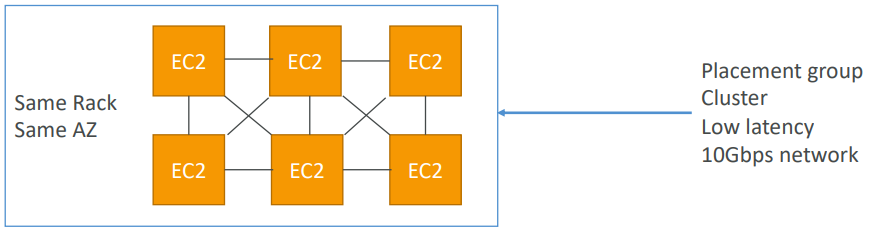
Pros: Great network (10 Gbps bandwidth between instances)
Cons: If the rack fails, all instances fails at the same time
Use case:
- Big Data job that needs to complete fast
- Application that needs extremely low latency and high network throughput
Spread Placement Groups
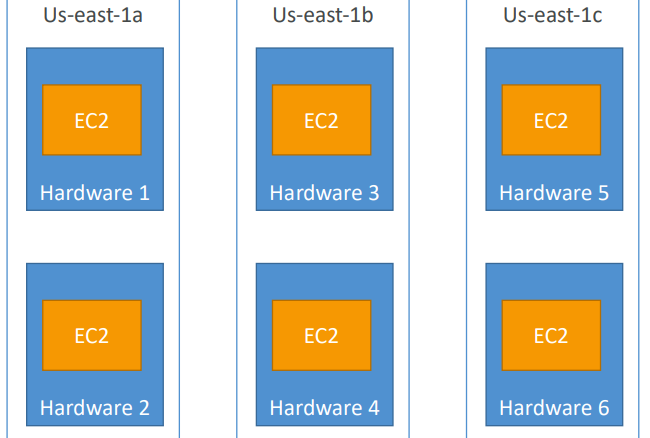
Pros:
- Can span across Availability Zones (AZ)
- Reduced risk is simultaneous failure
- EC2 Instances are on different physical hardware
Cons:
- Limited to 7 instances per AZ per placement group
Use case:
- Application that needs to maximize high availability
- Critical Applications where each instance must be isolated from failure from each other
Partition Placement Groups
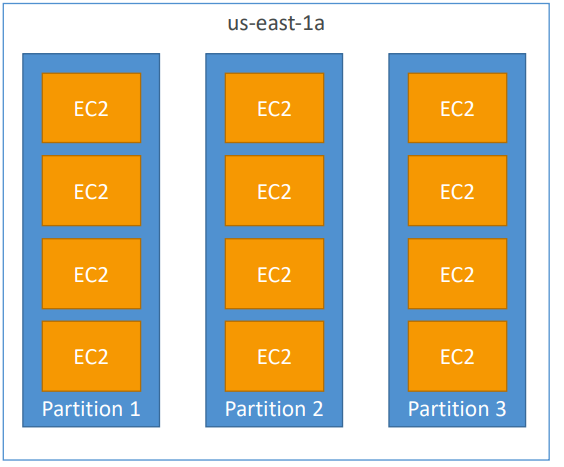
- Up to 7 partitions per AZ
- Up to 100s of EC2 instances
- The instances in a partition do not share racks with the instances in the other partitions
- A partition failure can affect many EC2 but won’t affect other partitions
- EC2 instances get access to the partition information as metadata
- Use cases: HDFS, HBase, Cassandra, Kafka
EC2 Hibernate
We know we can stop, terminate instances. Stop: the data on disk (EBS) is kept intact in the next start. Terminate: any EBS volumes (root) also set-up to be destroyed is lost. On start, the following happens:
- First start: the OS boots & the EC2 User Data script is run
- Following starts: the OS boots up
- Then your application starts, caches get warmed up, and that can take time!
Introducing EC2 Hibernate: The in-memory (RAM) state is preserved. The instance boot is much faster! (the OS is not stopped / restarted) Under the hood: the RAM state is written to a file in the root EBS volume. The root EBS volume must be encrypted
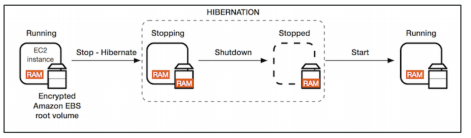
- Instance RAM size - must be less than 150 GB
- Instance size - not supported for bare metal instances.
- Root Volume: must be EBS, encrypted, not instance store, and large
- Available for On-Demand and Reserved Instances
- An instance cannot be hibernated more than 60 days
Use cases:
-
long-running processing
-
saving the RAM state
-
services that take time to initialize
Instance Type
- Reserved: (MINIMUM 1 year)
- Reserved Instances: long workloads
- Convertible Reserved Instances: long workloads with flexible instances
- Scheduled Reserved Instances: example – every Thursday between 3 and 6 pm
- Spot Instances: short workloads, for cheap, can lose instances (less reliable)
- Dedicated Instances: no other customers will share your hardware
- Dedicated Hosts: book an entire physical server, control instance placement
On Demand Instances: short workload, predictable pricing. Pay for what you use (billing per second, after the first minute). Has the highest cost but no upfront payment. No long term commitment.
Reserved: (MINIMUM 1 year) Up to 75% discount compared to On-demand. Pay upfront for what you use with long term commitment. Reservation period can be 1 or 3 years. Reserve a specific instance type. Recommended for steady state usage applications (think database).
Convertible Reserved Instance: can change the EC2 instance type while getting up to 54% discount.
Scheduled Reserved Instances: Launch within time window you reserve. When you require a fraction of day / week / month.
EC2 Spot Instances: Can get a discount of up to 90% compared to On-demand. Instances that you can “lose” at any point of time if your max price is less than the current spot
**price**. The ***<u>MOST*</u>** cost-efficient instances in AWS.Not great for critical jobs or databases
Great combo: Reserved Instances for baseline + On-Demand & Spot for peaks
EC2 Dedicated Hosts: Physical dedicated EC2 server for your use. Full control of EC2 Instance placement. Visibility into the underlying sockets / physical cores of the hardware. Useful for software that have complicated licensing model (BYOL – Bring Your Own License) Or for companies that have strong regulatory or compliance needs.
EC2 Dedicated Instances: Instances running on hardware that’s dedicated to you. May share hardware with other instances in same account. No control over instance placement (can move hardware after Stop / Start)
- On demand: coming and staying in resort whenever we like, we pay the full price
- Reserved: like planning ahead and if we plan to stay for a long time, we may get a good discount.
- Spot instances: the hotel allows people to bid for the empty rooms and the highest bidder keeps the rooms. You can get kicked out at any time
- Dedicated Hosts: We book an entire building of the resort
Burstable Instances
Burst means that overall, the instance has OK CPU performance. When the machine needs to process something unexpected (a spike in load for example), it can burst, and CPU can be VERY good. If the machine bursts, it utilizes “burst credits”. If all the credits are gone, the CPU becomes BAD. If the machine stops bursting, credits are accumulated over time. Burstable instances can be amazing to handle unexpected traffic and getting the insurance that it will be handled correctly. If your instance consistently runs low on credit, you need to move to a different kind of non-burstable instance.
Instance Resources
- R: applications that needs a lot of RAM – in-memory caches
- C: applications that needs good CPU – compute / databases
- M: applications that are balanced (think “medium”) – general / web app
- I: applications that need good local I/O (instance storage) – databases
- G: applications that need a GPU – video rendering / machine learning
- T2 / T3: burstable instances (up to a capacity)
- T2 / T3 - unlimited: unlimited burst. You pay extra money if you go over your credit balance, but you don’t lose in performance
AWS Lambda
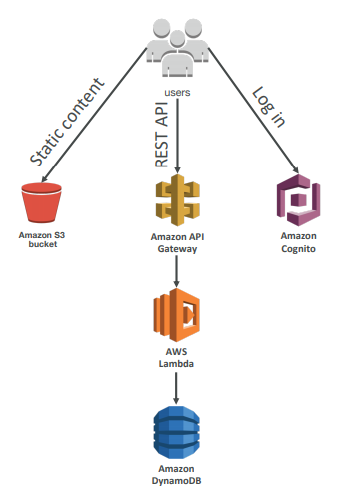
Serverless is a new paradigm in which the developers don’t have to manage servers anymore… Serverless was pioneered by AWS Lambda but now also includes anything that’s managed: “databases, messaging, storage, etc.”
Serverless does not mean there are no servers… it means you just don’t manage / provision / see them
Pricing model is per call and duration
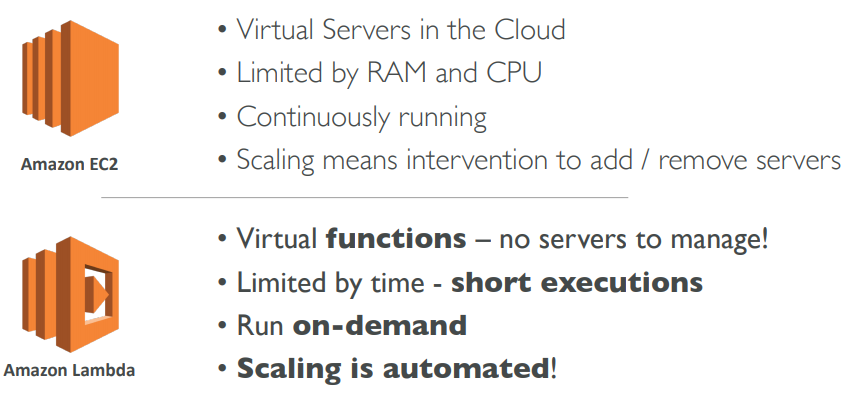
Lambda VS EC2
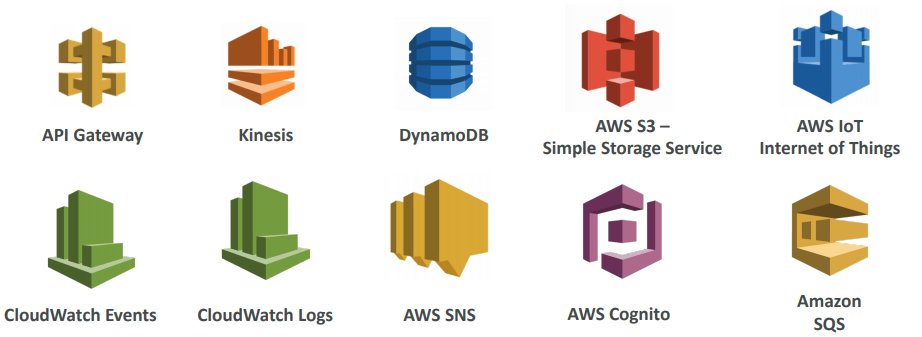
- Easy Pricing
- Pay per request and compute time
- Free tier of 1,000,000 AWS Lambda requests and 400,000 GBs of compute time
- Easy Integration
- Integrated with the whole AWS Stack
- Integrated with many programming languages
- Easy Monitoring
- Easy monitoring through AWS CloudWatch
- Easy to get more resources per functions (up to 3GB of RAM!)
- Increasing RAM will also improve CPU and network!
Integration of Lambda
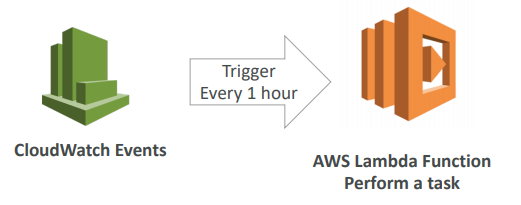
Serverless CRON Job
Lambda@Edge
You have deployed a CDN using CloudFront. What if you wanted to run a global AWS Lambda alongside? Or how to implement request filtering before reaching your application? For this, you can use Lambda@Edge: deploy Lambda functions alongside your CloudFront CDN. Build more responsive applications You don’t manage servers, Lambda is deployed globally . Customize the CDN content Pay only for what you use.
You can use Lambda to change CloudFront requests and responses:
- After CloudFront receives a request from a viewer (viewer request)
- Before CloudFront forwards the request to the origin (origin request)
- After CloudFront receives the response from the origin (origin response)
- Before CloudFront forwards the response to the viewer (viewer response)
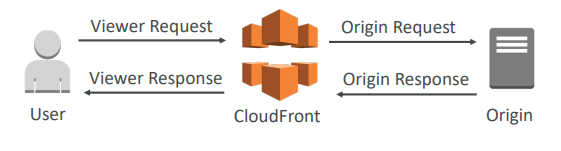
- You can also generate responses to viewers without ever sending the request to the origin
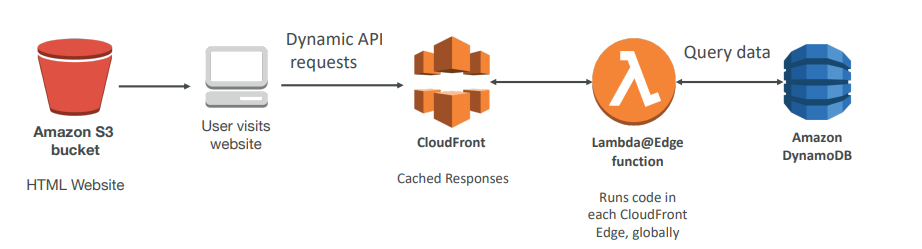
- Website Security and Privacy
- Dynamic Web Application at the Edge
- Search Engine Optimization (SEO)
- Intelligently Route Across Origins and Data Centers
- Bot Mitigation at the Edge
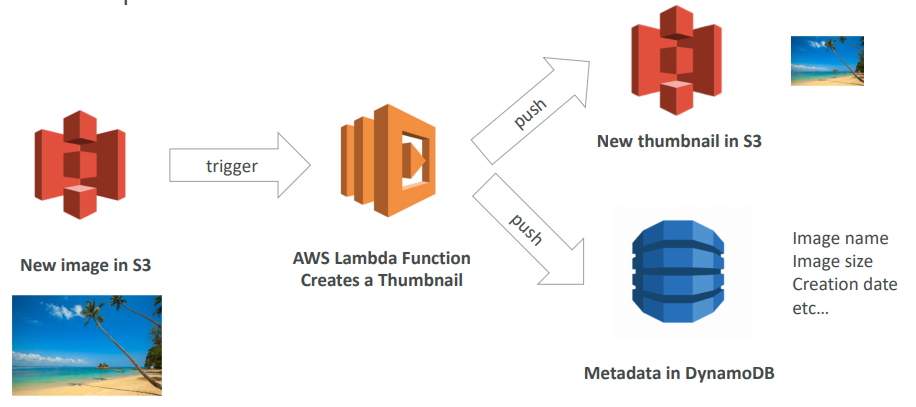
- Real-time Image Transformation
- A/B Testing
- User Authentication and Authorization
- User Prioritization
- User Tracking and Analytics
Use Case
ECS
- ECS is a container orchestration service
- ECS helps you run Docker containers on EC2 machines
- ECS is complicated, and made of:
- “ECS Core”: Running ECS on user-provisioned EC2 instances
- Fargate: Running ECS tasks on AWS-provisioned compute (serverless)
- EKS: Running ECS on AWS-powered Kubernetes (running on EC2)
- ECR: Docker Container Registry hosted by AWS
- ECS & Docker are very popular for microservices
- For now, for the exam, only “ECS Core” & ECR is in scope
- IAM security and roles at the ECS task level
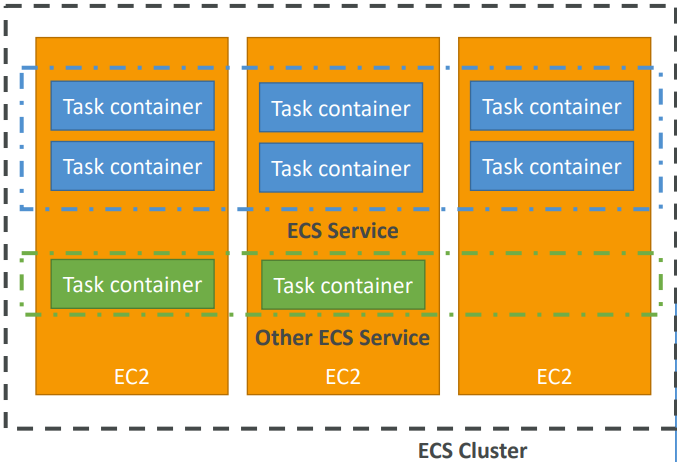
- ECS cluster: set of EC2 instances
- ECS service: applications definitions running on ECS cluster
- ECS tasks + definition: containers running to create the application
- ECS IAM roles: roles assigned to tasks to interact with AWS
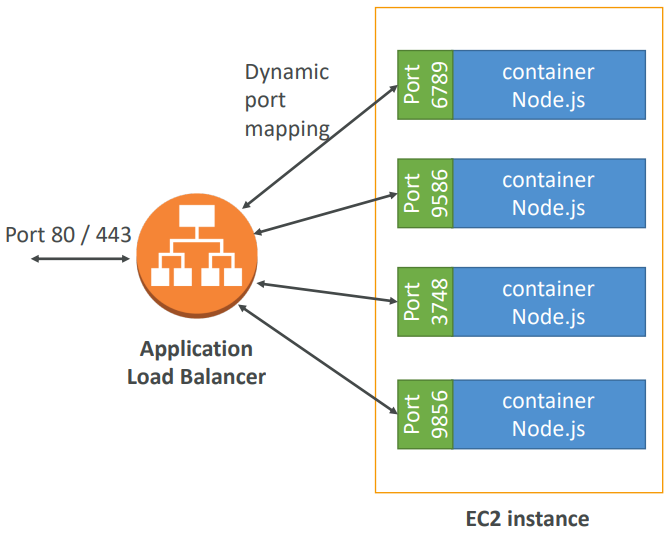
- Application Load Balancer (ALB) has a direct integration feature with ECS called “port mapping”
- This allows you to run multiple instances of the same application on the same EC2 machine
- Use cases:
- Increased resiliency even if running on one EC2 instance
- Maximize utilization of CPU / cores
- Ability to perform rolling upgrades without impacting application uptime
Configuration
Run an EC2 instance, install the ECS agent with ECS config file. • Or use an ECS-ready Linux AMI (still need to modify config file). ECS Config file is at
/etc/ecs/ecs.config

Elastic Container Registery (ECR)
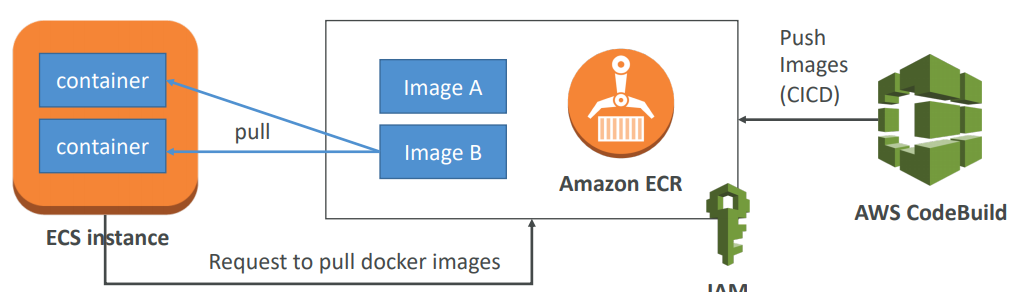
- Store, managed and deploy your containers on AWS
- Fully integrated with IAM & ECS
- Sent over HTTPS (encryption in flight) and encrypted at rest
Fargate
When launching an ECS Cluster, we have to create our EC2 instances. If we need to scale, we need to add EC2 instances. So we manage infrastructure…
With Fargate, it’s all Serverless! We don’t provision EC2 instances. We just create task definitions, and AWS will run our containers for us. To scale, just increase the task number. Simple! No more EC2 :)
Use cases
- Run microservices
- Ability to run multiple docker containers on the same machine
- Easy service discovery features to enhance communication
- Direct integration with Application Load Balancers
- Auto scaling capability
- Run batch processing / scheduled tasks
- Schedule ECS containers to run on On-demand / Reserved / Spot instances
- Migrate applications to the cloud
- Dockerize legacy applications running on premise
- Move Docker containers to run on ECS
AWS Step Function
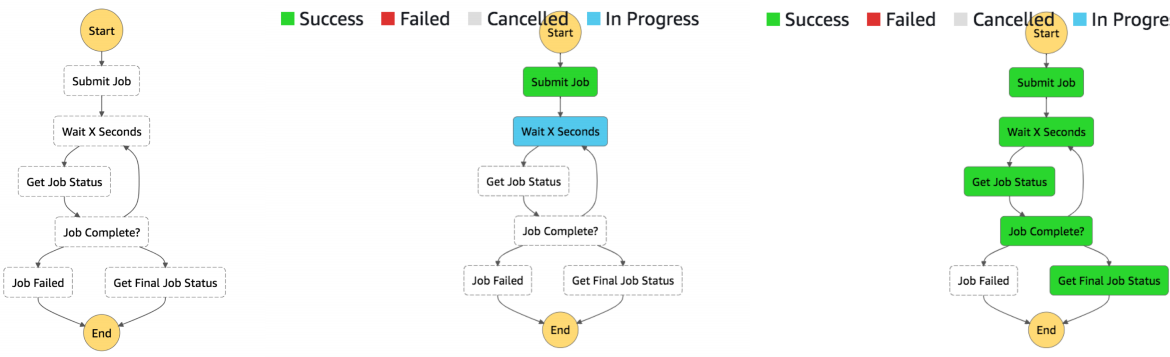
AWS Step Functions lets you coordinate multiple AWS services into serverless workflows so you can build and update apps quickly. Using Step Functions, you can design and run workflows that stitch together services, such as AWS Lambda, AWS Fargate, and Amazon SageMaker, into feature-rich applications. Workflows are made up of a series of steps, with the output of one step acting as input into the next. Application development is simpler and more intuitive using Step Functions, because it translates your workflow into a state machine diagram that is easy to understand, easy to explain to others, and easy to change. Step Functions automatically triggers and tracks each step, and retries when there are errors, so your application executes in order and as expected. With Step Functions, you can craft long-running workflows such as machine learning model training, report generation, and IT automation. You can also build high volume, short duration workflows such as IoT data ingestion, and streaming data processing.
Build serverless visual workflow to orchestrate your Lambda functions. Represent flow as a JSON state machine. Features: sequence, parallel, conditions, timeouts, error handling… •
It can also integrate with EC2, ECS, On premise servers, API Gateway. Maximum execution time of 1 year and possibility to implement human approval feature.
Use cases:
- Order fulfillment
- Data processing
- Web applications
- Any workflow
APIGW
🗃️ Databases
Types :
- RDBMS (= SQL / OLTP): RDS, Aurora – great for joins
- NoSQL database: DynamoDB (~JSON), ElastiCache (key / value pairs), Neptune (graphs) – no joins, no SQL
- Object Store: S3 (for big objects) / Glacier (for backups / archives)
- Data Warehouse (= SQL Analytics / BI): Redshift (OLAP), Athena
- Search: ElasticSearch (JSON) – free text, unstructured searches
- Graphs: Neptune – displays relationships between data
RDS
RDS stands for Relational Database Service. It’s a managed DB service for DB use SQL as a query language. It allows you to create databases in the cloud that are managed by AWS. Postgres, MySQL, MariaDB, Oracle, Microsoft SQL Server, Aurora (AWS Proprietary database)
RDS is a managed service: Automated provisioning, OS patching, Continuous backups and restore to specific timestamp (Point in Time Restore)!, Monitoring dashboards, Read replicas for improved read performance, Multi AZ setup for DR (Disaster Recovery), Maintenance windows for upgrades, Scaling capability (vertical and horizontal), Storage backed by EBS (gp2 or io1),
BUT you can’t SSH into your instances
-
Backups are automatically enabled in RDS
-
Automated backups:
- Daily full backup of the database (during the maintenance window)
- Transaction logs are backed-up by RDS every 5 minutes
- ⇒ ability to restore to any point in time (from oldest backup to 5 minutes ago)
- 7 days retention (can be increased to 35 days)
-
DB Snapshots:
- Manually triggered by the user
- Retention of backup for as long as you want
read scalability
-
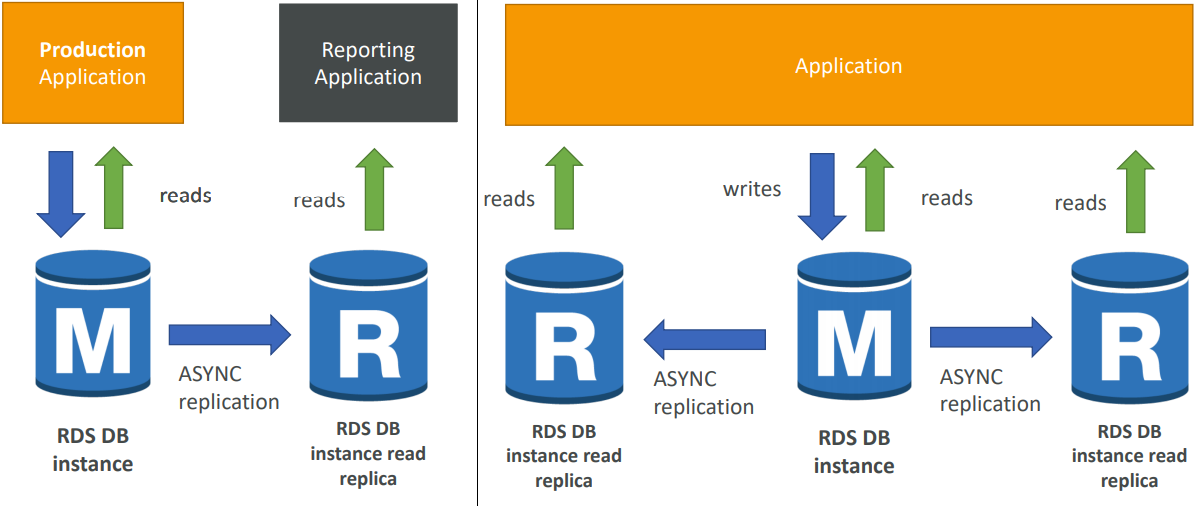
Up to 5 Read Replicas
-
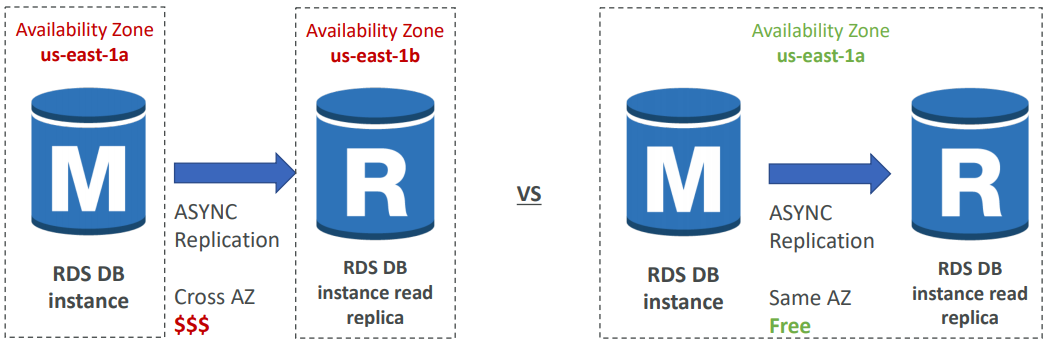
Within AZ, Cross AZ or Cross Region
-
Replication is ASYNC, so reads are eventually consistent
-
Replicas can be promoted to their own DB
-
Applications must update the connection string to leverage read replicas
-
Up to 5 Read Replicas
-
Within AZ, Cross AZ or Cross Region
-
Replication is ASYNC, so reads are eventually consistent
-
Replicas can be
-
You have a production database that is taking on normal load
-
You want to run a reporting application to run some analytics
-
You create a Read Replica to run the new workload there
-
The production application is unaffected
-
Read replicas are used for SELECT (=read) only kind of statements (not INSERT, UPDATE, DELETE)
Network Cost
In AWS there’s a network cost when data goes from one AZ to another. To reduce the cost, you can have your Read Replicas in the same AZ.
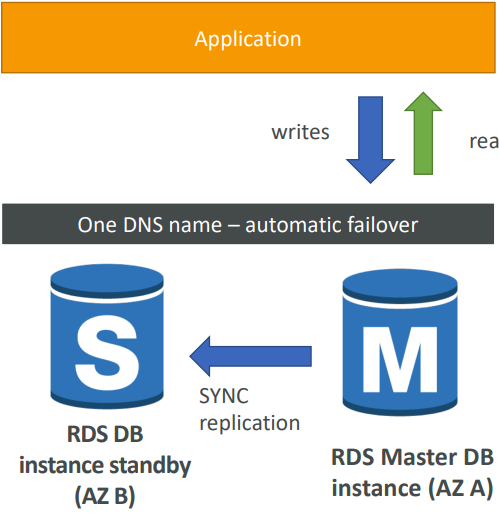
Disaster Recovery
- SYNC replication
- One DNS name – automatic app failover to standby
- Increase availability
- Failover in case of loss of AZ, loss of network, instance or storage failure
- No manual intervention in apps
- Not used for scaling
- Note:The Read Replicas be setup as Multi AZ for Disaster Recovery (DR)
Encryption
At rest encryption
Possibility to encrypt the master & read replicas with AWS KMS - AES-256 encryption. Encryption has to be defined at launch time and If the master is not encrypted, the read replicas cannot be encrypted.
Transparent Data Encryption (TDE) available for Oracle and SQL Server
In-flight encryption
SSL certificates to encrypt data to RDS in flight. Provide SSL options with trust certificate when connecting to database and to enforce SSL for PostgreSQL: rds.force_ssl=1 in the AWS RDS Console (Parameter Groups) while for MySQL within the DB we should GRANT USAGE ON *.* TO 'mysqluser'@'%' REQUIRE SSL;
Encrypting the RDS backups
Snapshots of un-encrypted RDS databases are un-encrypted and snapshots of encrypted RDS databases are encrypted BUTwe can convert a copied snapshot into an encrypted one.
To encrypt an un-encrypted RDS database we have to Create a snapshot of the un-encrypted database. Copy the snapshot and enable encryption for the snapshot, restore the database from the encrypted snapshot and migrate applications to the new database, and delete the old database.
Security
RDS databases are usually deployed within a private subnet, not in a public one. RDS security works by leveraging security groups (the same concept as for EC2 instances) – it controls which IP / security group can communicate with RDS
IAM policies help control who can **manage** AWS RDS (through the RDS API)
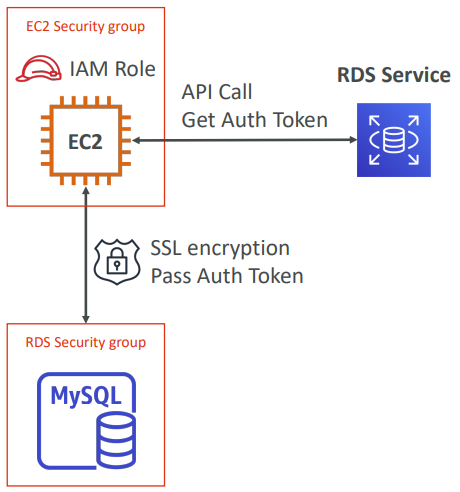
Traditional Username and Password can be used to login into the database while IAM-based authentication can be used to login into RDS MySQL & PostgreSQL
IAM database authentication works with MySQL and PostgreSQL. You don’t need a password, just an authentication token obtained through IAM & RDS API calls. Auth token has a lifetime of 15 minutes.
Benefits are Network in/out must be encrypted using SSL. IAM to centrally manage users instead of DB. Can leverage IAM Roles and EC2 Instance profiles for easy integration
Aurora
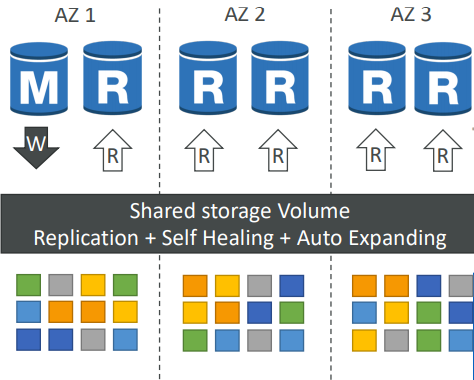
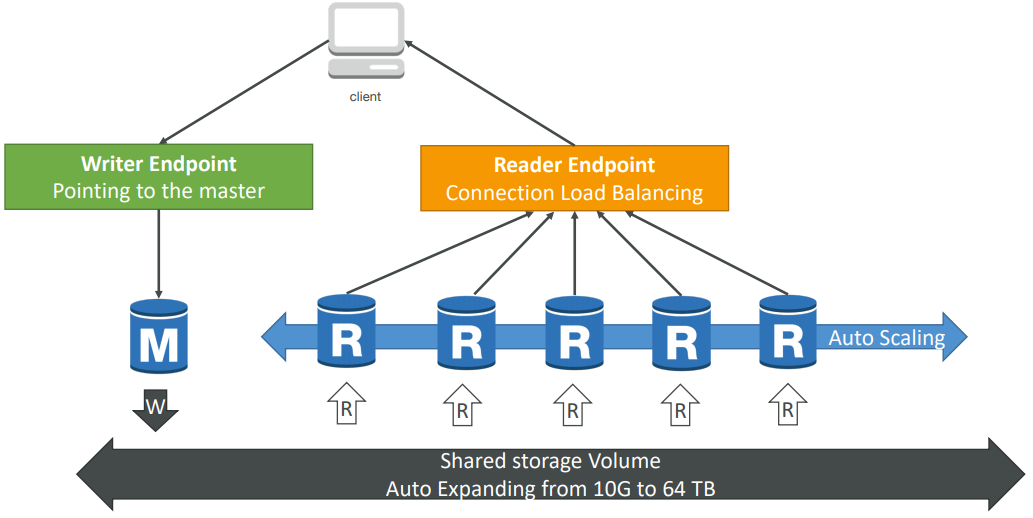
- 6 copies of your data across 3 AZ:
- 4 copies out of 6 needed for writes
- 3 copies out of 6 need for reads
- Self healing with peer-to-peer replication
- Storage is striped across 100s of volumes
- One Aurora Instance takes writes (master)
- Automated failover for master in less than 30 seconds
- Master + up to 15 Aurora Read Replicas serve reads
- Support for Cross Region Replication
- Automatic fail-over
- Backup and Recovery
- Isolation and security
- Industry compliance
- Push-button scaling
- Automated Patching with Zero Downtime
- Advanced Monitoring
- Routine Maintenance
- Backtrack: restore data at any point of time without using backups
Security
Similar to RDS because uses the same engines. Encryption at rest using KMS, Automated backups, snapshots and replicas are also encrypted. Encryption in flight using SSL (same process as MySQL or Postgres). Possibility to authenticate using IAM token (same method as RDS)
You are responsible for protecting the instance with security groups and we can’t SSH
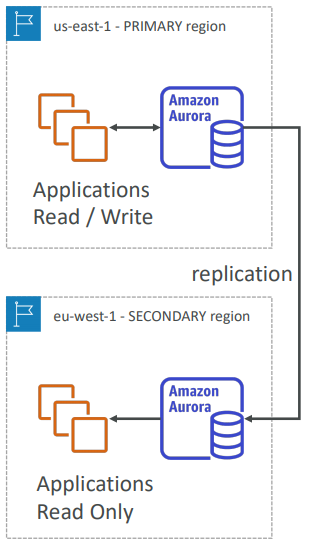
Aurora Cross Region Read Replicas:
- Useful for disaster recovery
- Simple to put in place
Aurora Global Database (recommended):
- 1 Primary Region (read / write)
- Up to 5 secondary (read-only) regions, replication lag is less than 1 second
- Up to 16 Read Replicas per secondary region
- Helps for decreasing latency
- Promoting another region (for disaster recovery) has an RTO of < 1 minute
ElastiCache
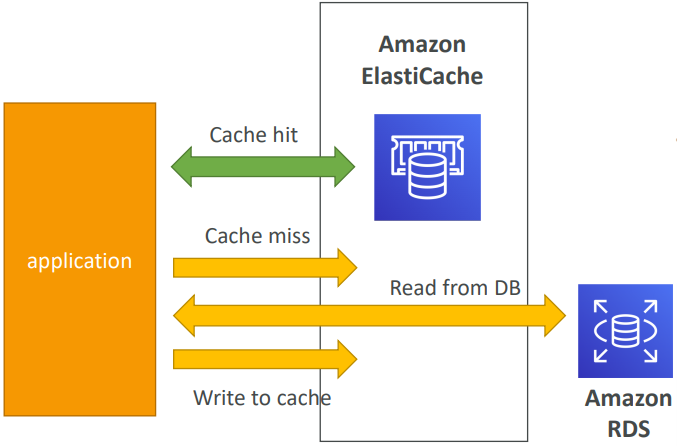
ElastiCache is to get managed Redis or Memcached. Caches are in-memory databases with really high performance, low latency. It Helps reduce load off of databases for read intensive workloads. Helps make your application stateless. AWS takes care of OS maintenance / patching, optimizations, setup, configuration, monitoring, failure recovery and backups.
Using ElastiCache involves heavy application code changes
User session with elasticache
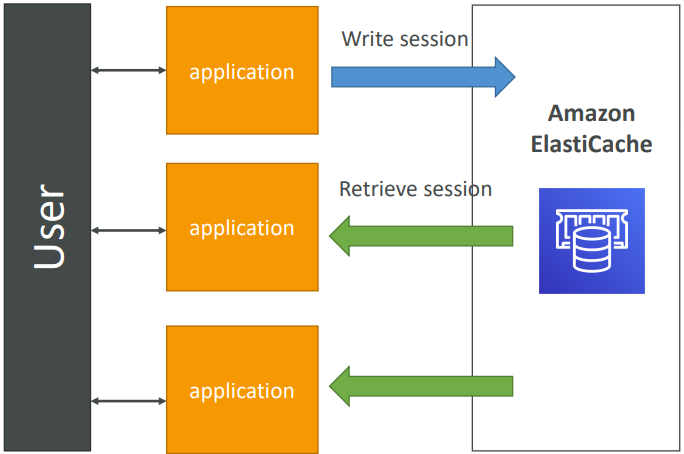
User logs into any of the application. The application writes the session data into ElastiCache. The user hits another instance of our application. The instance retrieves the data and the user is already logged in.
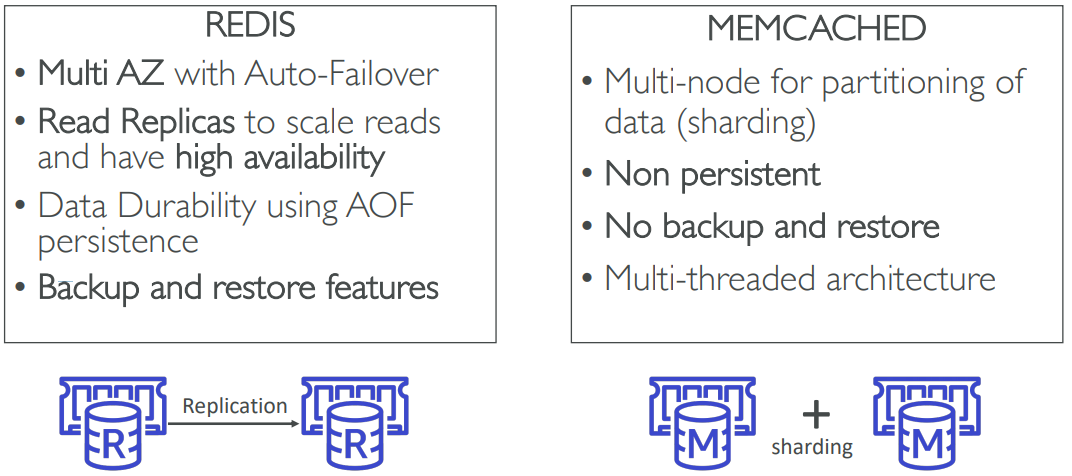
Redis vs Memcached
Security
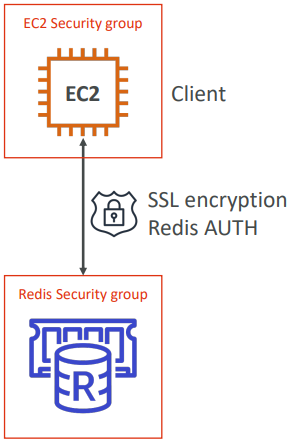
All caches in ElastiCache:
- Support SSL in flight encryption
- Do not support IAM authentication
- IAM policies on ElastiCache are only used for AWS API-level security
Redis AUTH
- You can set a “password/token” when you create a Redis cluster
- This is an extra level of security for your cache (on top of security groups)
Memcached
- Supports SASL-based authentication (advanced)
Patterns for ElastiCache
Lazy Loading: all the read data is cached, data can become stale in cache
Write Through: Adds or update data in the cache when written to a DB (no stale data)
Session Store: store temporary session data in a cache (using TTL features)
Quote: There are only two hard things in Computer Science: cache invalidation and naming things
DynamoDB
Fully Managed, Highly available with replication across 3 AZ. Document store NoSQL database - not a relational database. Scales to massive workloads, distributed database. Millions of requests per seconds, trillions of row, 100s of TB of storage. Fast and consistent in performance (low latency on retrieval). Integrated with IAM for security, authorization and administration. Enables event driven programming with DynamoDB Streams. Low cost and auto scaling capabilities.
DynamoDB is made of tables. Each table has a primary key (must be decided at creation time). Each table can have an infinite number of items (= rows). Each item has attributes (can be added over time – can be null). • Maximum size of a item is 400KB.
Data types supported are:
-
Scalar Types: String, Number, Binary, Boolean, Null
-
Document Types: List, Map
-
Set Types: String Set, Number Set, Binary Set
-
Table must have provisioned read and write capacity units
-
Read Capacity Units (RCU): throughput for reads ($0.00013 per RCU)
- 1 RCU = 1 strongly consistent read of 4 KB per second
- 1 RCU = 2 eventually consistent read of 4 KB per second
-
Write Capacity Units (WCU): throughput for writes ($0.00065 per WCU)
- 1 WCU = 1 write of 1 KB per second
-
Option to setup auto-scaling of throughput to meet demand
-
Throughput can be exceeded temporarily using “burst credit”
-
If burst credit are empty, you’ll get a “ProvisionedThroughputException”.
-
It’s then advised to do an exponential back-off retry
DAX
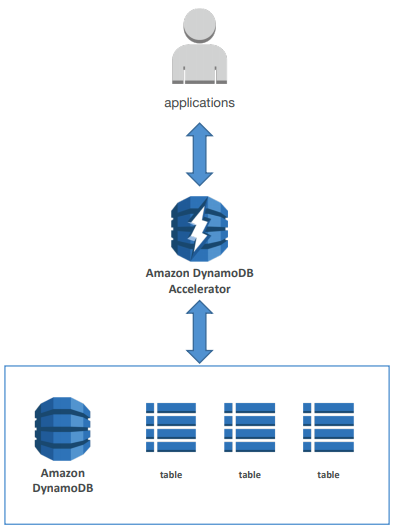
- DAX = DynamoDB Accelerator
- Seamless cache for DynamoDB, no application re - write
- Writes go through DAX to DynamoDB
- Micro second latency for cached reads & queries
- Solves the Hot Key problem (too many reads)
- 5 minutes TTL for cache by default
- Up to 10 nodes in the cluster
- Multi AZ (3 nodes minimum recommended for production)
- Secure (Encryption at rest with KMS, VPC, IAM, CloudTrail…)
DynamoDB Streams
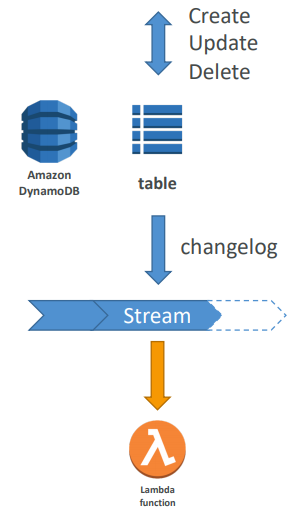
- Changes in DynamoDB (Create, Update, Delete) can end up in a DynamoDB Stream
- This stream can be read by AWS Lambda, and we can then do:
- React to changes in real time (welcome email to new users)
- Analytics
- Create derivative tables / views
- Insert into ElasticSearch
- Could implement cross region replication using Streams
- Stream has 24 hours of data retention
Features
- Transactions (new from Nov 2018)
- All or nothing type of operations
- Coordinated Insert, Update & Delete across multiple tables
- Include up to 10 unique items or up to 4 MB of data
- On Demand (new from Nov 2018)
- No capacity planning needed (WCU / RCU) – scales automatically
- 2.5x more expensive than provisioned capacity (use with care)
- Helpful when spikes are un-predictable or the application is very low throughput
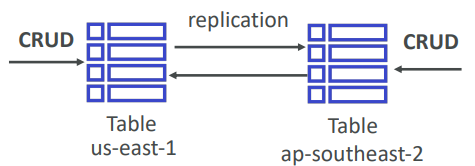
- Global Tables: (cross region replication)
- Active Active replication, many regions
- Must enable DynamoDB Streams
- Useful for low latency, DR purposes
- Capacity planning:
- Planned capacity: provision WCU & RCU, can enable auto scaling
- On-demand capacity: get unlimited WCU & RCU, no throttle, more expensive
Security
- Security:
- VPC Endpoints available to access DynamoDB without internet
- Access fully controlled by IAM
- Encryption at rest using KMS
- Encryption in transit using SSL / TLS
- Backup and Restore feature available
- Point in time restore like RDS
- No performance impact
- Global Tables
- Multi region, fully replicated, high performance
- Amazon DMS can be used to migrate to DynamoDB (from Mongo, Oracle, MySQL, S3, etc…)
- You can launch a local DynamoDB on your computer for development purposes
Redishift
- Redshift is based on PostgreSQL, but it’s not used for OLTP
- It’s OLAP – online analytical processing (analytics and data warehousing)
- 10x better performance than other data warehouses, scale to PBs of data
- Columnar storage of data (instead of row based)
- Massively Parallel Query Execution (MPP), highly available
- Pay as you go based on the instances provisioned
- Has a SQL interface for performing the queries
- BI tools such as AWS Quicksight or Tableau integrate with it
- Data is loaded from S3, DynamoDB, DMS, other DBs…
- From 1 node to 128 nodes, up to 160 GB of space per node
- Leader node: for query planning, results aggregation
- Compute node: for performing the queries, send results to leader
- Redshift Spectrum: perform queries directly against S3 (no need to load)
- Backup & Restore, Security VPC / IAM / KMS, Monitoring
- Redshift Enhanced VPC Routing: COPY / UNLOAD goes through VPC
- Snapshots are point-in-time backups of a cluster, stored internally in S3
- Snapshots are incremental (only what has changed is saved)
- You can restore a snapshot into a new cluster
- Automated: every 8 hours, every 5 GB, or on a schedule. Set retention
- Manual: snapshot is retained until you delete it
- You can configure Amazon Redshift to automatically copy snapshots
- (automated or manual) of a cluster to another AWS Region
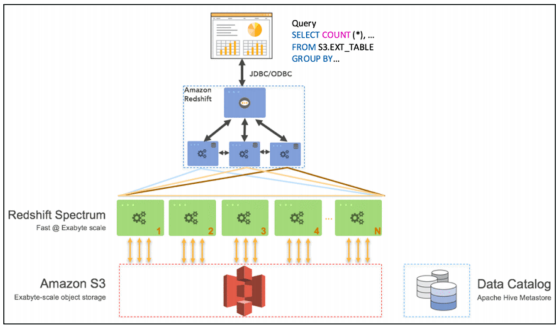
- Query data that is already in S3 without loading it
- Must have a Redshift cluster available to start the query
- The query is then submitted to thousands of Redshift Spectrum nodes
Neptune
- Fully managed graph database
- When do we use Graphs?
- High relationship data
- Social Networking: Users friends with Users, replied to comment on post of user and likes other comments.
- Knowledge graphs (Wikipedia)
- Highly available across 3 AZ, with up to 15 read replicas
- Point -in -time recovery, continuous backup to Amazon S3
- Support for KMS encryption at rest + HTTPS
Elastic Search
Remember: ElasticSearch = Search / Indexing
- Example: In DynamoDB, you can only find by primary key or indexes.
- With ElasticSearch, you can search any field, even partially matches
- It’s common to use ElasticSearch as a complement to another database
- ElasticSearch also has some usage for Big Data applications
- You can provision a cluster of instances
- Built-in integrations: Amazon Kinesis Data Firehose, AWS IoT, and Amazon CloudWatch Logs for data ingestion
- Security through Cognito & IAM, KMS encryption, SSL & VPC
- Comes with Kibana (visualization) & Logstash (log ingestion) – ELK stack
⏱️Ability to Auto Scale & HA
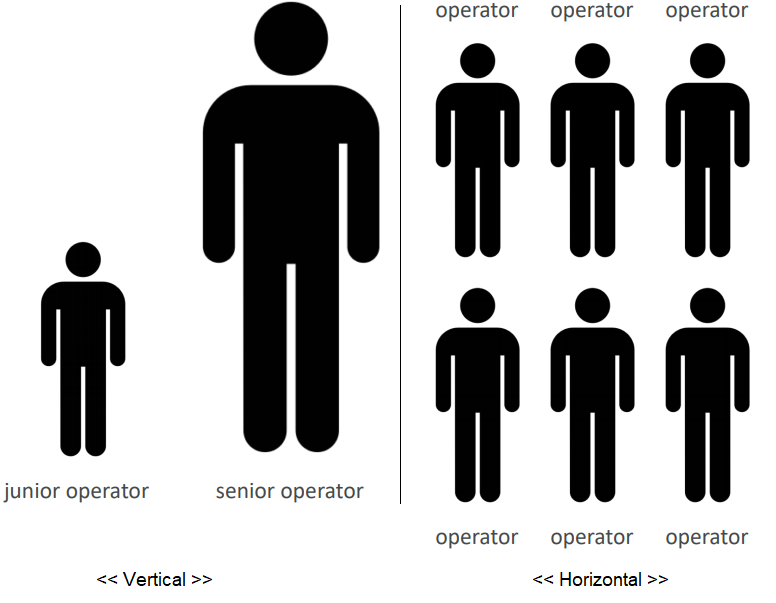
Scalability means that an application / system can handle greater loads by adapting.
Vertical VS Horizontal
-
Vertical (= scale up / down) and Horizontal (= scale out / in)
-
Vertical scalability is very common for non distributed systems, such as a database
-
RDS, ElastiCache are services that can scale vertically.
-
There’s usually a limit to how much you can vertically scale (hardware limit)
-
Horizontal scaling implies distributed systems.
Horizontal = Elasticity as well
High Availability
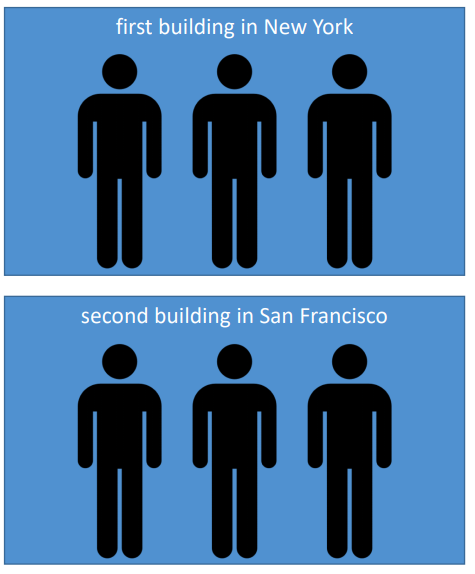
High availability means running your application / system in at least 2 data centers (== Availability Zones). The goal of high availability is to survive a data center loss.
ACTIVE HA means The high availability can be passive (for RDS Multi AZ for example)
PASSIVE HA means The high availability can be active (for horizontal scaling)
ELB
Load balancers are servers that forward internet traffic to multiple servers (EC2 Instances) downstream. They can be set up both in private or public subnets.
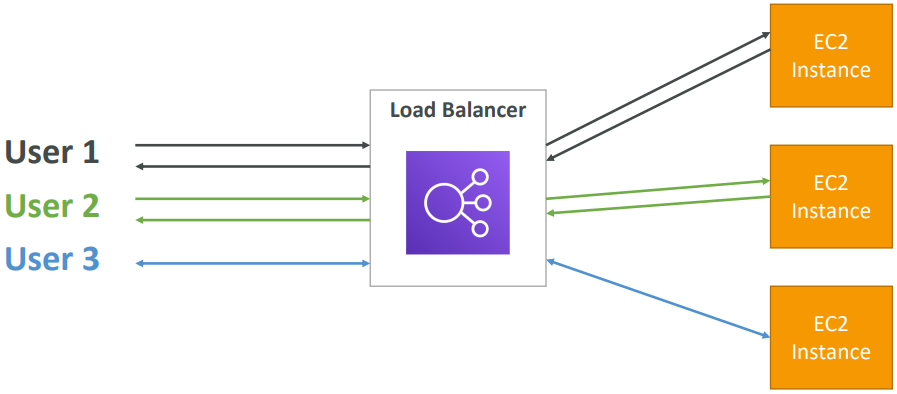
- Spread load across multiple downstream instances
- Expose a single point of access (DNS) to your application
- Seamlessly handle failures of downstream instances
- Do regular health checks to your instances
- Provide SSL termination (HTTPS) for your websites
- Enforce stickiness with cookies
- High availability across zones
- Separate public traffic from private traffic
An ELB (EC2 Load Balancer) is a managed load balancer
Health Checks
Health Checks are crucial for Load Balancers. They enable the load balancer to know if instances it forwards traffic to are available to reply to requests. The health check is done on a port and a route (/health or /heartbeat is common). If the response is not 200 (OK), then the instance is unhealthy.
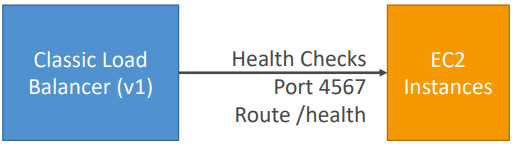
Classic Load Balancer
- Classic Load Balancer (v1 - old generation) – 2009 with HTTP, HTTPS, TCP
Application Load Balancer
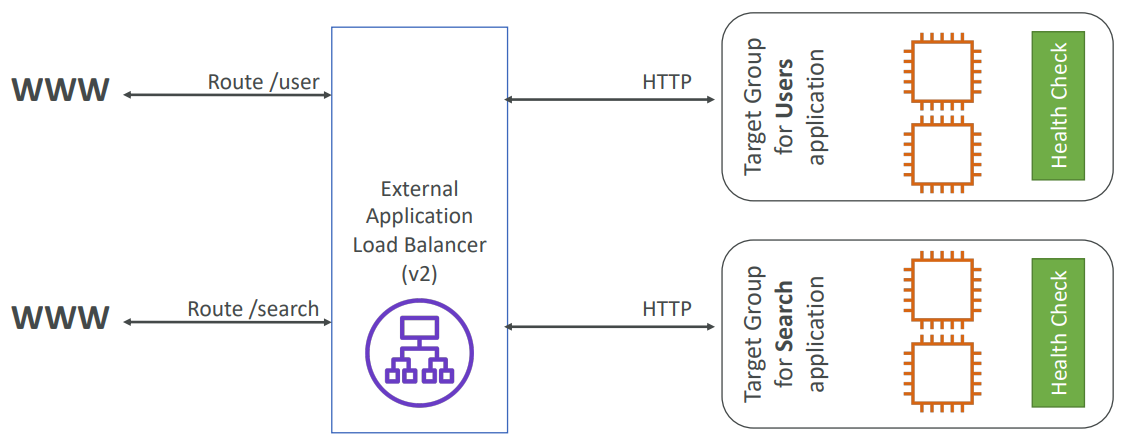
Balances the loads to target or multiple application in one machine (to containers). ALB are a great fit for micro-services & container-based application
(example: Docker & Amazon ECS). It has a port mapping feature to redirect to a dynamic port in ECS. In comparison, we’d need multiple Classic Load Balancer per application.
- Application Load Balancer (v2 - new generation) – 2016 with HTTP, HTTPS, WebSocket
- Load balancing to multiple applications on the same machine (ex: containers)
- Load balancing to multiple HTTP applications across machines (target groups)
Application Load Balancer has much better routing capabilities:
- Routing tables to different target groups:
- Routing based on path in URL
(example.com/users & example.com/posts) - Routing based on hostname in URL
(one.example.com & other.example.com) - Routing based on Query String, Headers
(example.com/users?id=123&order=false)
TARGET GROUPS
EC2 instances (can be managed by an Auto Scaling Group) and ECS tasks (managed by ECS itself). Lambda functions – HTTP request is translated into a JSON event.
IP Addresses – must be private IPs and ALB can route to multiple target groups • Health checks are at the target group level
To see the client IP we have to insert the
X-Forwarded-ForIP into HTTP header.

Network Load Balancer
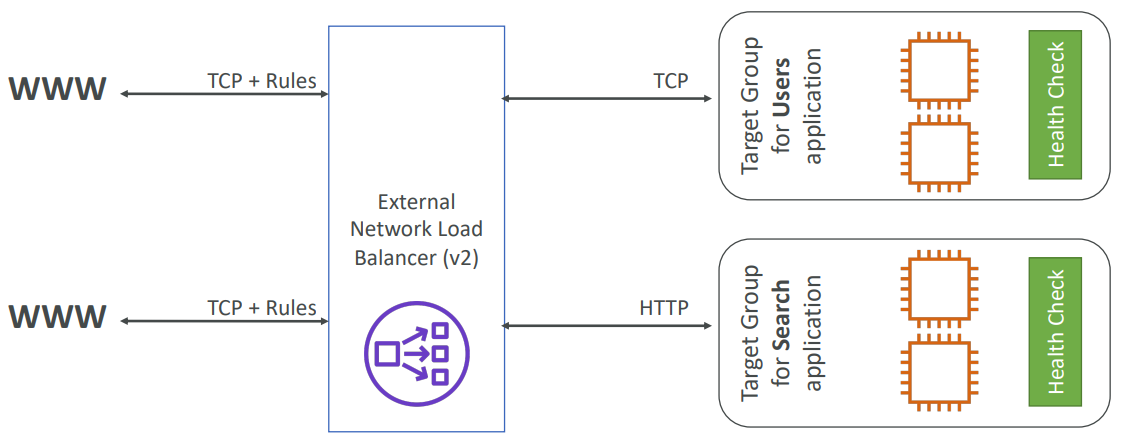
Network Load Balancer (v2 - new generation) – 2017 with TCP, TLS (secure TCP) & UDP
Forward TCP & UDP traffic to your instances. Handle millions of request per seconds. Less latency ~100 ms (vs 400 ms for ALB).
NLB has one static IP per AZ, and supports assigning Elastic IP. NLB are used for extreme performance, TCP or UDP traffic.
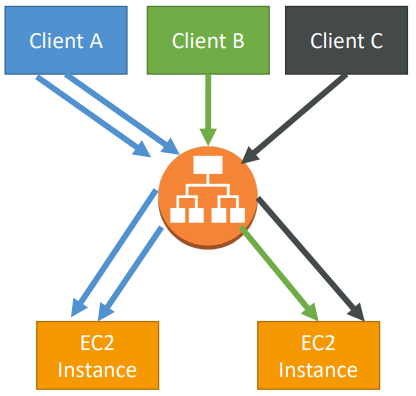
Stickiness
It is possible to implement stickiness so that the same client is always redirected to the same instance behind a load balancer. This works for Classic Load Balancers & Application Load Balancers. The cookie used for stickiness has an ***<u>expiration date you control*</u>**
Use case: make sure the user doesn’t lose his session data.
Enabling stickiness may bring imbalance to the load over the backend EC2 instances
Cross Zone Load Balancing
Classic Load Balancer: Disabled by default. No charges for inter AZ data if enabled.
Application Load Balancer: Always on (can’t be disabled). No charges for inter AZ data .
Network Load Balancer: Disabled by default. You pay charges ($) for inter AZ data if enabled.
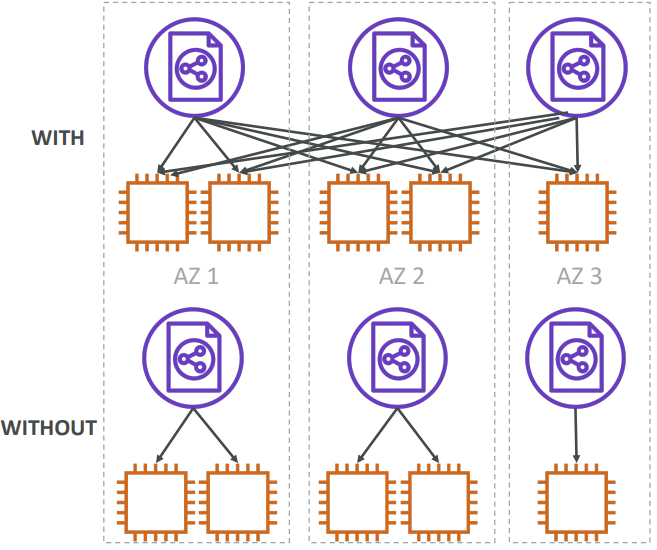
With Cross Zone Load Balancing: each load balancer instance distributes evenly across all registered instances in all AZ. Otherwise, each load balancer node distributes requests evenly across the registered instances in its Availability Zone only.
Security Groups
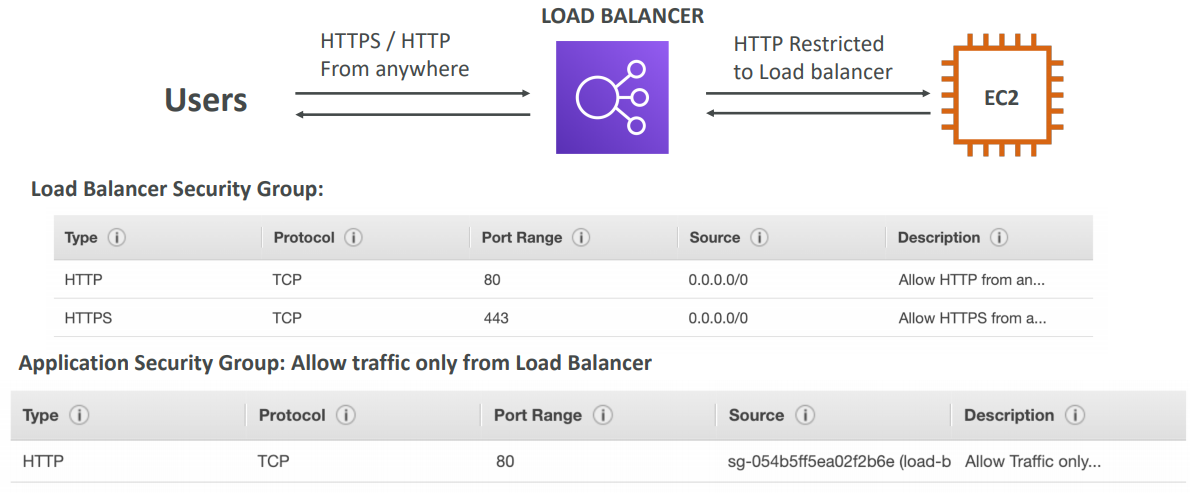
The load balancer uses an X.509 certificate (SSL/TLS server certificate). You can manage certificates using ACM (AWS Certificate Manager). You can create upload your own certificates alternatively. You must specify a default certificate. You can add an optional list of certs to support multiple domains.

SSL – Server Name Indication (SNI)
SNI solves the problem of loading multiple SSL certificates onto one web server (to serve multiple websites).
NOTE: Only works for ALB & NLB (newer generation), CloudFront. Does not work for CLB (older gen).
It’s a “newer” protocol, and requires the client to indicate the hostname of the target server in the initial SSL handshake. The server will then find the correct certificate, or return the default one.
Classic Load Balancer (v1)
- Support only one SSL certificate
- Must use multiple CLB for multiple hostname with multiple SSL certificates
Application Load Balancer (v2)
- Supports multiple listeners with multiple SSL certificates
- Uses Server Name Indication (SNI) to make it work
Network Load Balancer (v2)
- Supports multiple listeners with multiple SSL certificates
- Uses Server Name Indication (SNI) to make it work
Monitoring
ELB access logs will log all access requests (so you can debug per request). CloudWatch Metrics will give you aggregate statistics (ex: connections count).
Connection Draining
If we use Classic Load Balancer they named it Connection Draining and if we are using ALB or NLB they named it Deregistration Delay
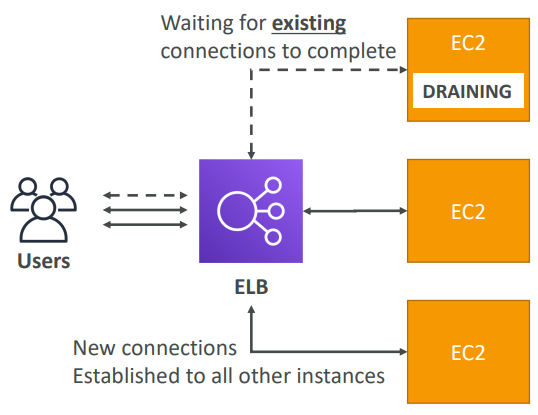
Time to complete “in-flight requests” while the instance is de-registering or unhealthy. Stops sending new requests to the instance which is de-registering. Between 1 to 3600 seconds, default is 300 seconds. Can be disabled (set value to 0). Set to a low value if your requests are short.
ASG
In real-life, the load on your websites and application can change. In the cloud, you can create and get rid of servers very quickly. ASG are free. You pay for the underlying resources being launched. ASG can terminate instances marked as unhealthy by an LB (and hence replace them).
Launch Configuration (legacy):
- Must be re-created every time
Launch Template (newer):
- Can have multiple versions
- Create parameters subsets (partial configuration for re-use and inheritance)
- Provision using both On-Demand and Spot instances (or a mix)
- Can use T2 unlimited burst feature
- Recommended by AWS going forward
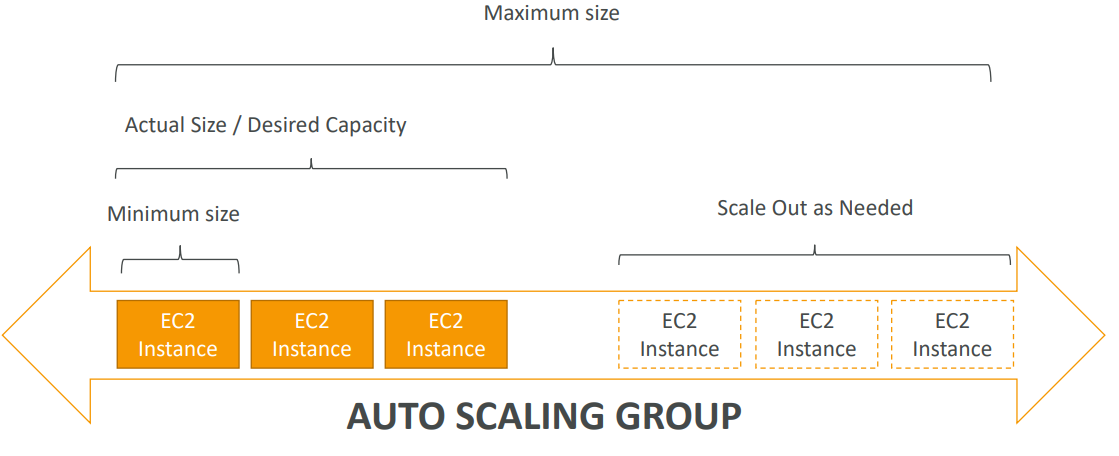
The goal of an Auto Scaling Group (ASG) is to:
- Scale out (add EC2 instances) to match an increased load
- Scale in (remove EC2 instances) to match a decreased load
- Ensure we have a minimum and a maximum number of machines running
- Automatically Register new instances to a load balancer
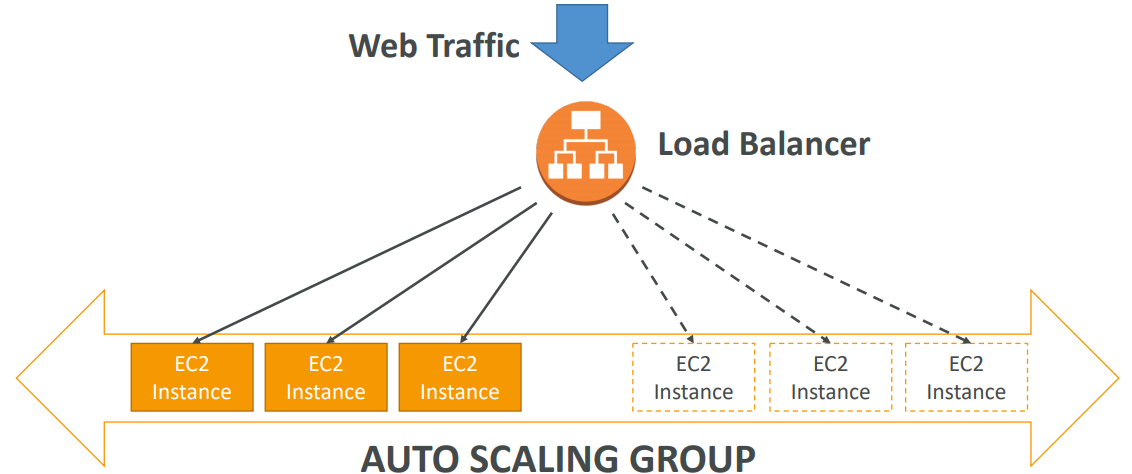
To update an ASG, you must provide a new launch configuration / launch template
- Launch configurations or Launch Templates (newer)
- AMI + Instance Type
- EC2 User Data
- EBS Volumes
- Security Groups
- SSH Key Pair
- Min Size / Max Size / Initial Capacity
- Network + Subnets Information
- Load Balancer Information
- Scaling Policies
Trigger Alarms on ASB

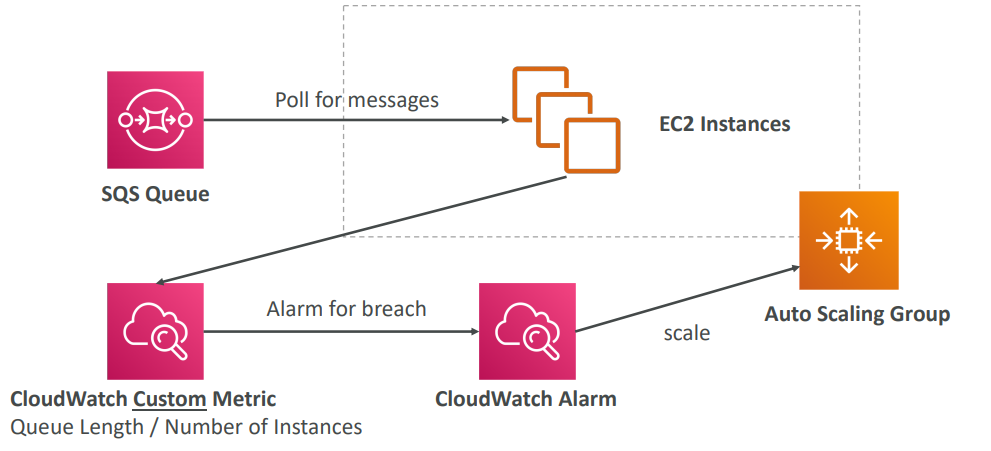
- It is possible to scale an ASG based on CloudWatch alarms
- An Alarm monitors a metric (such as Average CPU)
- Metrics are computed for the overall ASG instances
- Send custom metric from application on EC2 to CloudWatch (PutMetric API)
- Create CloudWatch alarm to react to low / high values
- Use the CloudWatch alarm as the scaling policy for ASG
Based on the alarm attributes:
- We can create scale-out policies (increase the number of instances)
- We can create scale-in policies (decrease the number of instances)
- We can auto scale based on a custom metric (ex: number of connected users)
It is now possible to define ”better” auto scaling rules that are directly managed by EC2. Target Average CPU Usage, Number of requests on the ELB per instance, Average Network In and out. These rules are easier to set up and can make more sense.
Target Tracking Scaling
Most simple and easy to set-up. Example: I want the average ASG CPU to stay at around 40%
Simple / Step Scaling
When a CloudWatch alarm is triggered (example CPU > 70%), then add 2 units. When a CloudWatch alarm is triggered (example CPU < 30%), then remove 1
Scheduled Actions
Anticipate a scaling based on known usage patterns • Example: increase the min capacity to 10 at 5 pm on Fridays
Cool Down
The cooldown period helps to ensure that your Auto Scaling group doesn’t launch or terminate additional instances before the previous scaling activity takes effect.
In addition to default cooldown for Auto Scaling group, we can create cooldowns that apply to a specific simple scaling policy. A scaling-specific cooldown period overrides the default cooldown period. One common use for scaling-specific cooldowns is with a scale-in policy—a policy that terminates instances based on a specific criteria or metric. Because this policy terminates instances, Amazon EC2 Auto Scaling needs less time to determine whether to terminate additional instances. If the default cooldown period of 300 seconds is too long—you can reduce costs by applying a scaling-specific cooldown period of 180 seconds to the scale-in policy. If your application is scaling up and down multiple times each hour, modify the Auto Scaling Groups cool-down timers and the CloudWatch Alarm Period that triggers the scale in.
Default Termination
ASG tries the balance the number of instances across AZ by default
- Find the AZ which has the most number of instances
- If there are multiple instances in the AZ to choose from, delete the one with the oldest launch configuration
LifeCycle Hooks
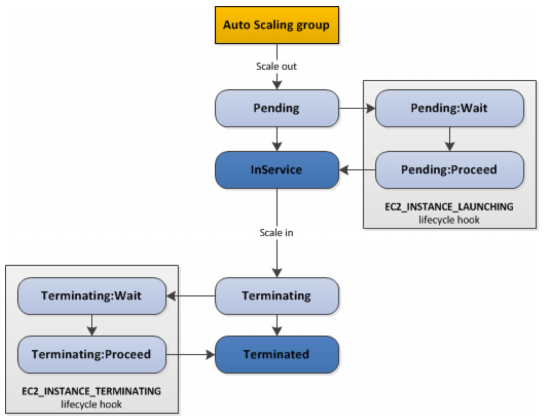
By default as soon as an instance is launched in an ASG it’s in service. You have the ability to perform extra steps before the instance goes in service (Pending state). You have the ability to perform some actions before the instance is terminated (Terminating state).
• Launch Configuration (legacy): • Must be re-created every time • Launch Template (newer): • Can have multiple versions • Create parameters subsets (partial configuration for re-use and inheritance) • Provision using both On-Demand and Spot instances (or a mix) • Can use T2 unlimited burst feature • Recommended by AWS going forward
Cloud Front
Content Delivery Network (CDN) and it improves read performance, content is cached at the edge. Can expose external HTTPS and can talk to internal HTTPS backends
DDoS protection, integration with Shield, AWS Web Application Firewall
Origins
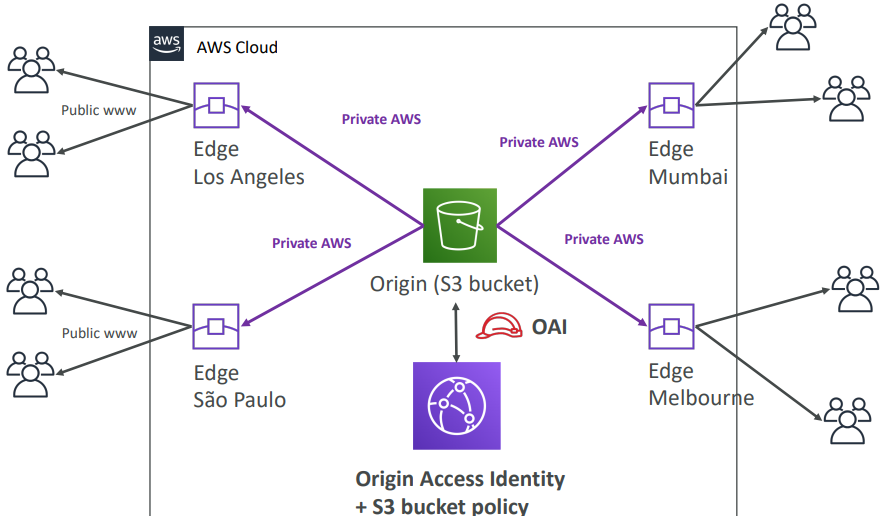
S3 bucket
- For distributing files and caching them at the edge
- Enhanced security with CloudFront Origin Access Identity (OAI)
- CloudFront can be used as an ingress (to upload files to S3)
S3 website
- Must first enabled the bucket as a static S3 website
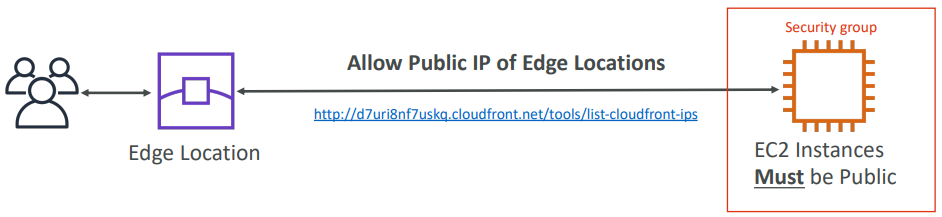
Custom Origin (HTTP) – Must be publicly accessible
- Application Load Balancer
- EC2 instance
- Any HTTP backend you want
S3 As Origin
EC2 as Origin
ALB as Origin

GEO Restriction
You can restrict who can access your distribution
-
Whitelist: Allow your users to access your content only if they’re in one of the countries on a list of approved countries.
-
Blacklist: Prevent your users from accessing your content if they’re in one of the countries on a blacklist of banned countries.
The “country” is determined using a 3rd party Geo-IP database. Use case: Copyright Laws to control access to content
CloudFront vs S3 Cross Region Replication
CloudFront:
- Global Edge network
- Files are cached for a TTL (maybe a day)
- Great for static content that must be available everywhere
S3 Cross Region Replication:
- Must be setup for each region you want replication to happen
- Files are updated in near real-time
- Great for dynamic content that needs to be available at low-latency in few regions
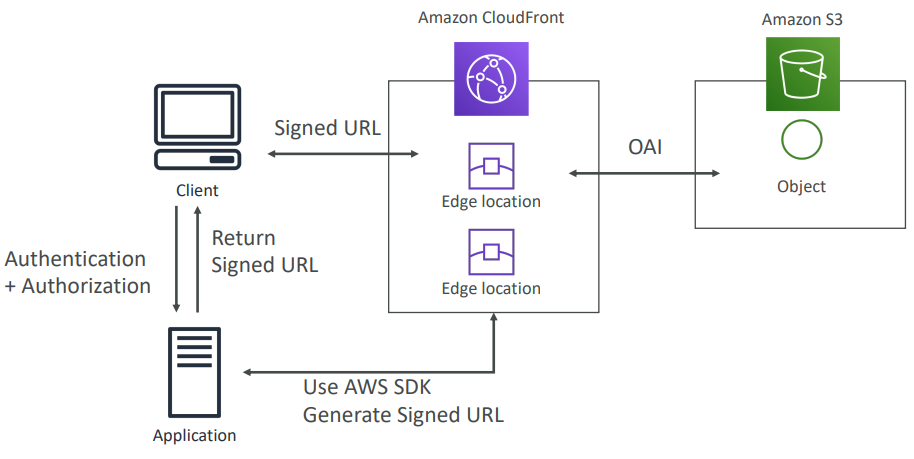
CloudFront Signed URL / Signed Cookies
You want to distribute paid shared content to premium users over the world. We can use CloudFront Signed URL / Cookie. We attach a policy with:
- Includes URL expiration
- Includes IP ranges to access the data from
- Trusted signers (which AWS accounts can create signed URLs)
How long should the URL be valid for?
- Shared content (movie, music): make it short (a few minutes)
- Private content (private to the user): you can make it last for years
Signed URL = access to individual files (one signed URL per file) Signed Cookies = access to multiple files (one signed cookie for many files)
Global Accelerator
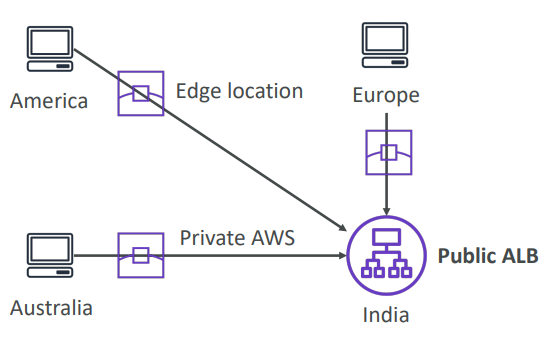
Works with Elastic IP, EC2 instances, ALB, NLB, public or private
Leverage the AWS internal network to route to your application. 2 Anycast IP are created for your application. The Anycast IP send traffic directly to Edge Locations. The Edge locations send the traffic to your application.
- They both use the AWS global network and its edge locations around the world
- Both services integrate with AWS Shield for DDoS protection.
CloudFront
- Improves performance for both cacheable content (such as images and videos)
- Dynamic content (such as API acceleration and dynamic site delivery)
- Content is served at the edge
Global Accelerator
- Improves performance for a wide range of applications over TCP or UDP
- Proxying packets at the edge to applications running in one or more AWS Regions.
- Good fit for non-HTTP use cases, such as gaming (UDP), IoT (MQTT), or Voice over IP
- Good for HTTP use cases that require static IP addresses
- Good for HTTP use cases that required deterministic, fast regional failover
🌋 Disaster Recovery
Any event that has a negative impact on a company’s business continuity or finances is a disaster. Disaster recovery (DR) is about preparing for and recovering from a disaster.
What kind of disaster recovery?
- On-premise ⇒ On-premise: traditional DR, and very expensive
- On-premise ⇒ AWS Cloud: hybrid recovery
- AWS Cloud Region A ⇒ AWS Cloud Region B
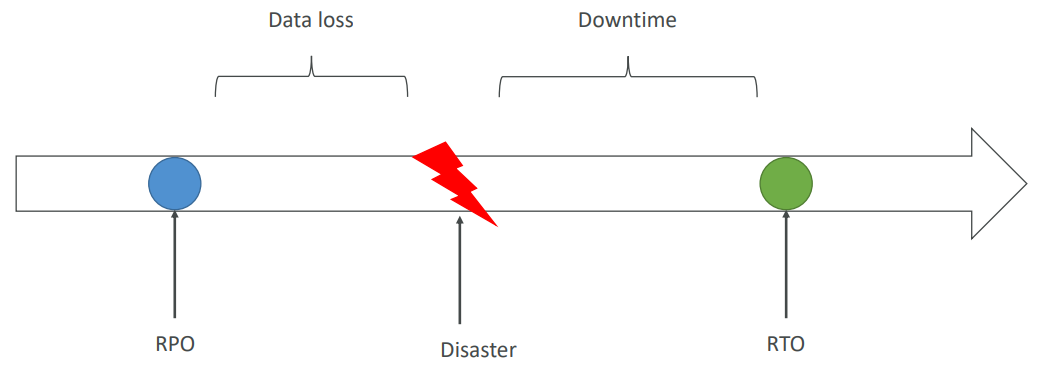
- Need to define two terms:
- RPO: Recovery Point Objective
- RTO: Recovery Time Objective
Strategies
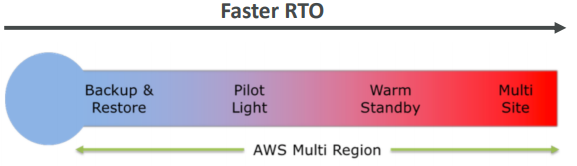
- Backup and Restore
- Pilot Light
- Warm Standby
- Hot Site / Multi Site Approach
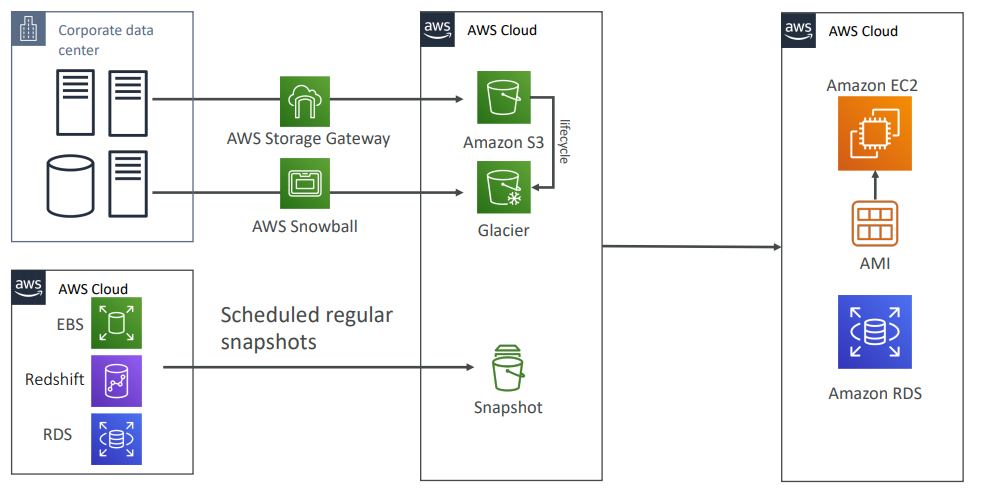
Backup and Restore (High RPO)
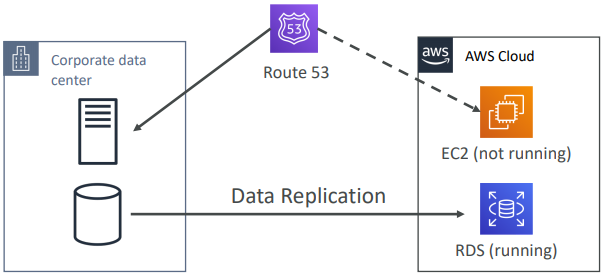
Disaster Recovery – Pilot Light
A small version of the app is always running in the cloud. Useful for the critical core (pilot light). Very similar to Backup and Restore. Faster than Backup and Restore as critical systems are already up.
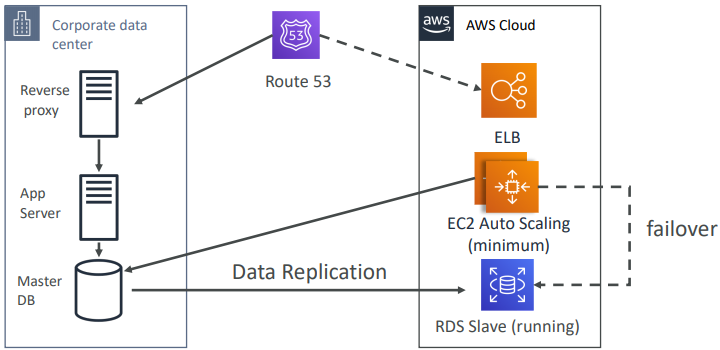
Warm StandBy
Full system is up and running, but at minimum size. Upon disaster, we can scale to production load.
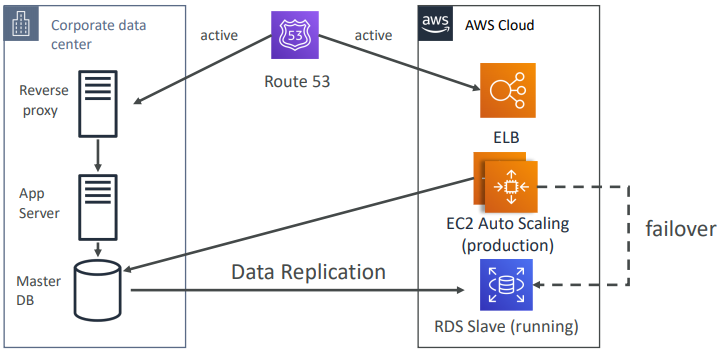
Multi Site / Hot Site Approach
Very low RTO (minutes or seconds) – very expensive. Full Production Scale is running AWS and On Premise.
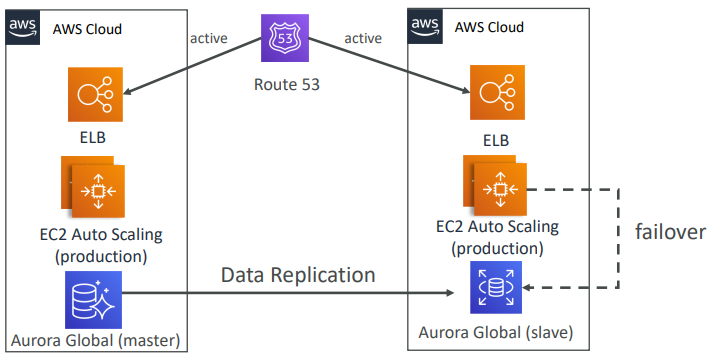
AWS Multi Region
Backup
- EBS Snapshots, RDS automated backups / Snapshots, etc…
- Regular pushes to S3 / S3 IA / Glacier, Lifecycle Policy, Cross Region Replication
- From On-Premise: Snowball or Storage Gateway
High Availability
- Use Route53 to migrate DNS over from Region to Region
- RDS Multi-AZ, ElastiCache Multi-AZ, EFS, S3
- Site to Site VPN as a recovery from Direct Connect
Replication
- RDS Replication (Cross Region), AWS Aurora + Global Databases
- Database replication from on-premise to RDS
- Storage Gateway
Automation
- CloudFormation / Elastic Beanstalk to re-create a whole new environment
- Recover / Reboot EC2 instances with CloudWatch if alarms fail
- AWS Lambda functions for customized automations
Chaos
- Netflix has a “simian-army” randomly terminating EC2
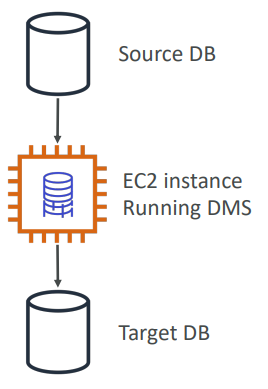
DMS Database Migration
Quickly and securely migrate databases to AWS, resilient, self healing. The source database remains available during the migration. Continuous Data Replication using CDC.
- You must create an EC2 instance to perform the replication tasks
AWS Schema Conversion Tool (SCT)
Convert your Database’s Schema from one engine to another.
- Example OLTP: (SQL Server or Oracle) to MySQL, PostgreSQL, Aurora
- Example OLAP: (Teradata or Oracle) to Amazon Redshift
- You do not need to use SCT if you are migrating the same DB engine
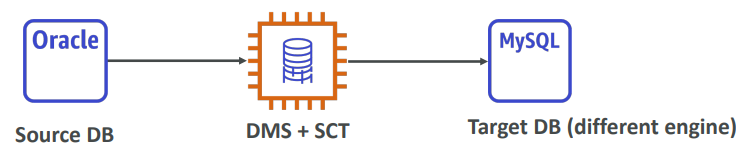
🏠 On-Prem Strategies
Ability to download Amazon Linux 2 AMI as a VM (.iso format)
- VMWare, KVM, VirtualBox (Oracle VM), Microsoft Hyper-V
VM Import / Export
- Migrate existing applications into EC2
- Create a DR repository strategy for your on-premise VMs
- Can export back the VMs from EC2 to on-premise
AWS Application Discovery Service
- Gather information about your on-premise servers to plan a migration
- Server utilization and dependency mappings
- Track with AWS Migration Hub
AWS Database Migration Service (DMS)
- replicate On-premise ⇒ AWS , AWS ⇒ AWS, AWS ⇒ On-premise
- Works with various database technologies (Oracle, MySQL, DynamoDB, etc..)
AWS Server Migration Service (SMS)
- Incremental replication of on-premise live servers to AWS
AWS DataSync
Move large amount of data from on- premise to AWS. Can synchronize to: Amazon S3, Amazon EFS, Amazon FSx for Windows. Move data from your NAS or file system via NFS or SMB. Replication tasks can be scheduled hourly, daily, weekly. Leverage the DataSync agent to connect to your systems
- For on-going replication / transfers: Site-to-Site VPN or DX with DMS or DataSync
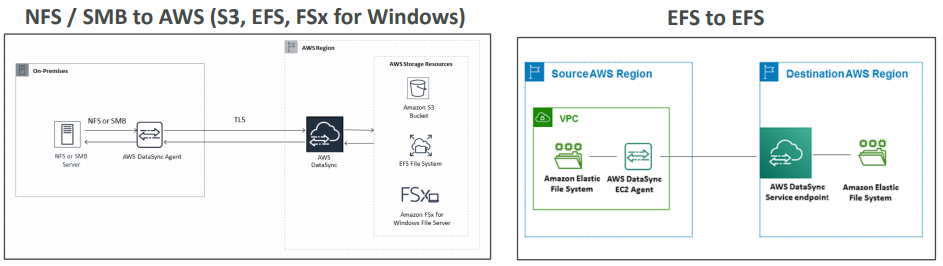
👁️Monitoring
Cloud Watch
CloudWatch provides metrics for every services in AWS. Metric is a variable to monitor (CPU Utilization, Networking…). Metrics belong to namespaces.
Dimension is an attribute of a metric (instance id, environment, etc…) ⇒ Up to 10 dimensions per metric and metrics have timestamps. Can create CloudWatch dashboards of metrics.
Monitoring EC2
EC2 instance metrics have metrics “every 5 minutes”. With detailed monitoring (for a cost), you get data “every 1 minute”.
It’s good to use detailed monitoring if you want to more prompt scale your ASG! Note: EC2 Memory usage is by default not pushed (must be pushed from inside the instance as a custom metric)
Custom Metrics
- Possibility to define and send your own custom metrics to CloudWatch
- Ability to use dimensions (attributes) to segment metrics
- Instance.id
- Environment.name
- Metric resolution (StorageResolution API parameter – two possible value):
- Standard: 1 minute (60 seconds)
- High Resolution: 1 second – Higher cost
- Use API call PutMetricData
- Use exponential back off in case of throttle errors
Dashboard
- Great way to setup dashboards for quick access to keys metrics
- Dashboards are global
- Dashboards can include graphs from different regions
- You can change the time zone & time range of the dashboards
- You can setup automatic refresh (10s, 1m, 2m, 5m, 15m)
Pricing:
- 3 dashboards (up to 50 metrics) for free
- $3/dashboard/month afterwards
Logs
-
Applications can send logs to CloudWatch using the SDK
-
CloudWatch can collect log from:
- Elastic Beanstalk: collection of logs from application
- ECS: collection from containers
- AWS Lambda: collection from function logs
- VPC Flow Logs: VPC specific logs
- API Gateway
- CloudTrail based on filter
- CloudWatch log agents: for example on EC2 machines
- Route53: Log DNS queries
-
CloudWatch Logs can go to:
-
Batch exporter to S3 for archival
-
Stream to ElasticSearch cluster for further analytics
-
-
Logs storage architecture:
- Log groups: arbitrary name, usually representing an application
- Log stream: instances within application / log files / containers
-
Can define log expiration policies (never expire, 30 days, etc..)
-
Using the AWS CLI we can tail CloudWatch logs
-
To send logs to CloudWatch, make sure IAM permissions are correct!
-
Security: encryption of logs using KMS at the Group Leve
Logs metric filter & insight
- CloudWatch Logs can use filter expressions
- For example, find a specific IP inside of a log
- Metric filters can be used to trigger alarms
- CloudWatch Logs Insights (new – Nov 2018) can be used to query logs and add queries to CloudWatch Dashboards
Alarms
- Alarms are used to trigger notifications for any metric
- Alarms can go to Auto Scaling, EC2 Actions, SNS notifications
- Various options (sampling, %, max, min, etc…)
- Alarm States:
- OK
- INSUFFICIENT_DATA
- ALARM
- Period:
- Length of time in seconds to evaluate the metric
- High resolution custom metrics: can only choose 10 sec or 30 sec
Events
- Source + Rule ⇒ Target
- Schedule: Cron jobs
- Event Pattern: Event rules to react to a service doing something
- Ex: CodePipeline state changes!
- Triggers to Lambda functions, SQS/SNS/Kinesis Messages
- CloudWatch Event creates a small JSON document to give information about the change
Cloud Trail
- Provides governance, compliance and audit for your AWS Account
- CloudTrail is enabled by default!
- Get an history of events / API calls made within your AWS Account by:
- Console
- SDK
- CLI
- AWS Services
- Can put logs from CloudTrail into CloudWatch Logs
- If a resource is deleted in AWS, look into CloudTrail first!
AWS CONFIG
AWS Config
- Helps with auditing and recording compliance of your AWS resources
- Helps record configurations and changes over time
- Possibility of storing the configuration data into S3 (analyzed by Athena)
- Questions that can be solved by AWS Config:
- Is there unrestricted SSH access to my security groups?
- Do my buckets have any public access?
- How has my ALB configuration changed over time?
- You can receive alerts (SNS notifications) for any changes
- AWS Config is a per-region service
- Can be aggregated across regions and accounts
View compliance of a resource over time
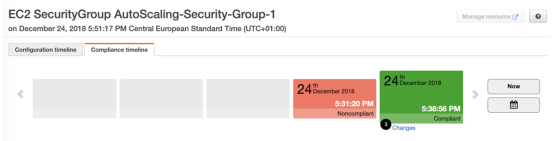
View configuration of a resource
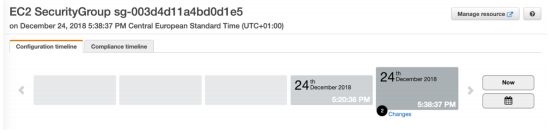
View CloudTrail API calls if enabled
- Can use AWS managed config rules (over 75)
- Can make custom config rules (must be defined in AWS Lambda)
- Evaluate if each EBS disk is of type gp2
- Evaluate if each EC2 instance is t2.micro
- Rules can be evaluated / triggered:
- For each config change
- And / or: at regular time intervals
- Can trigger CloudWatch Events if the rule is non-compliant (and chain with Lambda)
- Rules can have auto remediations:
- If a resource is not compliant, you can trigger an auto remediation
- Ex: stop instances with non-approved tags
- AWS Config Rules does not prevent actions from happening (no deny)
- Pricing: no free tier, $2 per active rule per region per month
CloudWatch vs CloudTrail vs Config
CloudWatch vs CloudTrail vs Config
- CloudWatch
- Performance monitoring (metrics, CPU, network, etc…) & dashboards
- Events & Alerting
- Log Aggregation & Analysis
- CloudTrail
- Record API calls made within your Account by everyone
- Can define trails for specific resources
- Global Service
- Config
- Record configuration changes
- Evaluate resources against compliance rules
- Get timeline of changes and compliance
🕸️ Networking
Your VPC CIDR should not overlap with your other networks (ex: corporate)
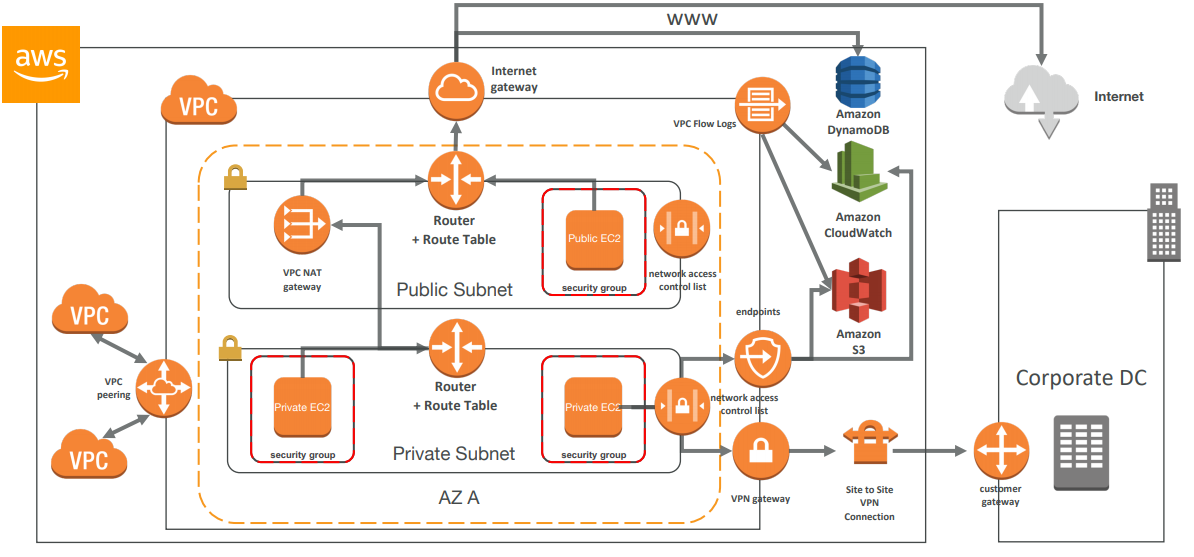
CIDR
CIDR are used for Security Groups rules, or AWS networking in general. CIDR is used for pivoting(ranging) the internal network IP addresses so we can subnet them appropriately. The base IP represents an IP contained in the range. The subnet masks defines how many bits can change in the IP. They help to define an IP address range.
The subnet mask can take two forms. Examples:
- 255.255.255.0 ⇒ less common
- /24 ⇒ more common
/32 – no IP number can change
/24 - last IP number can change
/16 – last IP two numbers can change
/8 – last IP three numbers can change
/0 – all IP numbers can change
Private IP can only allow certain values
- 10.0.0.0 – 10.255.255.255 (10.0.0.0/8) ⇐ in big networks
- 172.16.0.0 – 172.31.255.255 (172.16.0.0/12) ⇐ default AWS one
- 192.168.0.0 – 192.168.255.255 (192.168.0.0/16) ⇐ example: home networks
Default AWS VPC
All new accounts have a default VPC. New instances are launched into default VPC if no subnet is specified. Default VPC have internet connectivity and all instances have public IP. We also get a public and a private DNS name.
You can have multiple VPCs in a region (max 5 per region – soft limit).
Subnet
AWS reserves 5 IPs address (first 4 and last 1 IP address) in each Subnet. These 5 IPs are not available for use and cannot be assigned to an instance. For example, if CIDR block is 10.0.0.0/24 reserved IP are:
-
10.0.0.0: Network address
-
10.0.0.1: Reserved by AWS for the VPC router
-
10.0.0.2: Reserved by AWS for mapping to Amazon-provided DNS
-
10.0.0.3: Reserved by AWS for future use
-
10.0.0.255: Network broadcast address. AWS does not support broadcast in a VPC, therefore the address is reserved
Exam Tip:
- If you need 29 IP addresses for EC2 instances, you can’t choose a Subnet of size /27 (32 IP)
- You need at least 64 IP, Subnet size /26 (64-5 = 59 > 29, but 32-5 = 27 < 29)
Internet Gate Ways
Internet gateways helps our VPC instances connect with the internet. It scales horizontally and is HA and redundant. It must be created separately from VPC. One VPC can only be attached to one IGW and vice versa Internet Gateway is also a NAT for the instances that have a public IPv4. Internet Gateways on their own do not allow internet access… Route tables must also be edited!
NAT
NAT Instance
Allows instances in the private subnets to connect to the internet. Must be launched in a public subnet. Must have Elastic IP attached to it. Route table must be configured to route traffic from private subnets to NAT Instance.
Must disable EC2 flag: Source / Destination Check.
Amazon Linux AMI pre-configured are available and they’re not highly available / resilient setup out of the box. We need need to create ASG in multi AZ + resilient user-data script.
Internet traffic bandwidth depends on EC2 instance performance
Must manage security groups & rules
Inbound:
- Allow HTTP / HTTPS Traffic coming from Private Subnets
- Allow SSH from your home network (access is provided through Internet Gateway)
Outbound:
- Allow HTTP / HTTPS traffic to the internet
NAT Gateway
AWS managed NAT, higher bandwidth, better availability, no admin. NAT is created in a specific AZ, uses an EIP. Cannot be used by an instance in that subnet (only from other subnets).
- Pay by the hour for usage and bandwidth
- Requires an IGW (Private Subnet ⇒ NAT ⇒ IGW)
- 5 Gbps of bandwidth with automatic scaling up to 45 Gbps
- No security group to manage / required
- NAT Gateway is resilient within a single-AZ
- Must create multiple NAT Gateway in multiple AZ for fault-tolerance
- There is no cross AZ failover needed because if an AZ goes down it doesn’t need NAT
DNS
If you use custom DNS domain names in a private zone in Route 53, you must set both these attributes to true
enableDnsSupport: (= DNS Resolution setting)
-
Default True
-
Helps decide if DNS resolution is supported for the VPC
-
If True, queries the AWS DNS server at 169.254.169.253
enableDnsHostname: (= DNS Hostname setting)
-
False by default for newly created VPC, True by default for Default VPC
-
Won’t do anything unless enableDnsSupport=true
-
If True, Assign public hostname to EC2 instance if it has a public
Network ACL
NACL are a great way of blocking a specific IP at the subnet level
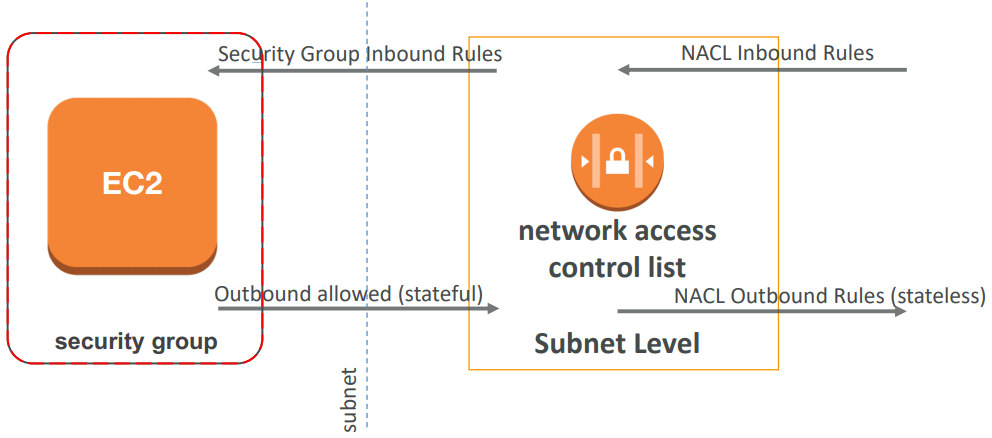
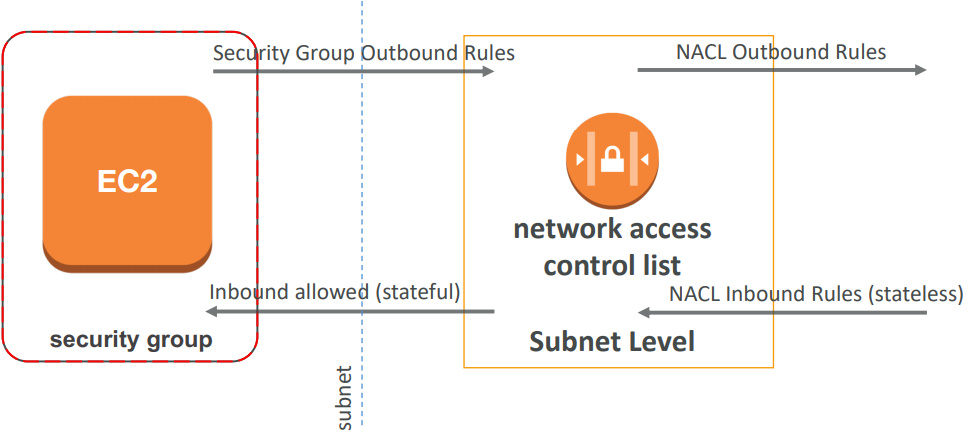
NACL are like a firewall which control traffic from and to subnet. Default NACL allows everything outbound and everything inbound. One NACL per Subnet, new Subnets are assigned the Default NACL. Newly created NACL will deny everything.
Define NACL rules:
Rules have a number (1-32766) and higher precedence with a lower number. For example If you define #100 ALLOW and #200 DENY , IP will be allowed. Last rule is an asterisk (*) and denies a request in case of no rule match. AWS recommends adding rules by increment of 100.
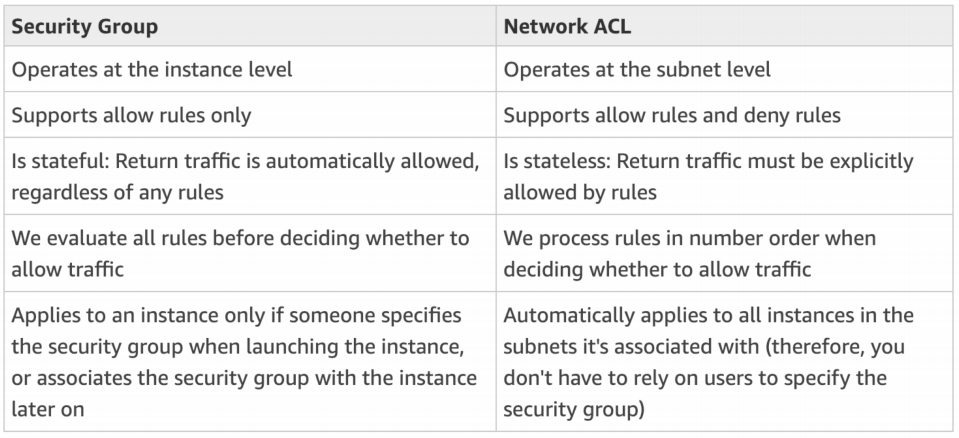
VPC Peering
VPC Peering connection is not transitive (must be established for each VPC that need to communicate with one another.
You must update route tables in each VPC’s subnets to ensure instances can communicate
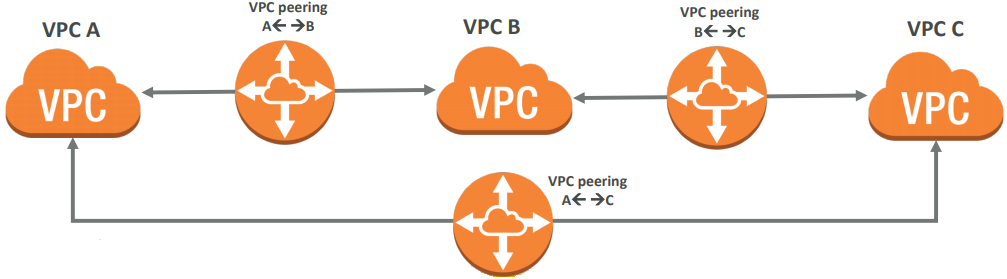
If you want to connect two VPC, privately using AWS’ network, use VPC Peering. Make them behave as if they were in the same network. In order to apply VPC Peering we need to make sure that they’re not having overlapping CIDR.
You can do VPC peering with another AWS account. It works with inter-region and cross-account. We can also reference a security group of a peered VPC (works cross account).

VPC Endpoints
They remove the need of IGW, NAT, etc… to access AWS Services
Endpoints allow you to connect to AWS Services using a private network instead of the public www network. They scale horizontally and are redundant.
Interface: provisions an ENI (private IP address) as an entry point (must attach security group) – most AWS services
Gateway: provisions a target and must be used in a route table – S3 and DynamoDB
In case of issues:
- Check DNS Setting Resolution in your VPC
- Check Route Tables
VPC Flow Logs
Capture information about IP traffic going into your interfaces: VPC Flow Logs, Subnet Flow Logs and Elastic Network Interface Flow Logs
It helps to monitor & troubleshoot connectivity issues and could be directed to flow logs data can go to S3 / CloudWatch Logs.
It also captures network information from AWS managed interfaces too: ELB, RDS, ElastiCache, Redshift, WorkSpaces
Flow logs Syntax & Query
Query VPC flow logs using Athena on S3 or CloudWatch Logs Insights.
<version> <account-id> <interface-id> <srcaddr> <dstaddr> <srcport> <dstport> <protocol> <packets> <bytes> <start> <end> <action> <log-status>
- Srcaddr, dstaddr help identify problematic IP
- Srcport, dstport help identity problematic ports
- Action : success or failure of the request due to Security Group / NACL
- Can be used for analytics on usage patterns, or malicious behavior
Bastion hosts or jump box
We can use a Bastion Host to SSH into our private instances. The bastion is in the public subnet which is then connected to all other private subnets. Bastion Host security group must be tightened
Exam Tip: Make sure the bastion host only has port 22 traffic from the IP you need, not from the security groups of your other instances.
Site To Site VPN
Virtual Private Gateway:
- VPN concentrator on the AWS side of the VPN connection
- VGW is created and attached to the VPC from which you want to create the Site-toSite VPN connection
- Possibility to customize the ASN
Customer Gateway:
- Software application or physical device on customer side of the VPN connection
- https://docs.aws.amazon.com/vpc/latest/adminguide/Introduction.html#DevicesTested
- IP Address:
- Use static, internet-routable IP address for your customer gateway device.
- If behind a CGW behind NAT (with NAT-T), use the public IP address of the NAT
Direct Connect
Provides a dedicated private connection from a remote network to your VPC. Dedicated connection must be setup between your DC and AWS Direct Connect locations. You need to setup a Virtual Private Gateway on your VPC. Access public resources (S3) and private (EC2) on same connection.
Use Cases: Increase bandwidth throughput
- working with large data sets – lower cost
- More consistent network experience - applications using real-time data feeds
- Hybrid Environments (on prem + cloud)
- Supports both IPv4 and IPv6
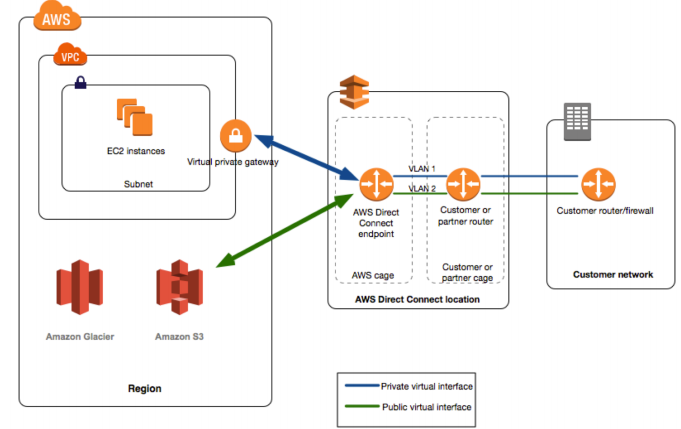
If you want to setup a Direct Connect to one or more VPC in many different regions (same account), you must use a Direct Connect Gateway
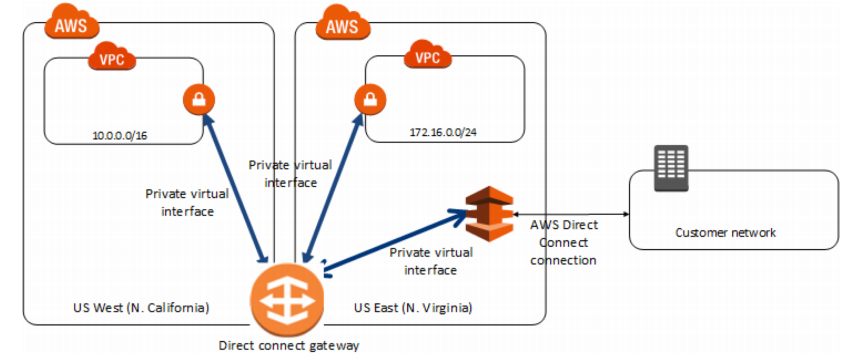
Connection Types
Lead times are often longer than 1 month to establish a new connection
Dedicated Connections: 1Gbps and 10 Gbps capacity
- Physical ethernet port dedicated to a customer
- Request made to AWS first, then completed by AWS Direct Connect Partners
Hosted Connections: 50Mbps, 500 Mbps, to 10 Gbps
- Connection requests are made via AWS Direct Connect Partners
- Capacity can be added or removed on demand
- 1, 2, 5, 10 Gbps available at select AWS Direct Connect Partners
Encryption
Data in transit is not encrypted but is private. AWS Direct Connect + VPN provides an IPsec -encrypted private connection. Good for an extra level of security, but slightly more complex to put in place.
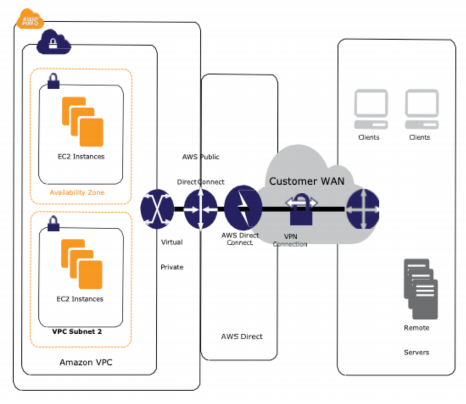
Egress only GW
Egress only Internet Gateway is for IPv6 only(Similar function as a NAT, but a NAT is for IPv4). Good to know: IPv6 are all public addresses. Therefore all our instances with IPv6 are publicly accessibly. Egress Only Internet Gateway gives our IPv6 instances access to the internet, but they won’t be directly reachable by the internet. After creating an Egress Only Internet Gateway, edit the route tables.
Exposing services in your VPC to other VPC
Option 1: make it public which means goes through the public www and is tougher to manage access
Option 2: VPC peering. Must create many peering relations. Opens the whole network.
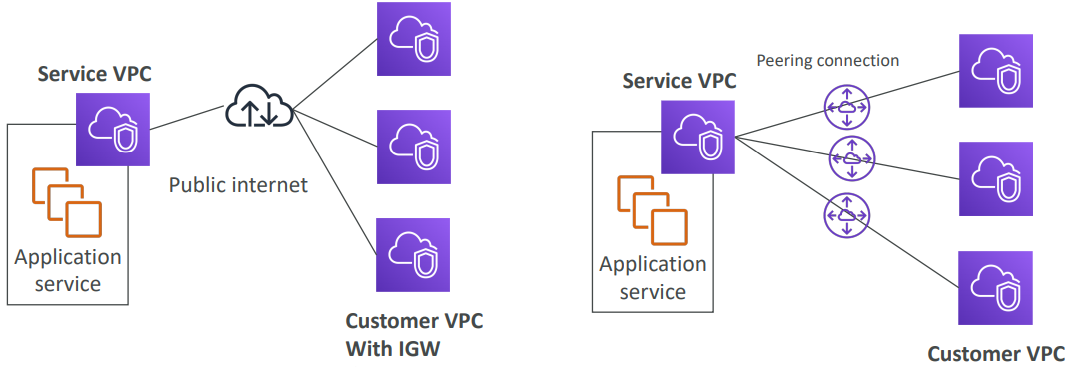
AWS PrivateLink (VPC Endpoint Services)
- Most secure & scalable way to expose a service to 1000s of VPC (own or other accounts)
- Does not require VPC peering, internet gateway, NAT, route tables…
- Requires a network load balancer (Service VPC) and ENI (Customer VPC)
- If the NLB is in multiple AZ, and the ENI in multiple AZ, the solution is fault tolerant!
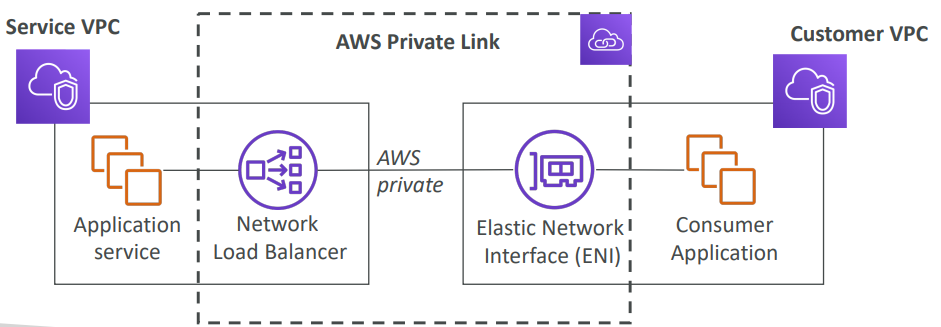
EC2 Classic &
EC2-Classic & AWS ClassicLink (deprecated)
EC2-Classic: instances run in a single network shared with other customers
Amazon VPC: your instances run logically isolated to your AWS account
ClassicLink allows you to link EC2-Classic instances to a VPC in your account
- Must associate a security group
- Enables communication using private IPv4 addresses
- Removes the need to make use of public IPv4 addresses or Elastic IP addresses
CloudHub
Provide secure communication between sites, if you have multiple VPN connections. Low cost hub -and -spoke model for primary or secondary network connectivity between locations. It’s a VPN connection so it goes over the public internet.
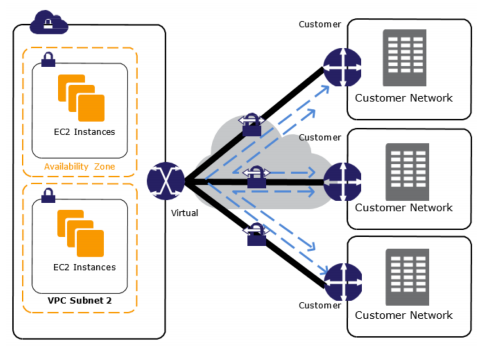
🚊Route 53
Route53 is a Managed DNS (Domain Name System). DNS is a collection of rules and records which helps clients understand how to reach a server through URLs.
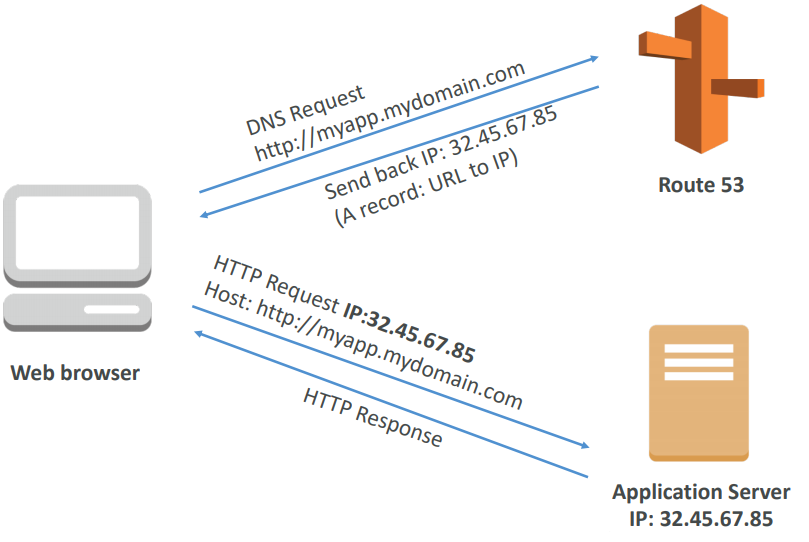
Route53 can use:
You pay $0.50 per month per hosted zone
- public domain names you own (or buy) application1.mypublicdomain.com
- private domain names that can be resolved by your instances in your VPCs. application1.company.internal
Route53 has advanced features such as:
- Load balancing (through DNS – also called client load balancing)
- Health checks (although limited…)
- Routing policy: simple, failover, geolocation, latency, weighted, multi value
DNS Records TTL (Time to Live)
High TTL: (e.g. 24hr) Less traffic on DNS • Possibly outdated records
Low TTL: (e.g 60 s) • More traffic on DNS • Records are outdated for less time • Easy to change records
TTL is mandatory for each DNS record
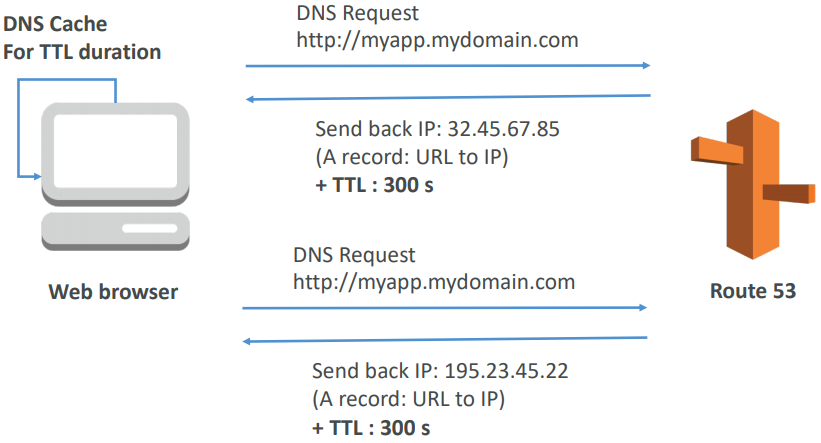
CNAME vs Alias
AWS Resources (Load Balancer, CloudFront, etc…) expose an AWS URL: lb1-1234.us-east-2.elb.amazonaws.com and you want it to be myapp.mydomain.com
CNAME: Points a URL to any other URL. (app.mydomain.com => blabla.anything.com)
- ONLY FOR NON ROOT DOMAIN (aka. something.mydomain.com)
Alias: Points a URL to an AWS Resource (app.mydomain.com => blabla.amazonaws.com)
- Works for ROOT DOMAIN and NON ROOT DOMAIN (aka
mydomain.com) - Free of charge
- Native health check
Routing Policies
Simple Routing
You can’t attach health checks to simple routing policy. If multiple values are returned, a random one is chosen by the client.
Maps a domain to one URL. Use when you need to redirect to a single resource.
Weighted Routing
Control the % of the requests that go to specific endpoint. Helpful to test 1% of traffic on new app version for example. Helpful to split traffic between two regions. Can be associated with Health Checks.
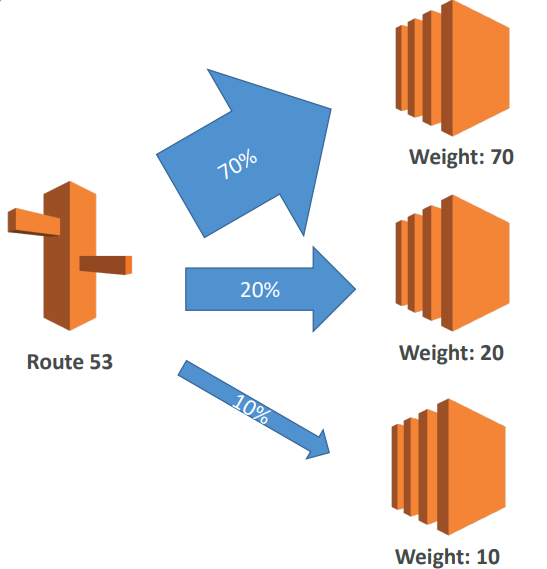
Latency
Latency is evaluated in terms of user to designated AWS Region
Redirect to the server that has the least latency close to us. Super helpful when latency of users is a priority. Germany may be directed to the US (if that’s the lowest latency).
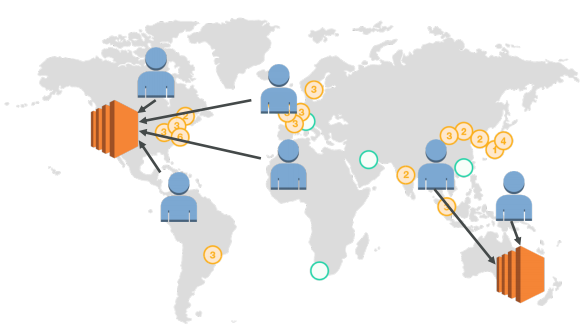
Health Checks
Can have HTTP, TCP and HTTPS health checks (no SSL verification) and possibility of integrating the health check with CloudWatch.
Health checks can be linked to Route53 DNS queries
Have X health checks failed ⇒ unhealthy (default 3).
After X health checks passed ⇒ health (default 3).
Default Health Check Interval: 30s (can set to 10s – higher cost) and about 15 health checkers will check the endpoint health. one request every 2 seconds on average.
Failover Routing
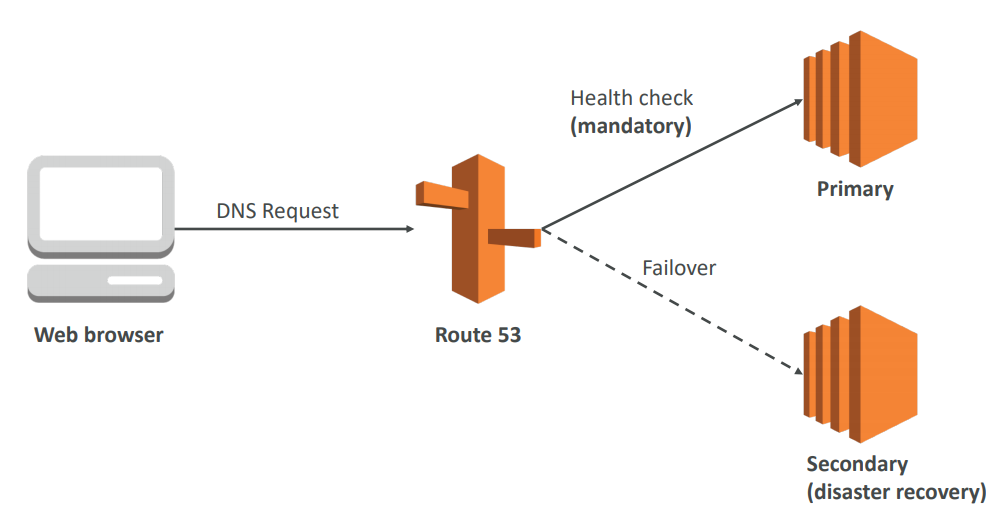
GEO Location Routing
Different from Latency based! This is routing based on user location. Here we specify: traffic from the UK should go to this specific IP. Should create a “default” policy (in case there’s no match on location).
Multi Value Routing
Use when routing traffic to multiple resources and if you want to associate a Route 53 health checks with records. Up to 8 healthy records are returned for each Multi Value query. Multi Value is not a substitute for having an ELB.

Route53 as Registrar
A domain name registrar is an organization that manages the reservation of Internet domain names.
Domain Registrar != DNS ⇒ But each domain registrar usually comes with some DNS features
Famous names:
- GoDaddy
- Google Domains
- Route 53 (AWS)
Connecting other domains
If you buy your domain on 3rd party website, you can still use Route53.
- Create a Hosted Zone in Route 53
- Update NS Records on 3rd party website to use Route 53 name servers